

Sound Meter Pro!
Sound Meter Pro! is made and published by nakhon phagdeechat. AppBrain is an independent app data site and isn't affiliated with nakhon phagdeechat. The app name, icon, screenshots and description belong to nakhon phagdeechat and are shown as published on the App Store.
AppBrain's verdict
- Last updated
- May 13, 2026
Rankings
App Store top chartsApp Store Rankings for Sound Meter Pro!
Competitors
Similar apps and more from nakhon phagdeechatAlternatives to Sound Meter Pro!



More from nakhon phagdeechat





Releases
Updates seen on the App Store- Version
- 2.0
- Launched
- September 2024
No changelog data
User feedback
Ratings and reviews on the App StoreComments on Sound Meter Pro! for iOS
We don't have enough comments to show example comments. Please check back later.
Technology
Found in the app by AppBrain- Price
- $2.99
- App size
- 2.57 MB
- Content rating
- Everyone
Technologies used by Sound Meter Pro!
About the app and developer
About Sound Meter Pro!
Sound Meter Pro! is an utilities app developed by nakhon phagdeechat.
User Ratings
The app has no ratings yet.
App Information
Sound Meter Pro! costs $2.99. The app size is 2.57 MB. The latest version available is 2.0. The last update was on May 13, 2026.
Technical Requirements
The app has a content rating of Everyone. The app has been available on the App Store since September 2024.
Developer information for nakhon phagdeechat
Address:
Store listing
By nakhon phagdeechat, from the App Store



Description by nakhon phagdeechat Written by the developer, not by AppBrain. Click to read.
Features:
-No Ads
-The UI is modern, clean, and easy to use.
-Displays the sound level in decibels.
-Displays the minimum average and maximum values measured at that time.
-Resets the average and maximum values for new measurements.
-Display the meter and the graph of the sound level changes at the same time.
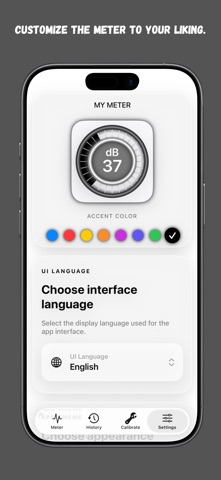
-You can customize the meter indicator with various colors.
-Support calibration setting menu.
-Support meter color setting menu.
-Displays alerts for sound level in various decibel ranges.
-Ability to set an automatic graph recording timer from 1 to 5 minutes as specified by the user.
-A history page for storing detailed automatic graph recordings. The graph data can be renamed, deleted, and shared as a PDF file.
-Includes a UI language menu.
-Includes a menu for setting light, dark, or automatic theme based on system settings.