

Soundbeam is made and published by PZ Mobile Limited. AppBrain is an independent app data site and isn't affiliated with PZ Mobile Limited. The app name, icon, screenshots and description belong to PZ Mobile Limited and are shown as published on the App Store.
AppBrain's verdict
Established- Rating on App Store
- 4.50
- 74 ratings
- Last updated
- October 7, 2022
It doesn't have enough ratings yet to judge what users think.
Rankings
App Store top chartsApp Store Rankings for Soundbeam
Competitors
Similar apps and more from PZ Mobile LimitedAlternatives to Soundbeam








More from PZ Mobile Limited


Releases
Updates seen on the App Store- Version
- 1.9
- Launched
- January 2012
No changelog data
User feedback
Ratings and reviews on the App StoreComments on Soundbeam for iOS
We don't have enough comments to show example comments. Please check back later.
Technology
Found in the app by AppBrain- Price
- $0.99
- App size
- 7.21 MB
- Content rating
- Everyone
Technologies used by Soundbeam
About the app and developer
About Soundbeam
Soundbeam is a music app developed by PZ Mobile Limited.
User Ratings
Soundbeam is rated 4.50 out of 5 stars. The rating is based on 74 ratings.
App Information
Soundbeam costs $0.99. The app size is 7.21 MB. The latest version available is 1.9. The last update was on October 7, 2022.
Technical Requirements
The app has a content rating of Everyone. The app has been available on the App Store since January 2012.
Developer information for PZ Mobile Limited
Address:
Store listing
By PZ Mobile Limited, from the App Store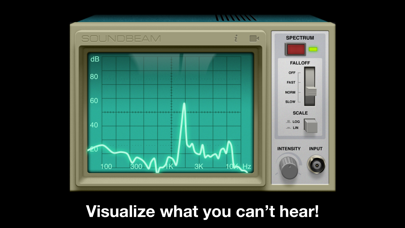



Description by PZ Mobile Limited Written by the developer, not by AppBrain. Click to read.
Plug in your electric guitar, a mic or any other (hi-Z) device to your mini-jack input and get accurate measurements. You can always use the built-in mic.
We paired stylish controls and an old-school interface with high precision signal processing algorithms, creating a new way to experience sound.
Soundbeam is an real-time audio analyzer (RTA) that processes the input of your microphone displaying it like a classic oscilloscope. It also features a spectral visualization of the audio using high resolution fourier transform (FFT) for accurate measurements.
Get a dose of nostalgia with Soundbeam now!
Key Features:
* Spectrum and waveform views
* Recording functionality
* Gesture support for frequency range and intensity levels adjustment
* Visualization controls
* ...and one more thing! Plug in your headset or guitar and watch what happens!
Controls:
* While in "spectrum mode", pinch the monitor vertically or horizontally to change frequency range and intensity levels respectively. You can also pan the soundwave with one finger.
* In "waveform mode" pinch the screen vertically to adjust intensity levels.
* Double tap on the screen to reset view.
* Tap & slide the intensity knob horizontally to adjust it.