

SoundMeter - Decibel dB Meter
SoundMeter - Decibel dB Meter is made and published by Yusuke Takeuchi. AppBrain is an independent app data site and isn't affiliated with Yusuke Takeuchi. The app name, icon, screenshots and description belong to Yusuke Takeuchi and are shown as published on the App Store.
AppBrain's verdict
- Last updated
- October 14, 2026
Rankings
App Store top chartsApp Store Rankings for SoundMeter - Decibel dB Meter
Competitors
Similar apps and more from Yusuke TakeuchiAlternatives to SoundMeter - Decibel dB Meter


More from Yusuke Takeuchi


Releases
Updates seen on the App Store- Version
- 1.0.4
- Launched
- July 2026
No changelog data
User feedback
Ratings and reviews on the App StoreComments on SoundMeter - Decibel dB Meter for iOS
We don't have enough comments to show example comments. Please check back later.
Technology
Found in the app by AppBrain- Price
- Free
- App size
- 6.16 MB
- Content rating
- Everyone
Technologies used by SoundMeter - Decibel dB Meter
About the app and developer
About SoundMeter - Decibel dB Meter
SoundMeter - Decibel dB Meter is an utilities app developed by Yusuke Takeuchi.
User Ratings
The app has no ratings yet.
App Information
SoundMeter - Decibel dB Meter is freely available from the App Store. The app size is 6.16 MB. The latest version available is 1.0.4. The last update was on October 14, 2026.
Technical Requirements
The app has a content rating of Everyone. The app has been available on the App Store since July 2026.
Developer information for Yusuke Takeuchi
Address:
Store listing
By Yusuke Takeuchi, from the App Store


Description by Yusuke Takeuchi Written by the developer, not by AppBrain. Click to read.
SoundMeter uses your iPhone's microphone to measure ambient sound in real time. Beyond raw dB numbers, it labels every reading in plain English — "quiet library", "busy street" — so you understand at a glance. From noise dispute evidence to sharing concert loudness, one app covers it all.
--- Key Features ---
■ Real-Time dB Meter
A half-circle arc meter shows the current volume at a glance. Updated every 100ms with smooth animation, plus MIN / AVG / MAX statistics to track changes over time.
■ Plain-English Sound Labels
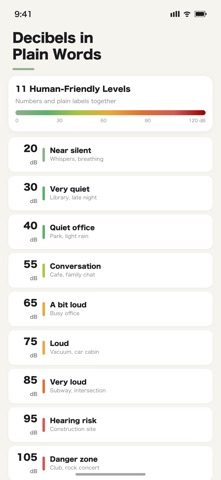
30 dB "Quiet Library", 60 dB "Normal Conversation", 90 dB "Very Loud" — 11 levels of intuitive labels help you feel the volume beyond the numbers.
■ Session Recording
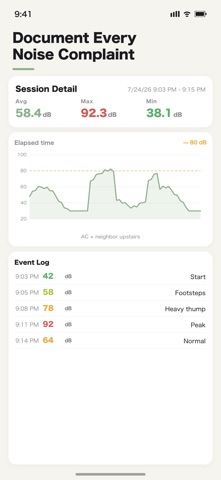
Tap "Start Recording" to save a session. Automatically logs 1-second dB samples, start/end times, and optional location tags. Perfect for documenting noise disputes.
■ Time-Series Charts
Swift Charts area graphs visualize your entire session. Color bands in the background instantly show quiet zones vs. warning zones.
■ CSV / PDF Export
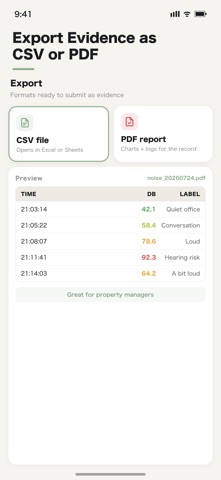
Export session data as CSV or PDF. Ideal for attaching to complaint filings, emails to landlords, or property manager reports.
■ Noise Alert Notifications
Set a threshold (30–120 dB) and get notified when exceeded. Choose "every time / every minute / every 5 minutes" — perfect for baby sleep monitoring, construction watch, or concert level checks.
■ Mic Calibration Offset
Manually adjust for your iPhone's mic sensitivity (±7 dB between models). Compare against a professional calibrated meter for higher accuracy.
■ Location Tags
Add location tags like "Downtown Apartment" to each session. Great for scouting apartments or comparing multiple locations.
■ Share Cards
Turn your current dB reading into a shareable card for X or Instagram. "Front row: 105 dB" — bring the experience to your feed.
■ Widget Support
Home Screen widgets show your last measured dB and label. Lock Screen widgets supported too.
■ iCloud Sync
Session records sync automatically via iCloud. Switch devices without losing history.
--- Perfect For ---
・Documenting noise complaints from neighbors
・Scouting apartments for ambient noise levels
・Checking a bedroom's quietness for a sleeping child
・Measuring sound leakage during music practice
・Sharing concert or festival loudness on social media
・Recording construction noise for property management
・Verifying quiet cafés for focused work
--- Privacy First ---
Your audio is never recorded or stored. Only dB values are captured — kept on your device and iCloud. No external transmission ever.
--- Minimal Design ---
Sage green aesthetic — calm, beautiful, grown-up. Not a garish tool, but a meter you're happy to keep on your Home Screen. Full light and dark mode support.
--- More ---
・Full dark mode
・16 languages supported
・iCloud sync
・Remove Ads IAP (one-time purchase)
・All features free
--- Disclaimer ---
This app provides approximate measurements using the iPhone's built-in microphone and is not a substitute for legally certified calibrated equipment. For legally binding measurements, consult a professional.
---------------------------------
Sage Apps Series
A collection of iOS utility apps designed for simplicity and ease of use. Unified design to make your day a little better.
>> Search "Sage Apps" on the App Store for more
---------------------------------