Spam Call Blocker: Caller ID. came out 36 days ago. It doesn't have enough ratings yet to judge what users think.
Spam Call Blocker: Caller ID. is made and published by
Aria Bennett.
AppBrain is an independent app data site and isn't affiliated with Aria Bennett.
The app name, icon, screenshots and description belong to Aria Bennett and are shown as
published on the App Store.
About Spam Call Blocker: Caller ID.
Spam Call Blocker: Caller ID. is a productivity app developed by Aria Bennett.
What is the rating of Spam Call Blocker: Caller ID.?
Spam Call Blocker: Caller ID. is rated 5.00 out of 5 stars, based on one rating ratings.
Is Spam Call Blocker: Caller ID. free?
Spam Call Blocker: Caller ID. is free. The app size is 57.22 MB. The latest version available is 3.0. The last update was on September 11, 2026.
What are the requirements for Spam Call Blocker: Caller ID.?
The app has a content rating of Everyone. The app has been available on the App Store since September 2026.
Description by Aria Bennett(from the App Store)
CALLER INTELLIGENCE THAT STAYS ON YOUR PHONE
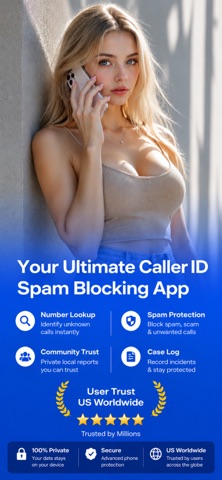
Spam Call Blocker: Caller ID is a private, offline-first caller intelligence and scam defense toolkit. Look up any number, understand its risk through transparent on-device signals, block callers on your own terms, and document unwanted calls — with no account, no contact upload, and no crowdsourced database.
WHAT MAKES THIS APP DIFFERENT
- Transparent by design: every risk assessment shows the reasons behind it, not just a score you have to trust. - Private by architecture: your lookups, flags, notes, and rules are stored only on this device. - Honest by default: if something cannot be determined on-device, the app says so instead of guessing.
RISK SIGNALS — KNOW WHY, NOT JUST WHAT Analyze any number entirely on your device. The app checks number format, line type, region match, premium-rate patterns, and your own history with the caller, then explains each signal in plain language. Tap "Why these signals" to see exactly how the result was formed.
SHIELD RULES — BLOCK ON YOUR TERMS Build your own blocking list with exact numbers and rules you define. Everything is saved on your device and applied through the iPhone's native Call Blocking and Identification system.
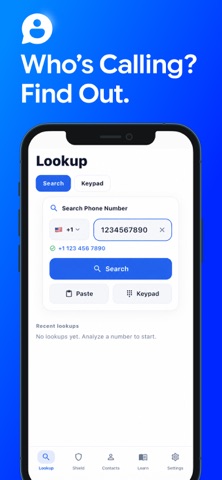
NUMBER LOOKUP AND HISTORY Search any number with the correct country code, paste from the clipboard, or use the built-in keypad. Your lookup history, starred numbers, and personal tags stay organized and private.
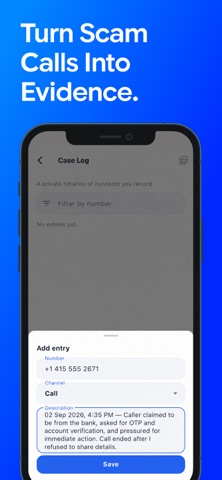
MY REPORTS AND MY NOTES Flag suspicious numbers and attach private notes. Your flags feed your own Risk Signals and Device Protection — they are yours alone and never shared.
BACKUP AND PORTABILITY Export your reports, notes, and block list to a file you control, and restore them anytime. Your data is portable because it belongs to you.
HOW BLOCKING AND IDENTIFICATION WORK Calls are blocked and labeled using only: numbers you add to your block list, rules you create, numbers you flag, and offline number-pattern checks. There are no shared, third-party, or crowdsourced spam lists. To enable device-level blocking, turn on this app's directory under Settings > Phone > Call Blocking & Identification.
PRIVACY, BY DESIGN Your lookups, reports, notes, and rules never leave your device. No account is required. Your contacts are never uploaded; names shown come only from your own address book or on-device analysis.
Know who is calling — without giving up your privacy.
DISCLAIMER
Risk Signals are informational estimates generated on this device from number patterns and your own saved data. They do not guarantee that any caller is safe or unsafe, and a flag does not prove wrongdoing — always use your own judgment. Some caller details (carrier, city, or name) may be unavailable because no crowdsourced database is used. Call blocking works only after you enable the app's directory in iOS Settings and applies only to the numbers and rules you set; no app can stop every unwanted call. The Scam Library is educational content and Case Log exports are formatted records of your own entries; neither constitutes legal advice. This app is not affiliated with Apple, any mobile carrier, or any government agency. The free version is supported by advertising.
For an uninterrupted experience, consider subscribing to access all app features without ads through an auto-renewing subscription available on a weekly, monthly, or yearly basis. Manage your subscription settings and turn off auto-renewal within your iTunes Account Settings after purchase, ensuring flexibility and control over your subscription.
Current subscription may not be canceled during the active subscription period; however, you can manage your subscription and/or turn off auto-renewal by visiting your iTunes Account Settings after purchase.
Read our full Terms of Service and our Privacy Policy at: Link to Privacy Policy: https://ariabennett.netlify.app/privacy-policy.html Link to Terms of use: https://ariabennett.netlify.app/terms-conditions.html
Each subscription will automatically renew 3 days before the expiration date for
the same time period. Subscriptions can be cancelled at any time before the renewal.