Download Android Apps and Games
AppBrain
  • Apps
  • Apps being viewed right now Trending apps today Most popular apps All-time most downloaded apps Top rated apps iPhone and iPad apps
  • Intelligence ▾
    Intelligence overview → Track any Android app or your whole market
    Track & analyze
    Keyword Tracker & OptimizerTrack & improve Play rankings App Performance ReportOne-off PDF for any app StatisticsFree Android & Play market stats
    Promote your app
    Featured Apps App Links
  • Intelligence
  • Pricing
  • Dashboard
  • Sign up
  • Log in
Last updated on: 2026-09-16
App Store Apps > Photo & Video > Spatial Converter
Spatial Converter icon

Spatial Converter

1.2.0
Byungil Park
1.00
1 reviews
$4.99

Spatial Converter Screenshot 1 of 5
Spatial Converter Screenshot 2 of 5
Spatial Converter Screenshot 3 of 5
Spatial Converter Screenshot 4 of 5
Spatial Converter Screenshot 5 of 5
1.00 · 1 reviews
Download from the App Store

About Spatial Converter

Spatial Converter is an overall app developed by Byungil Park.

How many times has Spatial Converter been downloaded?

What is the rating of Spatial Converter?

Spatial Converter is rated 1.00 out of 5 stars, based on one rating ratings.

Is Spatial Converter free?

Spatial Converter costs $4.99 to download. The APK download size is 1.45 MB. The latest version available is 1.2.0. The last update was on August 18, 2026.

What are the requirements for Spatial Converter?

The app has a content rating of Everyone. The app has been available on Google Play March 2024.

Description
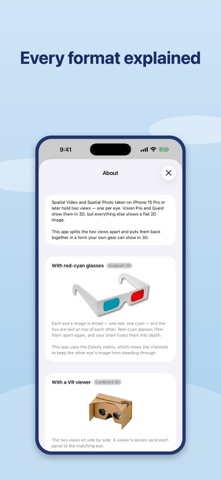
iPhone 15 Pro and later capture Spatial Video and Spatial Photo — two views, one
for each eye. Vision Pro and Quest show them in 3D. Everything else shows a flat
2D image.

Spatial Converter splits the two views apart and puts them back together in a
form your own gear can show in 3D.

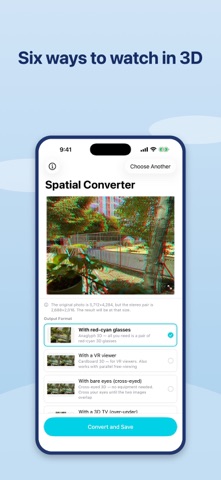
SIX WAYS TO WATCH

• Anaglyph 3D — red-cyan glasses. Uses the Dubois matrix, which mixes the color
channels to keep the other eye's image from bleeding through.
• Cardboard 3D — side by side, for VR viewers. Also works with the naked eye
using the parallel viewing technique.
• Cross-eyed 3D — the same layout with the panels swapped. Cross your eyes
slightly and the 3D image appears. No equipment at all.
• Over-Under 3D — stacked top and bottom, for 3D TVs and players that expect it.
• Left and right separately — two ordinary 2D files for your video editor.
• Spatial (MV-HEVC) — a lossless copy of the original, for Vision Pro and Quest.

SEE IT BEFORE YOU CONVERT

Pick a format and the preview changes at once. Compare all six, then convert the
one you want. No guessing.

BUILT FOR SPATIAL MEDIA

• Checks which view belongs to which eye before converting, so depth comes out
the right way round — an error that is easy to make and hard to notice.
• Applies the convergence hint recorded by the camera.
• Keeps the audio track untouched.
• Converts a 15-second clip in a few seconds.

PRIVATE AND SIMPLE

• Everything happens on your device. Nothing is uploaded.
• No account, no ads, no subscription.
• Only asks permission to ADD to your photo library — it never reads your photos.

REQUIREMENTS

Spatial Video and Spatial Photo are captured on iPhone 15 Pro or later:
Camera app → the spatial icon → hold the device in landscape.

--- WHAT'S NEW (v1.2) ---------------------------------------------------- [744]
Spatial Photo support, three new output formats, and a live preview.

• SPATIAL PHOTO — convert the stereo photos your iPhone takes, not just video.
All six formats work with photos too.
• CROSS-EYED 3D — a new format that needs no equipment at all. Cross your eyes
slightly and the 3D image appears.
• LEFT AND RIGHT SEPARATELY — export each eye as its own 2D file for editing.
• SPATIAL PASSTHROUGH — save a lossless copy for Vision Pro and Quest.
• LIVE PREVIEW — see each format on screen before converting.
• Left and right are now confirmed before converting, so depth comes out the
right way round.
• Anaglyph rebuilt on the Dubois matrix for less ghosting.
• Anaglyph, Cardboard and Over-Under 3D work as before.

Requires iOS 18.
Show more Show less

More data about Spatial Converter

Price $4.99
Rating 1.00 based on a single rating
Ranking Not ranked
Version 1.2.0
App download size 1.45 MB
Suitable for Everyone

Alternative downloads for the Spatial Converter app

Higher rated
StickMe: Stickers starring you icon StickMe: Stickers starring you
EZPZ
4.5
Free
41 ratings
Higher rated
MasterPhoto icon MasterPhoto
学平 陆
4.9
Free
12 ratings
Backup and Sync icon Backup and Sync
LAS TECHNOLOGIES PTE LTD
0.0
Free
DICA - Leaf icon DICA - Leaf
Sean Cho
0.0
$1.99
Higher rated
VideoSpeed+ : Video Speed Plus icon VideoSpeed+ : Video Speed Plus
kenji hara
5.0
Free
2 ratings
Speed Range | Video Editor icon Speed Range | Video Editor
Morning Avocado LLC
1.0
Free
1 ratings
DICA - Lilac icon DICA - Lilac
Sean Cho
0.0
$1.99
Higher rated
AI Photo Restore - RealSR icon AI Photo Restore - RealSR
俊华 罗
3.0
Free
2 ratings

More from Byungil Park

LLM Bridge - Multi LLM Client icon LLM Bridge - Multi LLM Client
Byungil Park
2.0
$2.99
4 ratings
Crack Detector icon Crack Detector
Byungil Park
1.0
$2.99
2 ratings
Tapes - Offline Voice to Text icon Tapes - Offline Voice to Text
Byungil Park
0.0
Free
LightScope: Light & EV Meter icon LightScope: Light & EV Meter
Byungil Park
0.0
$9.99
BikeCam Pro icon BikeCam Pro
Byungil Park
0.0
$2.99
Sudoku Zero — Offline, No Ads icon Sudoku Zero — Offline, No Ads
Byungil Park
0.0
$4.99
LightScope icon LightScope
Byungil Park
0.0
$3.99

Changelog of Spatial Converter

No changelog data

Developer information for Byungil Park

Byungil Park

Address:

Share Spatial Converter

Comments on Spatial Converter for iOS

We don't have enough comments to show example comments. Please check back later.

App Store Rankings for Spatial Converter

This app is not ranked

Technologies used by Spatial Converter

Popular Overall Apps other people are watching Today's trending apps Top new apps Apps on sale
StickMe: Stickers starring you icon StickMe: Stickers starring you
MasterPhoto icon MasterPhoto
Backup and Sync icon Backup and Sync
DICA - Leaf icon DICA - Leaf
VideoSpeed+ : Video Speed Plus icon VideoSpeed+ : Video Speed Plus
Speed Range | Video Editor icon Speed Range | Video Editor
DICA - Lilac icon DICA - Lilac
AI Photo Restore - RealSR icon AI Photo Restore - RealSR

Back to top
AppBrain Intelligence premium content

Subscribe now to get full and unlimited access to AppBrain Intelligence. You'll have access to:

  • App Intelligence dashboard (performance timeline, competitor comparison, country rankings, insight cards)
  • Detailed ranking data per app
  • Full timeline per developer
  • Device market shares data per country
  • Unlimited keyword tracking
1 Month

$75/mo
(billed every month)

SAVE 0%
Subscribe
3 Months

$65/mo
($195 billed every 3 months)

SAVE 13%
Subscribe
1 Year

$57.50/mo
($690 billed every year)

SAVE 23%
Subscribe
Each subscription will automatically renew 3 days before the expiration date for the same time period. Subscriptions can be cancelled at any time before the renewal.

AppBrain is a directory focused on discovering great apps and games. We give statistics, rankings and search options that Google Play and the App Store don't have. All trademarks are owned by their respective owners. AppBrain doesn't offer APKs or binaries, and always lets users install the official version from Google Play or the App Store.

More apps

  • Top Android apps being viewed
  • Angela's Dash: Run & fun
  • Screw Puzzle: Pin Master
  • View Schedule Voice Recorder

App statistics

  • Android statistics
  • Google Play Developer stats
  • Trending Android Apps
  • Trending iOS apps
  • Top popular Apps
  • Buy the best Android phone

About AppBrain

  • Contact
  • Privacy
  • Documentation
  • DMCA takedowns
  • Articles
  • Blog
  • Free webpage for your Android app
© 2010-2026 - AppBrain