

Speaker Positioning
Speaker Positioning is made and published by Marcel Knop. AppBrain is an independent app data site and isn't affiliated with Marcel Knop. The app name, icon, screenshots and description belong to Marcel Knop and are shown as published on the App Store.
AppBrain's verdict
- Last updated
- October 13, 2026
- Size
- 1.98 MB
User feedback
Ratings and reviews on the App StoreComments on Speaker Positioning for iOS
We don't have enough comments to show example comments. Please check back later.
Store listing
By Marcel Knop, from the App Store


Description by Marcel Knop Written by the developer, not by AppBrain. Click to read.
SEE YOUR SETUP
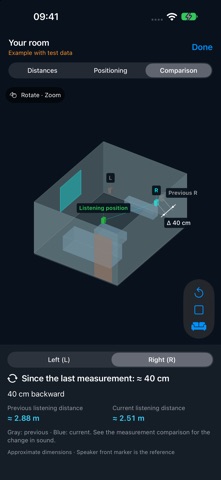
Mark both speakers and your listening position with the camera. View the room in 3D, rotate it, zoom in and switch to a top view. Read listening distances, wall clearances and proposed test moves directly in the scene.
On a compatible LiDAR iPhone, scan walls, openings and simplified furniture. An optional second pass captures coloured surfaces. Switch between the clean measurement view and room colours. Without LiDAR, define the room footprint manually.
TEST A CHANGE
Connect your stereo system, measure at the listening position, then try one change. Measure again with the same volume, microphone position and signal path. Compare the left/right arrival-time difference, both bass-response shapes and changes in position. The app explains when two measurements cannot safely be compared.
KEEP THE RESULT
Save measurements and their room views locally. Revisit the comparison before deciding whether to keep the change. Speaker-model and subwoofer guidance help you plan further tests.
FREE FEATURES
• Guided sound, camera and combined workflows
• 3D room view with useful dimensions and test positions
• LiDAR room and colour capture on supported iPhones
• Acoustic measurement, saved results and before-and-after comparison
PRO — ONE-TIME PURCHASE
• External measurement microphone with calibration-file import
• Wired line output and loopback latency calibration
• Impulse-response WAV and frequency-response export for REW
IMPORTANT
Camera dimensions and test positions are approximate. Coloured surfaces are not a photorealistic digital twin; hidden areas, glass and mirrors can leave gaps. Acoustic arrival times can include channel-processing delays. A smaller left/right difference alone does not guarantee better sound. Use repeat measurements and your listening impression to decide. Absolute acoustic distances require a valid latency calibration.
An iPhone and a connected stereo system are needed for acoustic assessment. The iPhone-only playback option is a function test. Start at a moderate volume. No account, advertising or tracking. Measurement and room data are processed and saved on your device; you choose whether to share exports.
Safety and technology
Found in the app by AppBrain- Price
- Free
- App size
- 1.98 MB
- Content rating
- Everyone
Technologies used by Speaker Positioning
Releases
Updates seen on the App Store- Version
- 1.2
- Launched
- September 2026
No changelog data
Alternatives
Similar apps and more from Marcel KnopAlternatives to Speaker Positioning


More from Marcel Knop


Rankings
App Store top chartsApp Store Rankings for Speaker Positioning
About the app and developer
About Speaker Positioning
Speaker Positioning is a music app developed by Marcel Knop.
What is the rating of Speaker Positioning?
Speaker Positioning has no ratings yet.
Is Speaker Positioning free?
Speaker Positioning is free. The app size is 1.98 MB. The latest version available is 1.2. The last update was on October 13, 2026.
What are the requirements for Speaker Positioning?
The app has a content rating of Everyone. The app has been available on the App Store since September 2026.
Developer information for Marcel Knop
Address:
Frequently asked questions about Speaker Positioning
Is Speaker Positioning free?
Yes. Speaker Positioning is free on the App Store.
Is Speaker Positioning still available?
Yes. Speaker Positioning is on the App Store, and the last update we saw was on October 13, 2026.
How large is Speaker Positioning?
Speaker Positioning is 1.98 MB.
Is Speaker Positioning suitable for children?
App Store rates the content of Speaker Positioning as suitable for everyone.
Who made Speaker Positioning?
Speaker Positioning was developed by Marcel Knop. It is listed in the music category on the App Store.
What are the best alternatives to Speaker Positioning?
People looking at Speaker Positioning also look at these music apps: Wireless Mic: Smart, Redlined, AB Mix Check, BetterAudio: Room Acustics, HiFi Setup: Bass & Speakers.