

Speakr — AI Voice Notes
Speakr — AI Voice Notes is made and published by Aleksei Egin. AppBrain is an independent app data site and isn't affiliated with Aleksei Egin. The app name, icon, screenshots and description belong to Aleksei Egin and are shown as published on the App Store.
AppBrain's verdict
- Rating on App Store
- 5.00
- 2 ratings
- Last updated
- October 15, 2026
It doesn't have enough ratings yet to judge what users think.
Rankings
App Store top chartsApp Store Rankings for Speakr — AI Voice Notes
Competitors
Similar apps and more from Aleksei EginMore from Aleksei Egin


Releases
Updates seen on the App Store- Version
- 1.9.2
- Launched
- April 2025
No changelog data
User feedback
Ratings and reviews on the App StoreComments on Speakr — AI Voice Notes for iOS
We don't have enough comments to show example comments. Please check back later.
Technology
Found in the app by AppBrain- Price
- Free
- App size
- 73.5 MB
- Content rating
- Everyone
Technologies used by Speakr — AI Voice Notes
About the app and developer
About Speakr — AI Voice Notes
Speakr — AI Voice Notes is a productivity app developed by Aleksei Egin.
What is the rating of Speakr — AI Voice Notes?
Speakr — AI Voice Notes is rated 5.00 out of 5 stars, based on 2 ratings.
Is Speakr — AI Voice Notes free?
Speakr — AI Voice Notes is free. The app size is 73.53 MB. The latest version available is 1.9.2. The last update was on October 15, 2026.
What are the requirements for Speakr — AI Voice Notes?
The app has a content rating of Everyone. The app has been available on the App Store since April 2025.
Developer information for Aleksei Egin
Address:
Store listing
By Aleksei Egin, from the App Store



Description by Aleksei Egin Written by the developer, not by AppBrain. Click to read.
Capture every moment and stay organized with Speakr—whether it’s a meeting, lecture, or video call, never miss a key detail.
With powerful audio and video summaries, advanced note editing, and smart folder organization, Speakr transforms your conversations and content into actionable insights.
Put Speakr to work today to summarize, edit, and organize your ideas effortlessly.
KEY FEATURES OF SPEAKR
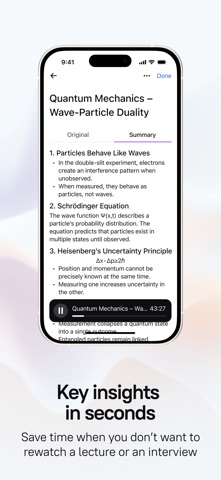
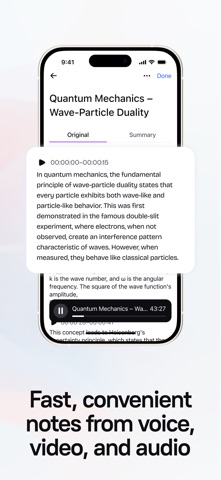
Audio & Video Summaries
• Summarize audio recordings from meetings, interviews, or personal notes with AI precision. Get concise takeaways instantly.
• Transform video content—lectures, webinars, or calls—into clear summaries, so you focus on what matters most.
Note Editing
• Edit your summaries and notes with ease. Refine text, add details, or highlight priorities to make every note your own.
• Perfect for students, professionals, or anyone who wants polished, actionable records.Perfect for students, professionals, or anyone who wants polished, actionable records.
Intelligent Summaries
• Speakr’s advanced AI technology transforms lengthy audio and video content into concise, actionable summaries.
• Whether it’s a conversation, lecture, or video call, you’ll get key takeaways at a glance.
• Includes organized lists, editable notes, and to-dos so you can focus on what matters most.
Privacy & Security Focus
• Your audio, video recordings, and notes are fully secure with Speakr.
• You’re in complete control—easily export or delete your files whenever you need.
• Ensures your data stays private and protected.
Unlimited Recording Time
• Speakr lets you record without limits, from quick voice memos to extended video sessions.
• You’ll never have to worry about running out of time mid-recording.
• Offers total flexibility for all your needs.
Easy Organization and Sharing
• Speakr’s intuitive interface simplifies categorizing and organizing recordings and summaries into custom folders.
• All content is easily searchable—perfect for students, professionals, and everyday users.
FLEXIBLE USE CASES
For Professionals:
• Delivers precise summaries of meetings and video calls.
• Lets you stay engaged without scrambling to take notes.
• Edit and organize them for seamless follow-ups.
For Students and Educators:
• Record and summarize lectures, video tutorials, or study sessions with ease.
• Organize notes into folders for quick review before exams or projects.
For Journalists:
• Capture interviews or video footage and summarize them into editable text.
• Speeds up editing and article writing.
For Everyone:
• Use Speakr as a digital notepad, memo recorder, or to capture key moments from calls.
• Versatile and user-friendly design works for every type of user.
DESIGNED FOR MAXIMUM PRODUCTIVITY
Speakr streamlines your workflow:
• Boost efficiency with instant audio and video summaries — no more endless replaying.
• Stay in control with editable notes tailored to your needs.
• Organize effortlessly with folders, making every file easy to locate and share.
Get Started with Speakr Today
Terms of Use: https://agreement.speakr.app/terms.html
Privacy Policy: https://agreement.speakr.app/privacy_policy.html