

SpectrumView Plus
SpectrumView Plus is made and published by Oxford Wave Research Ltd. AppBrain is an independent app data site and isn't affiliated with Oxford Wave Research Ltd. The app name, icon, screenshots and description belong to Oxford Wave Research Ltd. and are shown as published on the App Store.
AppBrain's verdict
Established- Rating on App Store
- 3.67
- 15 ratings
- Last updated
- January 25, 2024
It doesn't have enough ratings yet to judge what users think.
Rankings
App Store top chartsApp Store Rankings for SpectrumView Plus
Competitors
Similar apps and more from Oxford Wave Research Ltd.Alternatives to SpectrumView Plus



More from Oxford Wave Research Ltd.
Releases
Updates seen on the App Store- Version
- 2.4.2
- Launched
- December 2012
No changelog data
User feedback
Ratings and reviews on the App StoreComments on SpectrumView Plus for iOS
We don't have enough comments to show example comments. Please check back later.
Technology
Found in the app by AppBrain- Price
- $7.99
- App size
- 14.8 MB
- Content rating
- Everyone
Technologies used by SpectrumView Plus
About the app and developer
About SpectrumView Plus
SpectrumView Plus is an education app developed by Oxford Wave Research Ltd.
User Ratings
SpectrumView Plus is rated 3.67 out of 5 stars. The rating is based on 15 ratings.
App Information
SpectrumView Plus costs $7.99. The app size is 14.78 MB. The latest version available is 2.4.2. The last update was on January 25, 2024.
Technical Requirements
The app has a content rating of Everyone. The app has been available on the App Store since December 2012.
Developer information for Oxford Wave Research Ltd.
Address:
Frequently asked questions about SpectrumView Plus
Is SpectrumView Plus free?
No. SpectrumView Plus costs $7.99 on the App Store.
Is SpectrumView Plus still available?
Yes. SpectrumView Plus is on the App Store, and the last update we saw was on January 25, 2024.
How large is SpectrumView Plus?
SpectrumView Plus is 14.78 MB.
Is SpectrumView Plus suitable for children?
App Store rates the content of SpectrumView Plus as suitable for everyone.
How do people rate SpectrumView Plus?
SpectrumView Plus scores 3.67 out of 5 stars, from 15 ratings on the App Store.
Who made SpectrumView Plus?
SpectrumView Plus was developed by Oxford Wave Research Ltd. It is listed in the education category on the App Store.
What are the best alternatives to SpectrumView Plus?
People looking at SpectrumView Plus also look at these education apps: gramLAT - Latin grammar, Loughborough Wave Lab, Mass RMV Driver Permit Test, Shape Coding Lite, Wen - Chinese Character Origin.
Store listing
By Oxford Wave Research Ltd., from the App Store




Description by Oxford Wave Research Ltd. Written by the developer, not by AppBrain. Click to read.
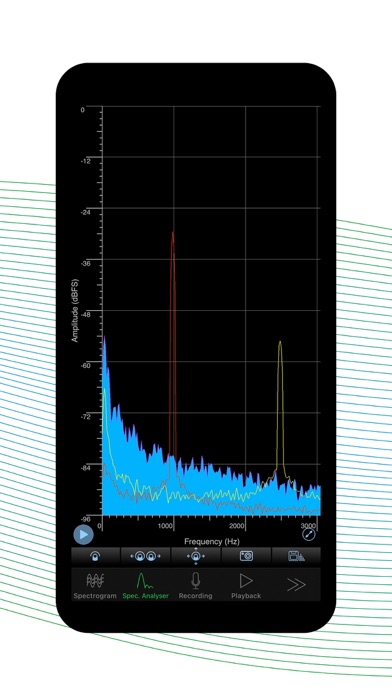
Visualise, in real time, the frequencies that you can hear around you and even those you cannot with SpectrumView Plus, your dynamic audio companion for iPhone, iPad, and iPod Touch.
SpectrumView provides a high-quality, real-time spectrogram and spectrum analyser display, with a configurable sample rate and frequency resolution. You can use this application to measure the highest tones you can sing, obtain visual feedback of the frequencies in your speech, identify an annoying sound, calibrate musical instruments and all sorts of acoustic analysis.
Here's what it can do for you:
· Refresh Spectrogram. Allows users to refresh the spectrogram so that it clears the spectrogram that had already been displayed.
· Change min and max scale. Allows users to set their own minimum and maximum scale value on the spectrogram and spectrum analyser view, in both linear and log scale.
· Set Recording filename. Recording filenames are editable and the suffix can be set to have an incremental value or date/time.
· Generate snapshot of the spectrum data from playback and live recordings.
· Access recordings and snapshots using the "Files" app. All the data can be easily accessible using the "Files" app that is available from iOS 11.
· Web File Transfer. Allows you to access your files from another device using a web browser.
· Logarithmic scale. Allows you to set either linear or logarithmic frequency scales in the Spectrogram and Spectrum Analyser views.
· Peak hold. Allows you to freeze and hold the peaks of the frequency envelope (three holds in three distinct colours) in Spectrum Analyser mode.
· Save location. Never forget where a clip was recorded – uses the devices location services.
· Auto lock disabled. During playback and recordings auto lock is disabled to prevent the device from automatically locking (if enabled), for uninterrupted recording/playback
· Multiple selectable sample rates from 8,000 Hz to 48,000 Hz
· High-frequency resolution with configurable signal analysis window lengths or Fast Fourier Transform (FFT) orders.
· Sound intensity represented using a colour spectrum scale from -96 dBFS to 0 dBFS.
· Frequency Pinch-to-Zoom. Allows you to zoom into the frequency space to look at a specific tone or frequency.
· Recording and Playback of Audio Files. Provides a fully functional audio recorder that allows you to record, pause and play back files in high-quality, uncompressed, wave format.
· Tap Data Cursor. Allows taps on any part of the Spectrogram or Spectrum Analyser display to obtain the exact frequency in Hertz (Hz) and level in decibels (dB) at that point.
· Musical Notes or Frequency Display on Tap. Selectable frequency or musical pitch notation to obtain the cent-accurate musical note e.g. A4 (22), when the display is tapped.
· Live Spectrogram and Spectrum Analyser Views of Recorded Files. Files recorded can be played back and the Spectrogram and Spectrum Analyser modes can be used to review the audio.
· Sharing Recorded Files by Email or iTunes File-sharing.
· High Quality Screenshots.
· *Improved* Soundcloud support. Audio files can be uploaded to or downloaded from Soundcloud as well as being able to post audio to Facebook.
· *NEW* Import audio from videos in your device library.
· Fullscreen mode. Hide the menu at the bottom of the screen to get even more of the screen dedicated to frequency analysis.
· Selectable spectrogram colour scales. You can now select one of 7 colour scales for your spectrogram.
· Selectable window functions. You can now see the window function options provided.
· Apply gain. A maximum of 24dB gain can be applied to make ‘hard to see’ details easier to view.
· Open In. Audio files can be directly opened in SpectrumView. View files sent by email directly in SpectrumView.