

Speedometer Speed
Speedometer Speed is made and published by Nelson Lai. AppBrain is an independent app data site and isn't affiliated with Nelson Lai. The app name, icon, screenshots and description belong to Nelson Lai and are shown as published on the App Store.
AppBrain's verdict
- Last updated
- October 12, 2026
Rankings
App Store top chartsApp Store Rankings for Speedometer Speed
Competitors
Similar apps and more from Nelson Lai







Releases
Updates seen on the App Store- Version
- 1.0.7
- Launched
- January 2026
No changelog data
User feedback
Ratings and reviews on the App StoreComments on Speedometer Speed for iOS
We don't have enough comments to show example comments. Please check back later.
Technology
Found in the app by AppBrain- Price
- Free
- App size
- 45.3 MB
- Content rating
- Everyone
Technologies used by Speedometer Speed
About the app and developer
About Speedometer Speed
Speedometer Speed is a navigation app developed by Nelson Lai.
User Ratings
The app has no ratings yet.
App Information
Speedometer Speed is freely available from the App Store. The app size is 45.28 MB. The latest version available is 1.0.7. The last update was on October 12, 2026.
Technical Requirements
The app has a content rating of Everyone. The app has been available on the App Store since January 2026.
Developer information for Nelson Lai
Address:
Frequently asked questions about Speedometer Speed
Is Speedometer Speed free?
Yes. Speedometer Speed is free on the App Store.
Is Speedometer Speed still available?
Yes. Speedometer Speed is on the App Store, and the last update we saw was on October 12, 2026.
How large is Speedometer Speed?
Speedometer Speed is 45.28 MB.
Is Speedometer Speed suitable for children?
App Store rates the content of Speedometer Speed as suitable for everyone.
Who made Speedometer Speed?
Speedometer Speed was developed by Nelson Lai. It is listed in the navigation category on the App Store.
What are the best alternatives to Speedometer Speed?
People looking at Speedometer Speed also look at these navigation apps: SpeedCalc: Speedometer & GPS, SpeedHUD - GPS Speedometer, Wild Plan: Camping Planner, Speedometer Mph Kph LockSpeed, Speedometer & Map Tracker.
Store listing
By Nelson Lai, from the App Store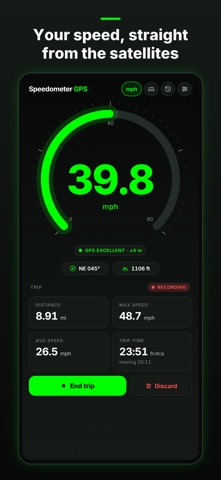


Description by Nelson Lai Written by the developer, not by AppBrain. Click to read.
Speedometer GPS turns your phone into a precise digital speedometer for anything that moves: cars, motorbikes, bicycles, e-bikes, scooters, boats, trains, runs — especially the things that never came with a speedometer of their own.
A READOUT YOU CAN TRUST
A fresh GPS fix every second, smoothed over the last five readings, so the number reads steady instead of twitching. The dial auto-ranges: a fine 0–40 mph scale on a bike, 0–80 or 0–160 on the highway, up to 800 on a plane.
A TRIP METER THAT RUNS ITSELF
No Start button to remember: open the app and go. A trip begins the moment you move and saves itself after you park: distance, max speed, average while moving, trip time and moving time, each in its own card — as accurate on foot or by bike as in the car. It keeps recording with the screen off — even a drive you start right after locking the phone — and if the app is closed mid-trip it picks the trip back up. End a trip early, or discard it, whenever you like. Screen-off recording uses more battery; you can turn it off in Settings.
ON THE LOCK SCREEN AND DYNAMIC ISLAND
While a trip records, your speed stays on the Lock Screen, and in the Dynamic Island on iPhones that have one — over Maps or any other app.
SPEED LIMIT ALARM
Set a limit in Settings. Pass it and the readout turns red, a marker shows on the dial and the phone buzzes and beeps, even on silent — again every ten seconds until you slow down. Presets for city, road and highway limits in km/h, mph or knots.
IT TELLS YOU WHEN TO TRUST IT
The pill under the number shows live GPS quality — EXCELLENT, GOOD, FAIR or POOR — with the accuracy radius in metres. Fixes worse than ±20 m are shown, but never counted toward a trip. Lose the signal in a tunnel and the readout drops to 0 and says SEARCHING instead of freezing on a stale number.
COMPASS AND ALTITUDE
Your heading (N, NE, E… plus degrees) and altitude sit right under the readout.
HUD MODE
A mirrored, full-screen readout on pure black, at full brightness. Lay the phone flat on the dashboard at night and read your speed reflected in the windshield.
MADE FOR A CAR MOUNT
Turn the phone sideways and the dashboard turns with it: the dial on one side, the trip on the other. The screen stays on while you're moving.
TRIP HISTORY, ODOMETER AND ROUTES
Trips are kept with their stats and the GPS points you recorded — the latest 100 of them. The Trips screen keeps a lifetime odometer — total distance, top speed and time across every trip — plus totals for the last 7 days, the month and the year to share as a recap card, and draws a thumbnail of each route. Open a trip for a speed-over-time chart and the full route on Apple Maps, coloured by speed, then export it as a GPX file or share a trip card with one tap. A new top speed or a distance milestone earns the card a badge.
KM/H, MPH OR KNOTS
Metric, imperial, or knots with nautical miles for sailing and boating. It starts in the units your phone uses and remembers your choice.
NO PHANTOM DISTANCE
GPS drift around a parked phone never adds up, impossible jumps between fixes are thrown out, and max speed comes from the smoothed value, so one glitchy sample can't fake a top speed.
WORKS OFFLINE, STAYS PRIVATE
Speed comes from GPS satellites, not the network, so the app works in airplane mode, abroad without data, at sea and in the backcountry. No account, no sign-up — your readings and saved trips stay on your phone.
Speedometer GPS is free and ad-supported. A one-time Pro purchase removes the ads, unlocks every display colour and exports your trip log as a spreadsheet (CSV); the speedometer, speed alarm, HUD mode, automatic trips and trip history all work fully either way.
Privacy policy: https://speed.chinesepowered.com/privacy.html