

SpeedWatch: GPS Speedometer
SpeedWatch: GPS Speedometer is made and published by Roman Rijkers. AppBrain is an independent app data site and isn't affiliated with Roman Rijkers. The app name, icon, screenshots and description belong to Roman Rijkers and are shown as published on the App Store.
AppBrain's verdict
- Last updated
- September 27, 2026
- Size
- 10.7 MB
User feedback
Ratings and reviews on the App StoreComments on SpeedWatch: GPS Speedometer for iOS
We don't have enough comments to show example comments. Please check back later.
Store listing
By Roman Rijkers, from the App Store




Description by Roman Rijkers Written by the developer, not by AppBrain. Click to read.
One huge number. Colours that tell you instantly whether you are inside your limit. And alerts that speak up before a camera does.
WHY DRIVERS USE IT
Your car's dial is small, awkwardly placed and never tells you how close you are to the limit. SpeedWatch gives you a full-screen GPS gauge that turns green, yellow, orange or red based on the limits YOU set for city, out-of-town and highway driving. One look and you know.
BUILT FOR THE ROAD
• Large live GPS speedometer in km/h or mph
• Four-zone colour coding driven by your own limits
• Quick presets for City, Outside city and Highway — tap to switch
• Live Activity on the Lock Screen and in the Dynamic Island
• Apple Watch app so your speed is on your wrist
• Night HUD: swipe in for a pure-black heads-up display that can mirror onto your windshield
• Section Control: measure your true average speed over a stretch of road
• Live map with your street name, compass heading, temperature and conditions
• Drives start and stop by themselves, and end about a minute after you park
AFTER EVERY DRIVE
The moment a drive ends you get a summary: distance, duration, top and average speed, and how much of it you spent over your own limit. If your phone was in your pocket it arrives as a notification and waits for you. Share any drive as a card, whatever you paid.
KNOW EVERY DRIVE
Every drive records duration, distance, top speed and average speed, and is labelled as a car trip or a bike ride. Open one to see the route on a map with the speed chart beside it. Filter your history, export it all to CSV, or clear it out in bulk. Statistics add totals, trends per week, month or year, and how much of your driving time sits over the limit.
MILEAGE FOR WORK
Mark a drive business or private the moment it ends, or with one swipe in the list. SpeedWatch then exports a mileage report as a PDF: distance totalled per purpose, then one line per trip with date, start, end and distance — ready for your employer or your accountant.
DASHCAM
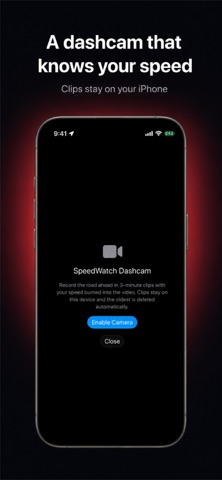
Record the road ahead with your speed burned into the clip. A hard jolt marks that clip so the storage limit will not delete it later. Clips are kept in a library on your device, ready to review, share or delete.
ON YOUR HOME SCREEN
Two widgets show your last drive and the distance you covered this week. "Start a drive" and "Stop the drive" work through Siri and Shortcuts, and starting one is a Control Center button away.
OFFLINE SPEED LIMITS
• Offline speed limits: download your country once, then see the limit of the road you are on
• Warnings for fixed speed cameras, only where the law allows them
Limits are approximate: the sign on the road always wins.
PRIVACY FIRST
No account and no sign-up. SpeedWatch has no server of its own: your drives, clips and settings are kept on your iPhone, and with Plus your drives are also backed up to your own iCloud. Weather and maps come from Apple.
PRICING — BUY ONCE, KEEP FOREVER
SpeedWatch is free to use. Two one-time unlocks, no subscription:
• SpeedWatch Plus — offline speed limits, over-speed alerts with sound and haptics, the night HUD, dark mode and eight accent colours, 30 days of statistics, the Home Screen widgets, and your ten newest drives with their routes
• SpeedWatch Pro — the whole drive history, the mileage log as a PDF, CSV export, bulk clean-up, your own trip labels and the dashcam. Everything you can turn into money or evidence. Includes everything in Plus.
Not sure? Run Pro free for seven days, once, straight from the upgrade screen. No card, no account, nothing to cancel.
IMPORTANT
SpeedWatch measures speed from GPS. Accuracy depends on satellite reception and it is not a legal replacement for your car's speedometer. The mileage report is a record of what you drove, not tax advice. Always keep your eyes on the road and follow local law — never operate your iPhone while driving.
Safety and technology
Found in the app by AppBrain- Price
- Free
- App size
- 10.7 MB
- Content rating
- Everyone
Technologies used by SpeedWatch: GPS Speedometer
Releases
Updates seen on the App Store- Version
- 3.46
- Launched
- June 2026
No changelog data
Alternatives
Similar apps and more from Roman RijkersAlternatives to SpeedWatch: GPS Speedometer


Rankings
App Store top chartsApp Store Rankings for SpeedWatch: GPS Speedometer
About the app and developer
About SpeedWatch: GPS Speedometer
SpeedWatch: GPS Speedometer is a navigation app developed by Roman Rijkers.
User Ratings
The app has no ratings yet.
App Information
SpeedWatch: GPS Speedometer is freely available from the App Store. The app size is 10.75 MB. The latest version available is 3.46. The last update was on September 27, 2026.
Technical Requirements
The app has a content rating of Everyone. The app has been available on the App Store since June 2026.
Developer information for Roman Rijkers
Address: