

Spend Easy - Expense Tracker
Spend Easy - Expense Tracker is made and published by Matthew Strickland. AppBrain is an independent app data site and isn't affiliated with Matthew Strickland. The app name, icon, screenshots and description belong to Matthew Strickland and are shown as published on the App Store.
AppBrain's verdict
- Last updated
- October 26, 2026
Rankings
App Store top chartsApp Store Rankings for Spend Easy - Expense Tracker
Competitors
Similar apps and more from Matthew StricklandAlternatives to Spend Easy - Expense Tracker


More from Matthew Strickland


Releases
Updates seen on the App Store- Version
- 1.2
- Launched
- February 2026
No changelog data
User feedback
Ratings and reviews on the App StoreComments on Spend Easy - Expense Tracker for iOS
We don't have enough comments to show example comments. Please check back later.
Technology
Found in the app by AppBrain- Price
- Free
- App size
- 4.31 MB
- Content rating
- Everyone
Technologies used by Spend Easy - Expense Tracker
About the app and developer
About Spend Easy - Expense Tracker
Spend Easy - Expense Tracker is a finance app developed by Matthew Strickland.
User Ratings
The app has no ratings yet.
App Information
Spend Easy - Expense Tracker is freely available from the App Store. The app size is 4.31 MB. The latest version available is 1.2. The last update was on October 26, 2026.
Technical Requirements
The app has a content rating of Everyone. The app has been available on the App Store since February 2026.
Developer information for Matthew Strickland
Address:
Store listing
By Matthew Strickland, from the App Store


Description by Matthew Strickland Written by the developer, not by AppBrain. Click to read.
Spend Easy is a simple, private expense tracker. Type what you spent in a few words, set a budget, and see what’s left this month. Everything stays on your device: no bank connections, no accounts, no cloud sync and no subscriptions.
ADD AN EXPENSE IN A SENTENCE
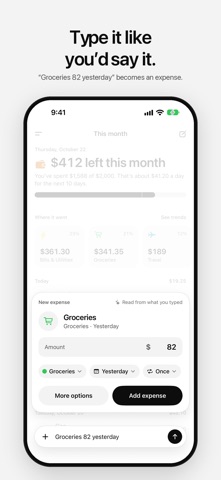
Type “Lunch 14.50” or “Groceries 82 yesterday” and Spend Easy reads the amount, the category and the day. Check it, then add it. Or use the full form, and read the total from a receipt photo on your device.
SEE WHAT’S LEFT
This month leads with what’s left in your budget and what that means for each day left. It tells you when you’re close to the limit, and where the money went, category by category.
BUDGETS AND ALERTS
Set a daily, weekly or monthly budget. Turn on budget alerts to get a heads-up when you reach the level you pick, and again if you go over.
REPEATING EXPENSES
Rent, phone, subscriptions: mark an expense as repeating and Spend Easy adds it again on each date.
TRENDS
Look back a week, a month or a year at a time, compare it with the one before, and see every category’s share.
YOUR CATEGORIES
Name them, pick an icon and a color, and put them in your order.
WIDGETS
See what’s left on your Home Screen and Lock Screen. The medium widget opens straight to a new expense.
YOUR DATA, YOUR WAY
Export every expense as a CSV file whenever you like. Amounts are exact, in your region’s currency or any currency you pick.
PRIVATE BY DESIGN
No bank login. No accounts. No cloud sync. No tracking. No subscriptions. Your expenses live in the app and its widget, on your device, and nowhere else.