

Spendy - Expense Tracker Diary
Spendy - Expense Tracker Diary is made and published by dasol kim. AppBrain is an independent app data site and isn't affiliated with dasol kim. The app name, icon, screenshots and description belong to dasol kim and are shown as published on the App Store.
AppBrain's verdict
- Rating on App Store
- 5.00
- 6 ratings
- Last updated
- October 16, 2026
It doesn't have enough ratings yet to judge what users think.
Rankings
App Store top chartsApp Store Rankings for Spendy - Expense Tracker Diary
Competitors
Similar apps and more from dasol kimAlternatives to Spendy - Expense Tracker Diary







More from dasol kim


Releases
Updates seen on the App Store- Version
- 3.12.0
- Launched
- October 2022
No changelog data
User feedback
Ratings and reviews on the App StoreComments on Spendy - Expense Tracker Diary for iOS
We don't have enough comments to show example comments. Please check back later.
Technology
Found in the app by AppBrain- Price
- Free
- App size
- 56.1 MB
- Content rating
- Everyone
Technologies used by Spendy - Expense Tracker Diary
About the app and developer
About Spendy - Expense Tracker Diary
Spendy - Expense Tracker Diary is a finance app developed by dasol kim.
User Ratings
Spendy - Expense Tracker Diary is rated 5.00 out of 5 stars. The rating is based on 6 ratings.
App Information
Spendy - Expense Tracker Diary is freely available from the App Store. The app size is 56.11 MB. The latest version available is 3.12.0. The last update was on October 16, 2026.
Technical Requirements
The app has a content rating of Everyone. The app has been available on the App Store since October 2022.
Developer information for dasol kim
Address:
Frequently asked questions about Spendy - Expense Tracker Diary
Is Spendy - Expense Tracker Diary free?
Yes. Spendy - Expense Tracker Diary is free on the App Store.
Is Spendy - Expense Tracker Diary still available?
Yes. Spendy - Expense Tracker Diary is on the App Store, and the last update we saw was on October 16, 2026.
How large is Spendy - Expense Tracker Diary?
Spendy - Expense Tracker Diary is 56.11 MB.
Is Spendy - Expense Tracker Diary suitable for children?
App Store rates the content of Spendy - Expense Tracker Diary as suitable for everyone.
How do people rate Spendy - Expense Tracker Diary?
Spendy - Expense Tracker Diary scores 5.00 out of 5 stars, from 6 ratings on the App Store.
Who made Spendy - Expense Tracker Diary?
Spendy - Expense Tracker Diary was developed by dasol kim. It is listed in the finance category on the App Store.
What are the best alternatives to Spendy - Expense Tracker Diary?
People looking at Spendy - Expense Tracker Diary also look at these finance apps: Stack - Expense Tracker, comoto - Coin mock investment, 보답 - 보험의 정답, 내부자들, MG더뱅킹기업.
Store listing
By dasol kim, from the App Store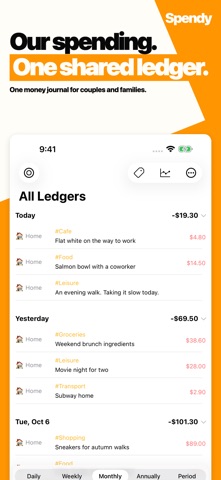


Description by dasol kim Written by the developer, not by AppBrain. Click to read.
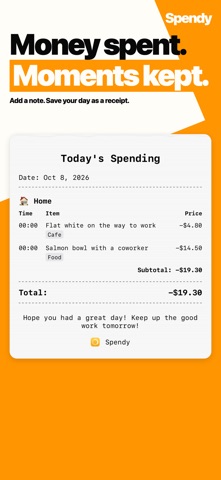
Open the app and you are already on the entry screen. Even without an amount, a tag and a one-line note become your diary for the day. If complex budget apps wore you out, Spendy makes recording a habit.
Recommended For
- Those who quit budget apps because they felt too complicated
- Couples, families, and friends who want to track expenses together
- People who want to record both their spending and their feelings
Key Features
Recording
- Quick entry first: start typing the moment you open the app.
- Budget as a diary: capture moments with just tags and notes — no amount needed.
- Tag management: understand your spending patterns at a glance.
- Attach photos and scan documents to keep receipts together.
Sharing & Sync
- iCloud shared budget: record and manage expenses in real time with your partner, family, or friends.
- Automatic sync across all your Apple devices — iPhone, iPad, and Mac.
Views & Insights
- Timeline and calendar views: browse your history the way you like.
- Smart lists: automatically group expenses by the conditions you set.
- Calendar & Reminders integration: see your schedule and spending in one timeline.
Automation
- Automatically register Apple Pay and SMS transactions.
- Build your own entry flows with Shortcuts support.
Widgets
- Home Screen and Lock Screen widgets show today's spending at a glance.
- Widget quick actions: memo, search, take a photo, scan a document.
Privacy
- Your ledger is stored in your own iCloud, not on our servers.
Some features are part of Spendy Premium, a one-time purchase you keep forever.
Start your habit of recording both money and moments with Spendy today.
Terms of Use: https://onessa.app/spendy/terms/
Privacy Policy: https://onessa.app/spendy/privacy/