Spentato is made and published by
Vladimir Karailiev.
AppBrain is an independent app data site and isn't affiliated with Vladimir Karailiev.
The app name, icon, screenshots and description belong to Vladimir Karailiev and are shown as
published on the App Store.
About Spentato
Spentato is a finance app developed by Vladimir Karailiev.
User Ratings
The app has no ratings yet.
App Information
Spentato is freely available from the App Store. The app size is 62.53 MB. The latest version available is 0.1.1. The last update was on September 24, 2026.
Technical Requirements
The app has a content rating of Everyone. The app has been available on the App Store since September 2026.
Description by Vladimir Karailiev(from the App Store)
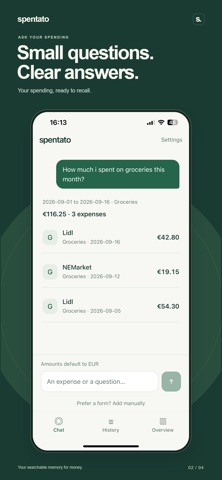
Your searchable memory for money. Spentato makes it easy to remember what you spent. Type a short message like “5 euro at Lidl” or “12.50 lunch yesterday”, then ask where your money went.
LOG SPENDING IN SECONDS Record expenses using supported short messages or a simple manual form. Browse your history, edit details, and confirm before deleting a purchase.
FIND WHAT YOU SPENT Check monthly totals, look up a merchant, and explore categories such as groceries, eating out and coffee. The app calculates totals from your saved expenses.
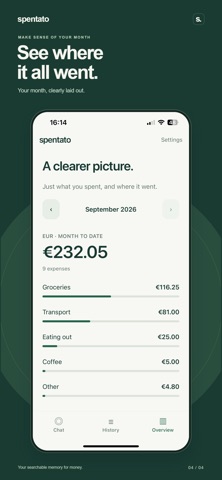
SEE THE MONTH CLEARLY Get a simple monthly overview of your spending by category. Choose EUR, USD or GBP as your default currency. Different currencies stay separate; Spentato never converts or combines them.
LOCAL FIRST Your saved expenses stay on your device. Simple entries, history and supported spending queries work offline.
Optional smart understanding helps with messages the offline parser cannot interpret. With your permission, the current message and necessary context are sent to OpenAI through Spentato’s service. Your saved transaction history is not sent. Spentato currently supports English input. There is no cloud sync or dedicated recovery service. Uninstalling the app or losing your device can mean losing your diary.
FREE DIARY, OPTIONAL PLUS Local diary features are free. Free smart understanding includes 30 online attempts per calendar month, resetting on the 1st in UTC. Failed or cancelled online attempts may count.
Spentato Plus is an optional monthly auto-renewing subscription with no fixed personal monthly request quota. Rate limits, service availability and abuse safeguards still apply. The current subscription price is shown before purchase. Payment is charged to your Apple Account at confirmation. Your subscription renews automatically unless cancelled at least 24 hours before the current period ends. Manage or cancel it in your Apple Account subscription settings.
AppBrain offers valuable information about your app and those of your competitors. Join AppBrain for free and claim this app to view more ranking data, view history etc.
Each subscription will automatically renew 3 days before the expiration date for
the same time period. Subscriptions can be cancelled at any time before the renewal.