Download Android Apps and Games
AppBrain
  • Apps
  • Apps being viewed right now Trending apps today Most popular apps All-time most downloaded apps Top rated apps iPhone and iPad apps
  • Intelligence ▾
    Intelligence overview → Track any Android app or your whole market
    Track & analyze
    Keyword Tracker & OptimizerTrack & improve Play rankings App Performance ReportOne-off PDF for any app StatisticsFree Android & Play market stats
    Promote your app
    Featured Apps App Links
  • Intelligence
  • Pricing
  • Dashboard
  • Sign up
  • Log in
Last updated on: 2026-09-23
App Store Apps > Productivity > Splicon: Split View Icon Maker
Splicon: Split View Icon Maker icon

Splicon: Split View Icon Maker

2.3.0
aiko ueda
0.00
0 reviews
Free

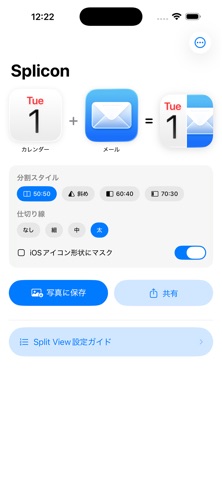
Splicon: Split View Icon Maker Screenshot 1 of 3
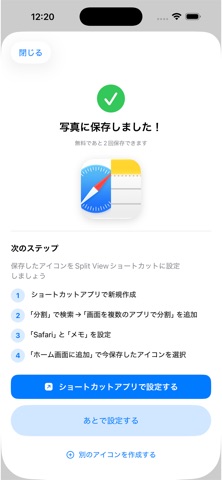
Splicon: Split View Icon Maker Screenshot 2 of 3
Splicon: Split View Icon Maker Screenshot 3 of 3
Download from the App Store

About Splicon: Split View Icon Maker

Splicon: Split View Icon Maker is a productivity app developed by aiko ueda.

User Ratings

The app has no ratings yet.

App Information

Splicon: Split View Icon Maker is FREE to download. The download size is 938.00 kB. The latest version available is 2.3.0. The last update was on May 23, 2026.

Technical Requirements

The app has a content rating of Everyone. The app has been available on App Store May 2026.

Description
Tired of manually opening Split View every time?

You know how it goes: open App A, drag App B from the Dock, adjust the divider, start working — and then do it all over again next time.

Splicon fixes this for good.

Create a custom icon that launches two apps in Split View with a single tap. Set it once on your Home Screen, and you're done forever.

WHY SPLICON EXISTS
iOS Shortcuts can create Split View shortcuts — but the only icon option is an emoji. When you have five or six shortcuts, a row of random emojis tells you nothing.

Splicon generates a clean side-by-side icon from the actual app icons of both apps, so you can see at a glance which pair you're launching.

HOW IT WORKS (5 minutes, once)
1. Search and select your two apps inside Splicon
2. Your combined icon is generated instantly
3. Save it to Photos
4. Open the Shortcuts app, create a Split View shortcut, and set the saved icon
5. Add to Home Screen — done

POPULAR COMBINATIONS
• ChatGPT + YouTube — research while watching
• Gmail + Calendar — reply without switching apps
• Notion + Slack — document conversations in real time
• Kindle + Obsidian — read and capture notes together
• YouTube + GoodNotes — take notes during video lectures
• Perplexity + Safari — verify research sources side by side

PLANS
Free — Create and save up to 3 icon pairs
Pro (one-time purchase) — Unlimited pairs + icon history for easy regeneration

REQUIREMENTS
• iPad only
• iPadOS 15 or later
• Split View-compatible iPad model

Turn your iPad into the multitasking machine it was built to be.
Show more Show less

More data about Splicon: Split View Icon Maker

Price Free to download
Rating No ratings
Ranking Not ranked
Version 2.3.0
App download size 938.0 KB
Suitable for Everyone

Changelog of Splicon: Split View Icon Maker

No changelog data

Developer information for aiko ueda

aiko ueda

Address:

Share Splicon: Split View Icon Maker

Comments on Splicon: Split View Icon Maker for iOS

We don't have enough comments to show example comments. Please check back later.

App Store Rankings for Splicon: Split View Icon Maker

This app is not ranked

Technologies used by Splicon: Split View Icon Maker

Popular Productivity Apps Today's trending apps Top new apps Apps on sale Apps other people are watching
More hot apps 🔥

Back to top
AppBrain Intelligence premium content

Subscribe now to get full and unlimited access to AppBrain Intelligence. You'll have access to:

  • App Intelligence dashboard (performance timeline, competitor comparison, country rankings, insight cards)
  • Detailed ranking data per app
  • Full timeline per developer
  • Device market shares data per country
  • Unlimited keyword tracking
1 Month

$75/mo
(billed every month)

SAVE 0%
Subscribe
3 Months

$65/mo
($195 billed every 3 months)

SAVE 13%
Subscribe
1 Year

$57.50/mo
($690 billed every year)

SAVE 23%
Subscribe
Each subscription will automatically renew 3 days before the expiration date for the same time period. Subscriptions can be cancelled at any time before the renewal.

AppBrain is a directory focused on discovering great apps and games. We give statistics, rankings and search options that Google Play and the App Store don't have. All trademarks are owned by their respective owners. AppBrain doesn't offer APKs or binaries, and always lets users install the official version from Google Play or the App Store.

More apps

  • Top Android apps being viewed
  • View Mid-Michigan NOW News
  • View Foothill Transit Watch
  • View JaGaApp 2.0

App statistics

  • Android statistics
  • Google Play Developer stats
  • Trending Android Apps
  • Trending iOS apps
  • Top popular Apps
  • Buy the best Android phone

About AppBrain

  • Contact
  • Privacy
  • Documentation
  • DMCA takedowns
  • Articles
  • Blog
  • Android app Install tracking and attribution options for the AppBrain ad network
© 2010-2026 - AppBrain