

Split and Merge PDF
Split and Merge PDF is made and published by KELVIN SENANU WALLACE. AppBrain is an independent app data site and isn't affiliated with KELVIN SENANU WALLACE. The app name, icon, screenshots and description belong to KELVIN SENANU WALLACE and are shown as published on the App Store.
AppBrain's verdict
- Last updated
- September 6, 2026
Rankings
App Store top chartsApp Store Rankings for Split and Merge PDF
Competitors
Similar apps and more from KELVIN SENANU WALLACEAlternatives to Split and Merge PDF


More from KELVIN SENANU WALLACE


Releases
Updates seen on the App Store- Version
- 1.1
- Launched
- May 2026
No changelog data
User feedback
Ratings and reviews on the App StoreComments on Split and Merge PDF for iOS
We don't have enough comments to show example comments. Please check back later.
Technology
Found in the app by AppBrain- Price
- Free
- App size
- 22.6 MB
- Content rating
- Everyone
Technologies used by Split and Merge PDF
About the app and developer
About Split and Merge PDF
Split and Merge PDF is an utilities app developed by KELVIN SENANU WALLACE.
What is the rating of Split and Merge PDF?
Split and Merge PDF has no ratings yet.
Is Split and Merge PDF free?
Split and Merge PDF is free. The app size is 22.57 MB. The latest version available is 1.1. The last update was on September 6, 2026.
What are the requirements for Split and Merge PDF?
The app has a content rating of Everyone. The app has been available on the App Store since May 2026.
Developer information for KELVIN SENANU WALLACE
Address:
Frequently asked questions about Split and Merge PDF
Is Split and Merge PDF free?
Yes. Split and Merge PDF is free on the App Store.
Is Split and Merge PDF still available?
Yes. Split and Merge PDF is on the App Store, and the last update we saw was on September 6, 2026.
How large is Split and Merge PDF?
Split and Merge PDF is 22.57 MB.
Is Split and Merge PDF suitable for children?
App Store rates the content of Split and Merge PDF as suitable for everyone.
Who made Split and Merge PDF?
Split and Merge PDF was developed by KELVIN SENANU WALLACE. It is listed in the utilities category on the App Store.
What are the best alternatives to Split and Merge PDF?
People looking at Split and Merge PDF also look at these utilities apps: PDF Spliter & Merger Pro, PDF Splitter & Compressor, Split PDF Easy, Split PDF Merger, Photo to PDF Merge & Split.
Store listing
By KELVIN SENANU WALLACE, from the App Store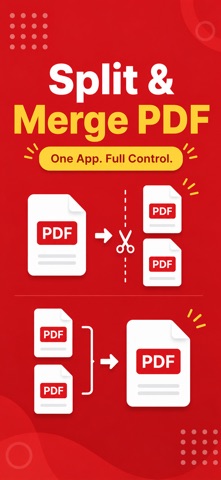

Description by KELVIN SENANU WALLACE Written by the developer, not by AppBrain. Click to read.
Split large files into separate pages, merge multiple PDFs into one organised document, and rearrange pages with precision. Built for students, professionals, and anyone who works with documents daily.
Key Features:
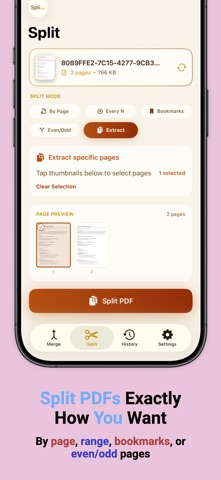
• Split PDFs
Extract pages or divide documents into multiple files instantly.
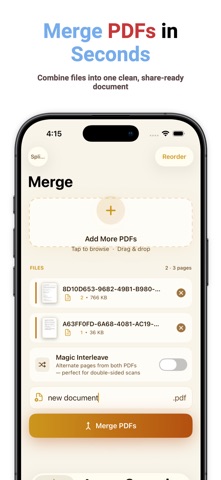
• Merge PDFs
Combine multiple files into a clean, unified PDF with full control over order and structure.
• Rearrange Pages
Reorder, rotate, or remove pages before exporting.
• Secure Processing
Your files remain private. Nothing leaves your device unless you choose to export or share.
• Fast Performance
Large file support with smooth, optimised processing.
• Simple Interface
Clear tools and an intuitive workflow designed to minimise steps and maximise productivity.
Why This App:
Split and Merge PDF is built for professionals, educators, freelancers, and anyone who needs fast and reliable PDF tools without unnecessary complexity. Whether you are submitting assignments, preparing reports, or organising documents for work, you can manage everything directly from your device.
Offline Support:
All PDF operations run locally on your device for speed, privacy, and convenience.
File Compatibility:
Supports standard PDF formats and works seamlessly with document management apps, email, and cloud storage services.
Subscription Details:
• Title: Savory All Access
• Length: 1 year
• Price: $39.99 per year and $7.99 per month (auto-renews)
• Terms of Use: https://www.apple.com/legal/internet-services/itunes/dev/stdeula/
• Privacy Policy: https://docs.google.com/document/d/1IysoItFPBXxdxDkkTJ6FRT1Of8qXqAwwB0op5coC1nU/edit?usp=sharing