

Split Speak
Split Speak is made and published by Michiel de Gooijer. AppBrain is an independent app data site and isn't affiliated with Michiel de Gooijer. The app name, icon, screenshots and description belong to Michiel de Gooijer and are shown as published on the App Store.
AppBrain's verdict
- Last updated
- July 30, 2026
Rankings
App Store top chartsApp Store Rankings for Split Speak
Competitors
Similar apps and more from Michiel de GooijerAlternatives to Split Speak


More from Michiel de Gooijer

Releases
Updates seen on the App Store- Version
- 1.0.1
- Launched
- April 2026
No changelog data
User feedback
Ratings and reviews on the App StoreComments on Split Speak for iOS
We don't have enough comments to show example comments. Please check back later.
Technology
Found in the app by AppBrain- Price
- Free
- App size
- 6.50 MB
- Content rating
- Everyone
Technologies used by Split Speak
About the app and developer
About Split Speak
Split Speak is a productivity app developed by Michiel de Gooijer.
What is the rating of Split Speak?
Split Speak has no ratings yet.
Is Split Speak free?
Split Speak is free. The app size is 6.50 MB. The latest version available is 1.0.1. The last update was on July 30, 2026.
What are the requirements for Split Speak?
The app has a content rating of Everyone. The app has been available on the App Store since April 2026.
Developer information for Michiel de Gooijer
Address:
Store listing
By Michiel de Gooijer, from the App Store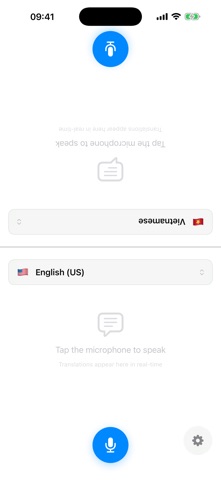

Description by Michiel de Gooijer Written by the developer, not by AppBrain. Click to read.
Place your iPhone or iPad between two people, choose a language for each side, and tap to speak. Each person sees their own side of the screen upright, making it easy to follow the conversation across a table.
On iPad, a three-column layout gives each person their own scrollable conversation history alongside the live translation, so you can always see what's been said.
DESIGNED FOR REAL CONVERSATIONS
• Split-screen interface for two people sitting opposite each other
• Real-time speech recognition while you talk
• On-device translation for privacy
• Spoken playback of translated text
• Conversation history for quick reference
TWO TRANSLATION MODES
Recommended Quality
For the best Split Speak experience, Recommended Quality provides more natural and more context-aware translations when available on your device.
• Better phrasing for natural conversation
• Better context understanding
• Best for longer or more nuanced speech
• Runs on-device for privacy
• Available after a one-time Apple Intelligence setup
Standard Quality
Standard Quality works right away with no extra setup.
• Ready immediately
• Reliable for everyday translation
• Great fallback while Recommended Quality is being enabled
• Runs on-device for privacy
ONE-TIME SETUP FOR RECOMMENDED QUALITY
Recommended Quality may require Apple Intelligence to be enabled in Settings and an on-device model download. Split Speak clearly explains this in onboarding and settings.
KEY FEATURES
• Real-time translation for face-to-face conversations
• Table-mode split-screen design
• iPad three-column layout with live conversation history
• 20 supported languages
• Adjustable speech playback speed
• Auto-speak options for each side
• Conversation history with search
• Light, dark, and system appearance options
• Haptic feedback
• On-device processing for privacy
GREAT FOR
• Travel conversations
• International meetings
• Restaurants and shopping abroad
• Cross-language family conversations
• Language practice
• Everyday communication on the go
SUPPORTED LANGUAGES
Arabic, Chinese (Simplified), Chinese (Traditional), Dutch, English (US), English (UK), French, German, Indonesian, Italian, Japanese, Korean, Polish, Portuguese (Brazil), Russian, Spanish, Thai, Turkish, Ukrainian, and Vietnamese.
PRIVACY FIRST
Speech recognition, translation, and text-to-speech are handled on-device. Your conversations are not sent to external servers.