

Split The Ticket & Bill
Split The Ticket & Bill is made and published by Juan Carlos Delgado. AppBrain is an independent app data site and isn't affiliated with Juan Carlos Delgado. The app name, icon, screenshots and description belong to Juan Carlos Delgado and are shown as published on the App Store.
AppBrain's verdict
- Last updated
- July 1, 2026
Rankings
App Store top chartsApp Store Rankings for Split The Ticket & Bill
Competitors
Similar apps and more from Juan Carlos DelgadoAlternatives to Split The Ticket & Bill


More from Juan Carlos Delgado


Releases
Updates seen on the App Store- Version
- 1.7.1
- Launched
- December 2021
No changelog data
User feedback
Ratings and reviews on the App StoreComments on Split The Ticket & Bill for iOS
We don't have enough comments to show example comments. Please check back later.
Technology
Found in the app by AppBrain- Price
- Free
- App size
- 16.0 MB
- Content rating
- Everyone
Technologies used by Split The Ticket & Bill
About the app and developer
About Split The Ticket & Bill
Split The Ticket & Bill is a finance app developed by Juan Carlos Delgado.
User Ratings
The app has no ratings yet.
App Information
Split The Ticket & Bill is freely available from the App Store. The app size is 15.97 MB. The latest version available is 1.7.1. The last update was on July 1, 2026.
Technical Requirements
The app has a content rating of Everyone. The app has been available on the App Store since December 2021.
Developer information for Juan Carlos Delgado
Address:
Frequently asked questions about Split The Ticket & Bill
Is Split The Ticket & Bill free?
Yes. Split The Ticket & Bill is free on the App Store.
Is Split The Ticket & Bill still available?
Yes. Split The Ticket & Bill is on the App Store, and the last update we saw was on July 1, 2026.
How large is Split The Ticket & Bill?
Split The Ticket & Bill is 15.97 MB.
Is Split The Ticket & Bill suitable for children?
App Store rates the content of Split The Ticket & Bill as suitable for everyone.
Who made Split The Ticket & Bill?
Split The Ticket & Bill was developed by Juan Carlos Delgado. It is listed in the finance category on the App Store.
What are the best alternatives to Split The Ticket & Bill?
People looking at Split The Ticket & Bill also look at these finance apps: Splitee - Partage des dépenses, Sesterce – Split expenses, Incomes, Okticket - Gestión de gastos, Expense Tool.
Store listing
By Juan Carlos Delgado, from the App Store



Description by Juan Carlos Delgado Written by the developer, not by AppBrain. Click to read.
Split The Ticket is the best application to keep accounts on trips, vacations, family gatherings, when you go out to party, when sharing a house (renting a house, etc.). It is also very useful to keep track of the debts that other people have with you.
Completely free!
Available online (on the web) or on your mobile phone or tablet.
*** HIGHLIGHTS FEATURES
** No registration
To use our application you do not have to register. Simply go to the store, install the App and start using it. If you use the web version, you just have to type www.splittheticket.com in your preferred browser.
** Free
Split The Ticket is completely free. You will have all the functions enabled from the beginning, without having to pay for a higher version to have access to the most special features.
**Unlimited
You can create as many groups as you want and in each group you can add as many participants as you need. At Split The Ticket we don't leave anyone out.
** Very visual, with images and emoticons
To facilitate the use of the application and make it easier to handle, you will be able to associate images in different areas of the application: user profile, group of expenses and notes.
** Differentiated participation percentages
Not all people have the same weight in different expenses. For example, in trips, we could decide that the children are only going to be passed on 50% of the expenses; however, to adults, 100%. We can assign a percentage to each participant and, by default, in the notes in which they take part, this percentage will initially be assigned to them (although this can also be changed later).
Also in the notes we can include fixed amounts (instead of percentages) for certain people.
** Multiple currencies
Groups must have a default currency. This currency is the one with which the balances will be squared. By default, the currency of your country will be assigned, although this can be changed later.
The notes that we make can be expressed in a different currency (let's imagine a trip to the South American continent, where in each country we can have expenses in different currencies). If the currency of the entry is different from that of the group, countervalues will also be shown in the currency of the group, to facilitate and better understand the amounts of the expenses. You can also change the exchange rate.
** Different types of notes
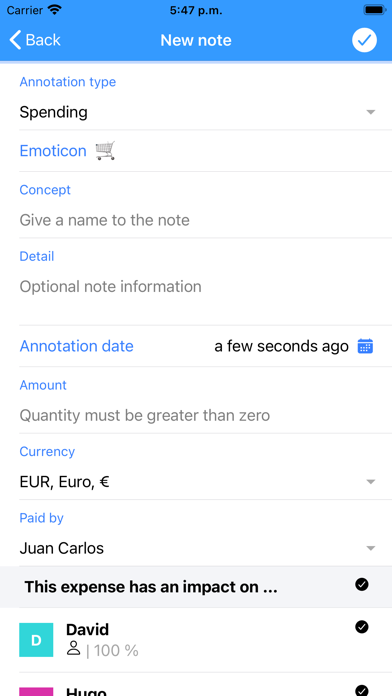
Expenses are the different purchases or payments that we make throughout the life of the group.
Contributions to the fund, in the case of setting up a fund prior to starting to make expenses.
Refunds, with which we will settle the accounts with the rest of the group participants.
Income, are amounts that reach the group and that can be distributed among the different participants of the group.
** Graphs of balances and fees
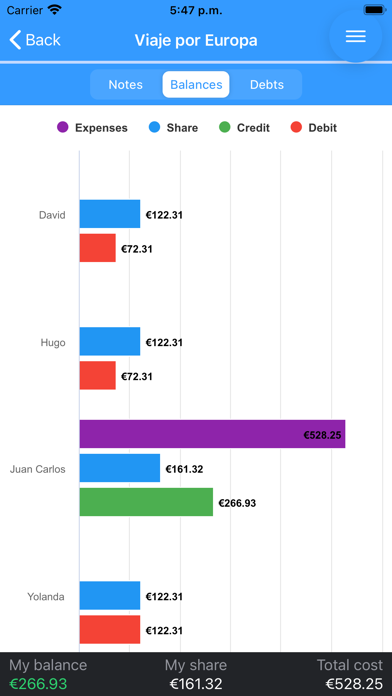
There are graphs where you can see, by participant, the relationship between the fees that we have to contribute to the expenses incurred, according to our participation percentage, and the balances of each participant.
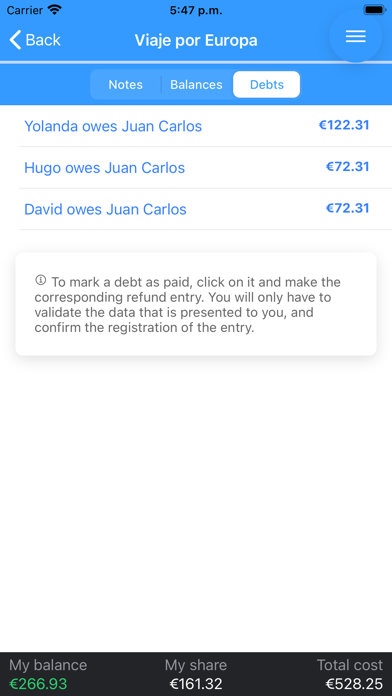
We can also see how much we owe each person, based on the current status of the group. If the group is square, the application will notify us of this situation.
** Share the groups
Share the groups with the participants, so that they have access to it, can identify themselves and make their own annotations of expenses. Don't carry all the work yourself!
Share by WhatsApp, mail, or social networks.
**It works without internet connection.
Add expenses, income, etc. even if you are currently offline. As soon as the App is opened with internet connection, all your entries will be automatically synchronized and balances and debts will be generated according to all the entries of all the participants of the group.