

SplitDeck is made and published by NATHANIEL J MOREHOUSE. AppBrain is an independent app data site and isn't affiliated with NATHANIEL J MOREHOUSE. The app name, icon, screenshots and description belong to NATHANIEL J MOREHOUSE and are shown as published on the App Store.
AppBrain's verdict
- Rating on App Store
- 5.00
- 1 ratings
- Last updated
- August 11, 2026
It doesn't have enough ratings yet to judge what users think.
Rankings
App Store top chartsApp Store Rankings for SplitDeck
Competitors
Similar apps and more from NATHANIEL J MOREHOUSEMore from NATHANIEL J MOREHOUSE


Releases
Updates seen on the App Store- Version
- 1.6
- Launched
- April 2026
No changelog data
User feedback
Ratings and reviews on the App StoreComments on SplitDeck for iOS
We don't have enough comments to show example comments. Please check back later.
Technology
Found in the app by AppBrain- Price
- Free
- App size
- 3.69 MB
- Content rating
- Everyone
Technologies used by SplitDeck
About the app and developer
About SplitDeck
SplitDeck is a sports app developed by NATHANIEL J MOREHOUSE.
What is the rating of SplitDeck?
SplitDeck is rated 5.00 out of 5 stars, based on one rating ratings.
Is SplitDeck free?
SplitDeck is free. The app size is 3.69 MB. The latest version available is 1.6. The last update was on August 11, 2026.
What are the requirements for SplitDeck?
The app has a content rating of Everyone. The app has been available on the App Store since April 2026.
Developer information for NATHANIEL J MOREHOUSE
Address:
Frequently asked questions about SplitDeck
Is SplitDeck free?
Yes. SplitDeck is free on the App Store.
Is SplitDeck still available?
Yes. SplitDeck is on the App Store, and the last update we saw was on August 11, 2026.
How large is SplitDeck?
SplitDeck is 3.69 MB.
Is SplitDeck suitable for children?
App Store rates the content of SplitDeck as suitable for everyone.
How do people rate SplitDeck?
SplitDeck has one rating of 5.00 stars on the App Store.
Who made SplitDeck?
SplitDeck was developed by NATHANIEL J MOREHOUSE. It is listed in the sports category on the App Store.
Store listing
By NATHANIEL J MOREHOUSE, from the App Store



Description by NATHANIEL J MOREHOUSE Written by the developer, not by AppBrain. Click to read.
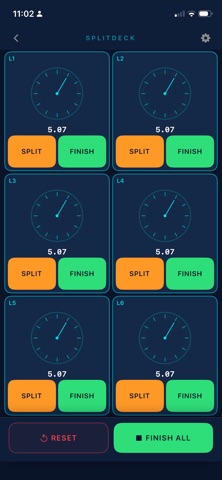
Record splits as swimmers hit the wall. Finish each lane independently. Undo a mistaken finish instantly. Your session auto-saves every 5 seconds — no data lost if the app closes unexpectedly.
HOW IT WORKS
Tap Start All — every timer begins at the same moment. Tap Split on any lane as a swimmer touches the wall. Tap Finish to stop that lane while others keep running. Save your results with one tap when the set is done.
SPLITDECK PRO
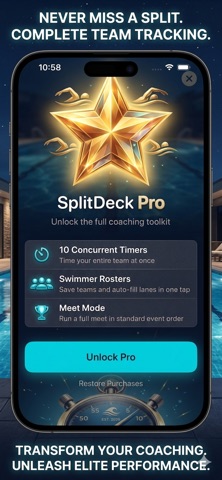
10 concurrent lanes (free tier: 3)
Swimmer rosters with one-tap lane auto-fill
Full meet mode with standard 11-event order and gender grouping
Heat-by-heat progression — names auto-populate for every heat
Heat sheet import — scan or upload a heat sheet, auto-populate events, heats, lanes, and swimmer names
Filter scanned results against a saved roster
BUILT FOR THE POOL DECK
Oversized tap targets for fast, one-handed use
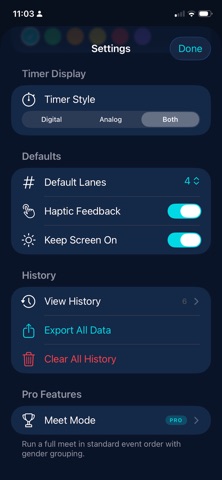
Digital stopwatch, analog clock face, or both at the same time
4 color themes: Dark, Light, Pool Blue, Midnight
6 accent colors
High contrast for outdoor visibility
Keep Screen On mode prevents auto-lock during timing
SAVE AND EXPORT
Session history grouped by day
Quick Save with one tap or Name & Save for custom labels
Export individual sessions, date ranges, or everything at once as CSV
Swipe to rename or delete saved sessions
Crash recovery — auto-save restores your session on relaunch
CHOOSE YOUR DISPLAY
Switch between a clean digital readout, an analog stopwatch face with second and minute hands, or both side by side. Timers scale automatically to fit your lane count — from one full-screen timer to a grid of ten.
NO SETUP FRICTION
Open the app. Pick your lanes. Tap Start. You're timing in under 5 seconds. Swimmer names are optional. Rosters make it even faster — select a team and auto-fill every lane in one tap.
No accounts. No subscriptions. No ads. No internet required. Your data stays on your device.
SplitDeck replaces the handful of stopwatches you're juggling on deck. It's faster, cleaner, and everything stays saved.