

Splitext: Carousel Story Maker
Splitext: Carousel Story Maker is made and published by Ivan Zinovev. AppBrain is an independent app data site and isn't affiliated with Ivan Zinovev. The app name, icon, screenshots and description belong to Ivan Zinovev and are shown as published on the App Store.
AppBrain's verdict
EstablishedLoved by users- Rating on App Store
- 4.66
- 122 ratings
- Last updated
- June 22, 2026
Users love it: 4.7 stars from 122 ratings.
Rankings
App Store top chartsApp Store Rankings for Splitext: Carousel Story Maker
Competitors
Similar apps and more from Ivan ZinovevAlternatives to Splitext: Carousel Story Maker





More from Ivan Zinovev

Releases
Updates seen on the App Store- Version
- 2.0.2
- Launched
- September 2019
No changelog data
User feedback
Ratings and reviews on the App StoreComments on Splitext: Carousel Story Maker for iOS
We don't have enough comments to show example comments. Please check back later.
Technology
Found in the app by AppBrain- Price
- Free
- App size
- 18.0 MB
- Content rating
- Medium
Technologies used by Splitext: Carousel Story Maker
About the app and developer
About Splitext: Carousel Story Maker
Splitext: Carousel Story Maker is a photo & video app developed by Ivan Zinovev.
User Ratings
Splitext: Carousel Story Maker is rated 4.66 out of 5 stars. The rating is based on 120 ratings.
App Information
Splitext: Carousel Story Maker is freely available from the App Store. The app size is 17.96 MB. The latest version available is 2.0.2. The last update was on June 22, 2026.
Technical Requirements
The app has a content rating of Medium Maturity. The app has been available on the App Store since September 2019.
Developer information for Ivan Zinovev
Address:
Frequently asked questions about Splitext: Carousel Story Maker
Is Splitext: Carousel Story Maker free?
Yes. Splitext: Carousel Story Maker is free on the App Store.
Is Splitext: Carousel Story Maker still available?
Yes. Splitext: Carousel Story Maker is on the App Store, and the last update we saw was on June 22, 2026.
How large is Splitext: Carousel Story Maker?
Splitext: Carousel Story Maker is 17.96 MB.
Is Splitext: Carousel Story Maker suitable for children?
App Store gives Splitext: Carousel Story Maker a medium maturity rating, so it is not meant for young children.
How do people rate Splitext: Carousel Story Maker?
Splitext: Carousel Story Maker scores 4.66 out of 5 stars, from 122 ratings on the App Store.
Who made Splitext: Carousel Story Maker?
Splitext: Carousel Story Maker was developed by Ivan Zinovev. It is listed in the photo & video category on the App Store.
What are the best alternatives to Splitext: Carousel Story Maker?
People looking at Splitext: Carousel Story Maker also look at these photo & video apps: Stylish Text・Stories Filters, Smoozly: Animated Stories, Quotes Creator, Text Art, STORIO Templates for instagram, Add Text to Photos - Typorama.
Store listing
By Ivan Zinovev, from the App Store


Description by Ivan Zinovev Written by the developer, not by AppBrain. Click to read.
TEXT EDITOR
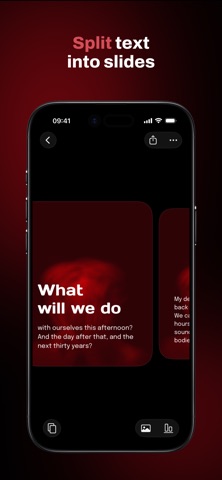
Customize text and paragraph settings: size, indents, capitalization, and alignment. Highlight, underline, and strikethrough text. Insert a page break to move text to the next slide. Or let the app split long text into slides — if the text doesn't fit on a slide, it will automatically wrap to the next one.
FONTS
Use built-in fonts or install your own from Files or the built-in Google Fonts catalog.
TEXT STYLES
Create styles based on selected text, set one as the default style, and it will be automatically applied to new posts.
TEXT OVER PHOTO/VIDEO
Choose a slide background: color, photo, or video. You can choose a photo or video from your gallery or search through stock photos. Adjust the overlay color and opacity to ensure the text doesn't blend in with the background.
EDIT MODE
Choose between Slide and Carousel modes. If you want to choose a unique background and alignment for each slide, choose Slide mode. If you want uniform settings for all slides, choose Carousel mode.
WORKSPACES
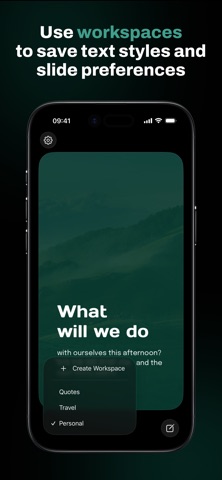
Managing multiple social media pages with different post designs? Create a workspace for each design, and the app will save the settings you apply to all slides: size, margins, alignment, and background. The settings will be automatically applied to new posts.
Terms of Use: https://www.apple.com/legal/internet-services/itunes/dev/stdeula/