

Splitter AI: Vocal Remover
Splitter AI: Vocal Remover is made and published by Huacen Co.,LTD. AppBrain is an independent app data site and isn't affiliated with Huacen Co.,LTD. The app name, icon, screenshots and description belong to Huacen Co.,LTD and are shown as published on the App Store.
AppBrain's verdict
- Rating on App Store
- 3.38
- 24 ratings
- Last updated
- October 27, 2026
It doesn't have enough ratings yet to judge what users think.
Rankings
App Store top chartsApp Store Rankings for Splitter AI: Vocal Remover
Competitors
Similar apps and more from Huacen Co.,LTDAlternatives to Splitter AI: Vocal Remover





Releases
Updates seen on the App Store- Version
- 1.4.4
- Launched
- October 2024
No changelog data
User feedback
Ratings and reviews on the App StoreComments on Splitter AI: Vocal Remover for iOS
We don't have enough comments to show example comments. Please check back later.
Technology
Found in the app by AppBrain- Price
- Free
- App size
- 140.5 MB
- Content rating
- Everyone
Technologies used by Splitter AI: Vocal Remover
About the app and developer
About Splitter AI: Vocal Remover
Splitter AI: Vocal Remover is a music app developed by Huacen Co.,LTD.
User Ratings
Splitter AI: Vocal Remover is rated 3.38 out of 5 stars. The rating is based on 24 ratings.
App Information
Splitter AI: Vocal Remover is freely available from the App Store. The app size is 140.54 MB. The latest version available is 1.4.4. The last update was on October 27, 2026.
Technical Requirements
The app has a content rating of Everyone. The app has been available on the App Store since October 2024.
Developer information for Huacen Co.,LTD
Address:
Frequently asked questions about Splitter AI: Vocal Remover
Is Splitter AI: Vocal Remover free?
Yes. Splitter AI: Vocal Remover is free on the App Store.
Is Splitter AI: Vocal Remover still available?
Yes. Splitter AI: Vocal Remover is on the App Store, and the last update we saw was on October 27, 2026.
How large is Splitter AI: Vocal Remover?
Splitter AI: Vocal Remover is 140.54 MB.
Is Splitter AI: Vocal Remover suitable for children?
App Store rates the content of Splitter AI: Vocal Remover as suitable for everyone.
How do people rate Splitter AI: Vocal Remover?
Splitter AI: Vocal Remover scores 3.38 out of 5 stars, from 24 ratings on the App Store.
Who made Splitter AI: Vocal Remover?
Splitter AI: Vocal Remover was developed by Huacen Co.,LTD. It is listed in the music category on the App Store.
What are the best alternatives to Splitter AI: Vocal Remover?
People looking at Splitter AI: Vocal Remover also look at these music apps: Vocal Remover: AI Splitter, AI Song Generator: AI Music, Real Violin Solo, Music AI Song Generator, Cover, Musk MIDI Player.
Store listing
By Huacen Co.,LTD, from the App Store
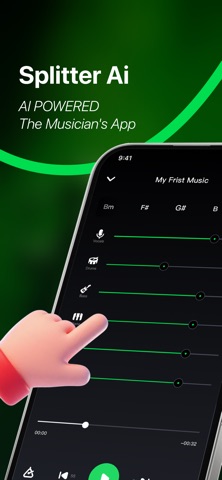


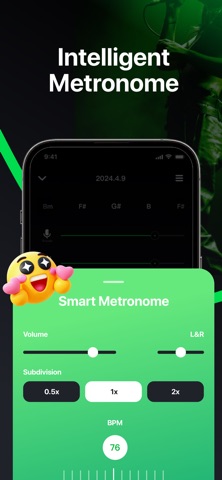
Description by Huacen Co.,LTD Written by the developer, not by AppBrain. Click to read.
Remove vocals or instruments from any song with AI. Adjust key or tempo instantly and create professional-quality backing tracks for guitar, drums, piano, vocals, or bass — all in one app. Whether you’re a musician, student, or content creator, Splitter AI gives you total control over your sound.
Key Features
• Separate any track with AI: Split vocals, drums, guitar, bass, piano, strings, and more. Perfect for vocal removal or creating custom backing tracks.
• Generate click tracks: Smart metronome syncs instantly with any song’s beat.
• Detect chords automatically: Real-time AI chord display, from beginner to advanced levels.
• Change speed easily: Slow down or speed up tricky sections with automatic BPM detection.
• Transpose with AI: Detect and shift the song’s key with automatic chord transposition across all 12 keys.
• Create custom mixes: Produce acapella, karaoke, or instrument-only versions in seconds.
• Export and share: Save high-quality stems or mixes and use them in any DAW or music app.
How It Works
• Upload your audio or video file — Splitter AI instantly separates vocals and instruments while detecting the song’s beat and chords.
• Adjust volumes, mute tracks, or remove vocals with one tap.
• Download your separated stems or export a custom mix for your project.
Supported Formats
• Audio: MP3, WAV, FLAC, OGG, AIFF (AIF), AU, CAF, OPUS
• Video: MP4, M4A, M4V, M4R, MPEG (MPG), FLV, MOV, MKV, WEBM
Who’s It For
• Musicians, singers, acapella groups, and music producers
• Guitarists, drummers, bass players, and pianists
• Music students, teachers, and social media content creators
Why Splitter AI
Powered by AI, Splitter AI helps you separate, remix, and enhance any song. Whether you’re creating backing tracks, practicing your instrument, or remixing music, Splitter AI makes your sound clearer and your workflow faster.
Join the band today and take your music to the next level with Splitter AI!
Subscription Information
• Weekly Subscription: 3-Day Free Trial, then $9.99/week — cancel anytime
• Yearly Subscription: $39.90/year
Payment will be charged to your iTunes account upon confirmation of purchase. Subscriptions automatically renew unless canceled at least 24 hours before the end of the current period. Renewal charges will be applied to your account within 24 hours before the current period ends. You can manage or cancel your subscription anytime in your App Store account settings.
In some countries or regions (including Germany, Israel, South Africa, and Turkey), subscription management may differ slightly. Please refer to Apple’s subscription policy for more information.
Privacy Policy: https://www.huacentech.com/policy/
Terms of Use: https://www.huacentech.com/terms/