

SQLiteFlow - SQLite Editor
SQLiteFlow - SQLite Editor is made and published by 晨亮 贾. AppBrain is an independent app data site and isn't affiliated with 晨亮 贾. The app name, icon, screenshots and description belong to 晨亮 贾 and are shown as published on the App Store.
AppBrain's verdict
Established- Rating on App Store
- 4.51
- 51 ratings
- Last updated
- September 12, 2026
- Size
- 12.1 MB
It doesn't have enough ratings yet to judge what users think.
User feedback
Ratings and reviews on the App StoreComments on SQLiteFlow - SQLite Editor for iOS
We don't have enough comments to show example comments. Please check back later.
Store listing
By 晨亮 贾, from the App Store




Description by 晨亮 贾 Written by the developer, not by AppBrain. Click to read.
It contains features as described below:
Browse
• Manage files. Supports add, remove, duplicate, rename folders, SQLite databases, SQL files, CSV files, etc.
• Supports import database from iCloud Drive by the file picker.
• Supports open external SQL files, CSV files and Filter files.
• Supports open external folders. Requires iOS 13.0 or iPadOS 13.0.
• Supports show recents files.
Query Editor
• Multi-query execution.
• Syntax highlighting.
• SQL auto-completion.
• Format query.
Data Editor
• View, edit or add table data.
• Multiple cells/rows/columns selection.
• View table data with a convenient filter.
• Sort records by tapping on column title.
• Edit blob data as hex or show it as preview if possible.
Alter Table
• View, edit or add table fields, indexes, foreign keys, checks.
• View triggers.
• View DDL.
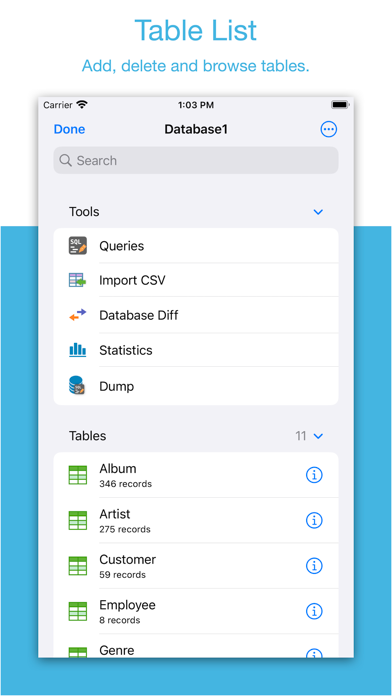
Table List
• Supports display each table's name and records count.
Connect
• Supports let SQLiteFlow(macOS) connect databases in this app. One use case is that you can debug query performance issue on your iPhone or iPad directly through your Mac.
Drag and Drop
• Supports drag and drop to import or export SQLite databases and SQL files in iPad.
Database Statistics
• Supports show records count of each table.
• Supports show total size of each table
• Supports show size of each table's content.
• Supports show size of each table's index.
This feature may help you get more insight about your SQLite databases' data storage information, which may let you see if there're any chances to let SQLite working in a more effective way in your device.
ER Diagram
• Supports display ER diagram.
• Supports toggle field type hide or show.
• Supports Relationship Guessing.
• Supports copy as Mermaid markdown.
Database Diff
• Supports generate SQL text that can let you transform a database content into another.
• Supports show a summary of the differences between two databases.
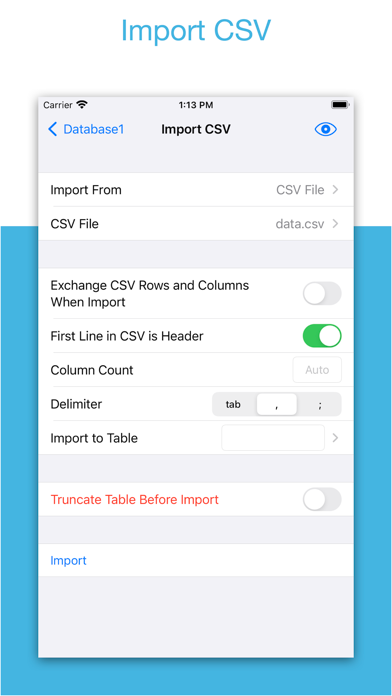
Import
• Supports import CSV data.
• Supports import JSON data.
Export
• In Data Editor or Query Results, supports export data to CSV, JSON, Markdown or List.
• In Data Editor, supports export data to Insert Statement or Update Statement if possible.
Multiple Windows
• Supports multiple windows for iPadOS 13 or later.
Dark Mode
• Supports dark mode.
visionOS
• Supports visionOS.
Shortcuts
• Supports "Run Query" action.
• Supports "Import CSV" action.
• Supports "Import JSON" action.
Create Function
• Supports create scalar function using a simple JavaScript routine.
Terms of Use: https://www.apple.com/legal/internet-services/itunes/dev/stdeula/
Safety and technology
Found in the app by AppBrain- Price
- Free
- App size
- 12.1 MB
- Content rating
- Everyone
Technologies used by SQLiteFlow - SQLite Editor
Releases
Updates seen on the App Store- Version
- 6.8.6
- Launched
- August 2018
No changelog data
Alternatives
Similar apps and more from 晨亮 贾Alternatives to SQLiteFlow - SQLite Editor




Rankings
App Store top chartsApp Store Rankings for SQLiteFlow - SQLite Editor
About the app and developer
About SQLiteFlow - SQLite Editor
SQLiteFlow - SQLite Editor is an overall app developed by 晨亮 贾.
What is the rating of SQLiteFlow - SQLite Editor?
SQLiteFlow - SQLite Editor is rated 4.51 out of 5 stars, based on 51 ratings.
Is SQLiteFlow - SQLite Editor free?
SQLiteFlow - SQLite Editor is free. The app size is 12.08 MB. The latest version available is 6.8.6. The last update was on September 12, 2026.
What are the requirements for SQLiteFlow - SQLite Editor?
The app has a content rating of Everyone. The app has been available on the App Store since August 2018.
Developer information for 晨亮 贾
Address:
Frequently asked questions about SQLiteFlow - SQLite Editor
Is SQLiteFlow - SQLite Editor free?
Yes. SQLiteFlow - SQLite Editor is free on the App Store.
Is SQLiteFlow - SQLite Editor still available?
Yes. SQLiteFlow - SQLite Editor is on the App Store, and the last update we saw was on September 12, 2026.
How large is SQLiteFlow - SQLite Editor?
SQLiteFlow - SQLite Editor is 12.08 MB.
Is SQLiteFlow - SQLite Editor suitable for children?
App Store rates the content of SQLiteFlow - SQLite Editor as suitable for everyone.
How do people rate SQLiteFlow - SQLite Editor?
SQLiteFlow - SQLite Editor scores 4.51 out of 5 stars, from 51 ratings on the App Store.
Who made SQLiteFlow - SQLite Editor?
SQLiteFlow - SQLite Editor was developed by 晨亮 贾. It is listed in the overall category on the App Store.
What are the best alternatives to SQLiteFlow - SQLite Editor?
People looking at SQLiteFlow - SQLite Editor also look at these overall apps: SQLite Mobile Client, MySQL Mobile Client, TablePlus - Database Client, PostgreSQL Client, MySQL Client by SQLPro.