

Squigglings: How to Draw
Squigglings: How to Draw is made and published by Click Clack Labs LLC. AppBrain is an independent app data site and isn't affiliated with Click Clack Labs LLC. The app name, icon, screenshots and description belong to Click Clack Labs LLC and are shown as published on the App Store.
AppBrain's verdict
New- Rating on App Store
- 5.00
- 2 ratings
- Last updated
- September 18, 2026
Squigglings: How to Draw came out 66 days ago. It doesn't have enough ratings yet to judge what users think.
Rankings
App Store top chartsApp Store Rankings for Squigglings: How to Draw
Competitors
Similar apps and more from Click Clack Labs LLCAlternatives to Squigglings: How to Draw


More from Click Clack Labs LLC


Releases
Updates seen on the App Store- Version
- 1.0.2
- Launched
- August 2026
No changelog data
User feedback
Ratings and reviews on the App StoreComments on Squigglings: How to Draw for iOS
We don't have enough comments to show example comments. Please check back later.
Technology
Found in the app by AppBrain- Price
- Free
- App size
- 120.8 MB
- Content rating
- Everyone
Technologies used by Squigglings: How to Draw
About the app and developer
About Squigglings: How to Draw
Squigglings: How to Draw is an education app developed by Click Clack Labs LLC.
What is the rating of Squigglings: How to Draw?
Squigglings: How to Draw is rated 5.00 out of 5 stars, based on 2 ratings.
Is Squigglings: How to Draw free?
Squigglings: How to Draw is free. The app size is 120.81 MB. The latest version available is 1.0.2. The last update was on September 18, 2026.
What are the requirements for Squigglings: How to Draw?
The app has a content rating of Everyone. The app has been available on the App Store since August 2026.
Developer information for Click Clack Labs LLC
Address:
Frequently asked questions about Squigglings: How to Draw
Is Squigglings: How to Draw free?
Yes. Squigglings: How to Draw is free on the App Store.
Is Squigglings: How to Draw still available?
Yes. Squigglings: How to Draw is on the App Store, and the last update we saw was on September 18, 2026.
How large is Squigglings: How to Draw?
Squigglings: How to Draw is 120.81 MB.
Is Squigglings: How to Draw suitable for children?
App Store rates the content of Squigglings: How to Draw as suitable for everyone.
How do people rate Squigglings: How to Draw?
Squigglings: How to Draw scores 5.00 out of 5 stars, from 2 ratings on the App Store.
Who made Squigglings: How to Draw?
Squigglings: How to Draw was developed by Click Clack Labs LLC. It is listed in the education category on the App Store.
What are the best alternatives to Squigglings: How to Draw?
People looking at Squigglings: How to Draw also look at these education apps: Pizpon – English for Kids, Drawwus: Learn How to Draw, IMSQC Mobile App, Line by Line: Learn to Draw, Draw Along : Learn to Draw.
Store listing
By Click Clack Labs LLC, from the App Store


Description by Click Clack Labs LLC Written by the developer, not by AppBrain. Click to read.
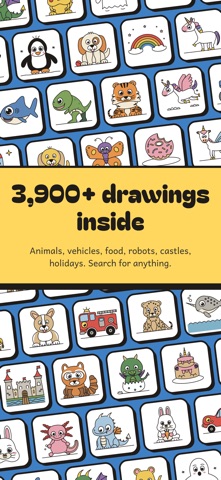
Dragons. Puppies. T. rex. Unicorns. Race cars. Ice cream. Squigglings turns every one of them into a few easy lines a 5-year-old can copy, one line at a time, in red, on top of what they have already drawn. Follow the red and the picture appears. No talent required, just a pencil.
3,900+ DRAWINGS, AND THE NEXT LINE IS ALWAYS OBVIOUS
Most "how to draw" books jump from a circle to a finished lion. Squigglings never jumps. Each step adds one simple shape, written in words a 7-year-old reads on their own: "Draw a big round tummy under the head." Big shapes first, details last, 10 to 14 steps, about ten minutes, and a drawing they are proud of at the end.
WATCH IT DRAW ITSELF
Tap any drawing and it draws itself before their eyes, then colours itself in. Kids see exactly where they are heading before they pick up a pencil, so they start confident and stay confident.
TICK OFF EVERY STEP
A hand-drawn squiggle rail fills with blue ink as they go. Each step earns a green check, and the rail does a loop-the-loop when the picture is done. Progress is saved, so a drawing can wait until tomorrow.
A NEW SQUIGGLE EVERY DAY
Today's Squiggle is a fresh drawing every morning, the same one for everybody, so friends, cousins and whole classrooms can draw it together and compare.
MADE FOR SMALL HANDS
Big buttons. Large text. Short sentences. Medium and Advanced levels, so a 5-year-old and a 10-year-old both find their fit. Works with VoiceOver, large type and Reduce Motion.
SAVE, SHARE, PRINT
Star the favourites. Share the finished picture with grandparents. Print a light outline to trace and colour on real paper.
QUIET BY DESIGN
• Works fully offline: nothing to download later, nothing that needs Wi-Fi
• No ads, no accounts, no purchases, no tracking, ever
• Made for small hands: big buttons, short sentences, Medium and Advanced levels
• No notifications nagging anyone
• Our privacy label says "Data Not Collected", and it means it
WHAT'S INSIDE
Animals: dog, cat, bunny, fox, lion, panda, owl, shark, dolphin, axolotl, T. rex, stegosaurus, dragon, baby dragon, unicorn, pegasus and hundreds more. Vehicles: car, race car, monster truck, fire truck, police car, train, rocket, airplane, submarine. Food: cupcake, pizza, ice cream, donut, taco. Plus robots, castles, people, holidays, sports, nature, letters, numbers and shapes, sorted into categories with a search box on top, and ordered by what kids love most.
WHO IT'S FOR
Ages 5 and up (younger with a helper beside them). Parents who want screen time that ends with paper and crayons. Teachers who need a five-minute warm-up the whole class can follow. Anyone who ever said "I can't draw".
Squigglings is from the makers of squigglings.com, where every drawing is also free to print. Draw something today.