

SquirrelView Mobile
SquirrelView Mobile is made and published by Grant Instruments. AppBrain is an independent app data site and isn't affiliated with Grant Instruments. The app name, icon, screenshots and description belong to Grant Instruments and are shown as published on the App Store.
AppBrain's verdict
- Last updated
- January 21, 2026
Rankings
App Store top chartsApp Store Rankings for SquirrelView Mobile
Competitors
Similar apps and more from Grant InstrumentsAlternatives to SquirrelView Mobile





Releases
Updates seen on the App Store- Version
- v1.1.2
- Launched
- November 2021
No changelog data
User feedback
Ratings and reviews on the App StoreComments on SquirrelView Mobile for iOS
We don't have enough comments to show example comments. Please check back later.
Technology
Found in the app by AppBrain- Price
- Free
- App size
- 18.8 MB
- Content rating
- Everyone
Technologies used by SquirrelView Mobile
About the app and developer
About SquirrelView Mobile
SquirrelView Mobile is an utilities app developed by Grant Instruments.
User Ratings
The app has no ratings yet.
App Information
SquirrelView Mobile is freely available from the App Store. The app size is 18.85 MB. The latest version available is v1.1.2. The last update was on January 21, 2026.
Technical Requirements
The app has a content rating of Everyone. The app has been available on the App Store since November 2021.
Developer information for Grant Instruments
Address:
Store listing
By Grant Instruments, from the App Store

Description by Grant Instruments Written by the developer, not by AppBrain. Click to read.
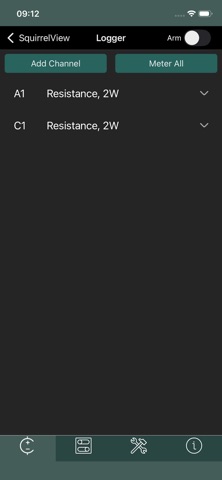
SquirrelView is the modern replacement for the traditional LCD screen and button interface found on previous generation data loggers. Control and monitor your Grant Instruments SQ16 series Bluetooth-enabled data loggers directly from your smartphone.
COMPATIBLE DEVICES
• SQ16 Basic
• SQ16 Plus
KEY FEATURES
• Real-time Temperature Monitoring - View instantaneous meter readings from all logger channels
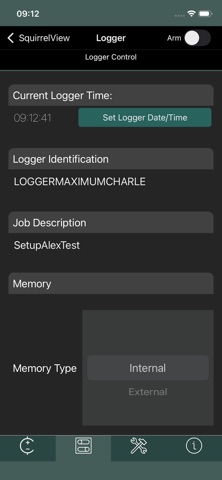
• Logger Control - Arm or disarm your logger remotely
• Channel Configuration - Configure analog and reference junction channels
• System Information - Check firmware version, battery voltage, and device status
• Bluetooth Connectivity - Wireless connection eliminates the need for physical buttons and screens
SIMPLE TO USE
1. Activate Bluetooth on your SQ16 logger (hold power button for 8 seconds)
2. Open SquirrelView and scan for devices
3. Connect to your logger
4. Monitor, configure settings, or arm/disarm logging
ABOUT GRANT INSTRUMENTS
Grant Instruments has been manufacturing precision data loggers for temperature monitoring and validation since 1986. The SQ16 series represents our latest generation of professional monitoring equipment, combining proven reliability with modern wireless connectivity.
NO SUBSCRIPTION REQUIRED
One-time download. No ongoing fees. No cloud services. All data stays on your device.
REQUIREMENTS
• Android device with Bluetooth 4.0 or higher
• Grant Instruments SQ16 series data logger with Bluetooth enabled
For technical support or product information, visit grantinstruments.com