

SSTP Connect
SSTP Connect is made and published by Domosekai Limited. AppBrain is an independent app data site and isn't affiliated with Domosekai Limited. The app name, icon, screenshots and description belong to Domosekai Limited and are shown as published on the App Store.
AppBrain's verdict
EstablishedLoved by usersTop 10- Best rank
- #6
- Top Paid, Russia
- Rating on App Store
- 4.77
- 1,076 ratings
- Last updated
- June 16, 2025
Users love it: 4.8 stars from 1,076 ratings. Its best ranking is #6 in Top Paid, Utilities in Russia.
Rankings
App Store top charts- Highest rank
- #6
- Chart
- Top Paid
- Utilities
- Country
- Russia
App Store Rankings for SSTP Connect
Top rankings
Ranking history in Russia
Competitors
Similar apps and more from Domosekai LimitedAlternatives to SSTP Connect





More from Domosekai Limited

Releases
Updates seen on the App Store- Version
- 3.9.10
- Launched
- January 2021
No changelog data
User feedback
Ratings and reviews on the App StoreComments on SSTP Connect for iOS
We don't have enough comments to show example comments. Please check back later.
Technology
Found in the app by AppBrain- Price
- $2.99
- App size
- 17.0 MB
- Content rating
- Everyone
Technologies used by SSTP Connect
About the app and developer
About SSTP Connect
SSTP Connect is an utilities app developed by Domosekai Limited.
User Ratings
SSTP Connect is rated 4.77 out of 5 stars. The rating is based on 1.1 thousand ratings.
App Information
SSTP Connect costs $2.99. The app size is 17.03 MB. The latest version available is 3.9.10. The last update was on June 16, 2025.
Technical Requirements
The app has a content rating of Everyone. The app has been available on the App Store since January 2021.
Developer information for Domosekai Limited
Address:
Frequently asked questions about SSTP Connect
Is SSTP Connect free?
No. SSTP Connect costs $2.99 on the App Store.
Is SSTP Connect still available?
Yes. SSTP Connect is on the App Store, and the last update we saw was on June 16, 2025.
How large is SSTP Connect?
SSTP Connect is 17.03 MB.
Is SSTP Connect suitable for children?
App Store rates the content of SSTP Connect as suitable for everyone.
How do people rate SSTP Connect?
SSTP Connect scores 4.77 out of 5 stars, from 1,076 ratings on the App Store.
Who made SSTP Connect?
SSTP Connect was developed by Domosekai Limited. It is listed in the utilities category on the App Store.
What are the best alternatives to SSTP Connect?
People looking at SSTP Connect also look at these utilities apps: Clavister OneConnect, sing-box, Chute - Proxy Network Toolbox, Passepartout, VPN Client, Private & Secure VPN: TorGuard.
Store listing
By Domosekai Limited, from the App Store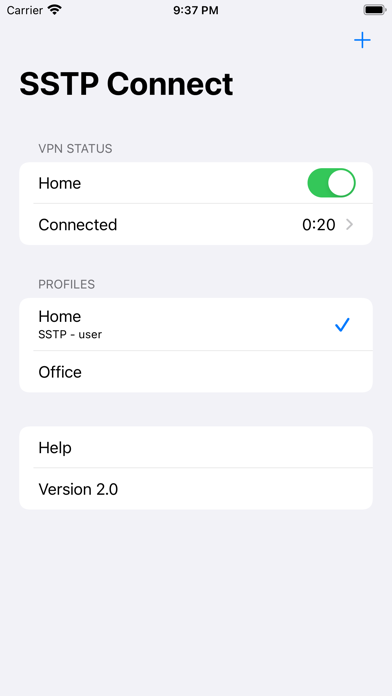
Description by Domosekai Limited Written by the developer, not by AppBrain. Click to read.
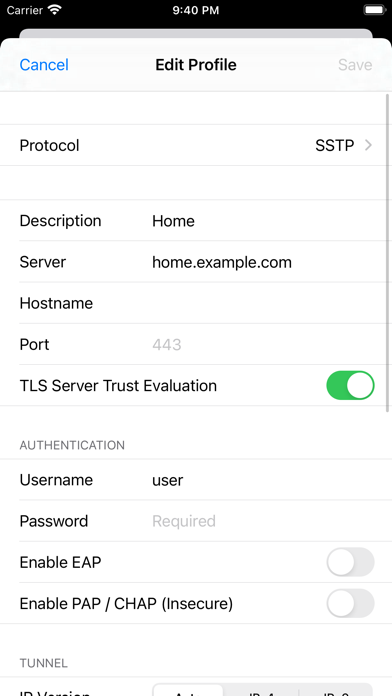
- SSTP (MS-SSTP)
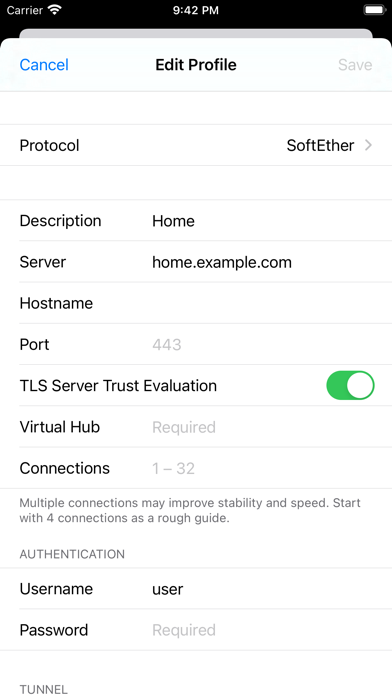
- SoftEther VPN
This is only a VPN client. No VPN service is included. You need to specify the server you are connecting to.
• Native
Only iOS native libraries are used in the core function, including the TLS stack. No OpenSSL.
Connections are saved natively so that you can start a connection from the system settings.
• Simple
VPN clients ought to be small and simple. No ads, analytics or other 3rd-party SDK are included.
• Privacy
No data is collected from you. Connection log only exists in the memory and is never saved to the device.
• Complete
Support all password and certificate-based authentications available in Windows 11.
Support authenticating by password and certificate at the same time with TEAP (EAP chaining).
Protocol details below.
• Security
Passwords and certificates are stored in the iOS keychain. SSTP Connect never saves them locally for convenience.
• IPv6 Ready
Support both IPv6 connections and stateless IPv6 configuration in the VPN tunnels. (DHCPv6 not supported)
• More than TCP
Support NAT traversal (NAT-T) and UDP acceleration just like the official SoftEther client.
• Easy Import and Export
Not only from SSTP Connect, reading connection settings from SoftEther Client Manager is also a piece of cake.
• Routing
Accept static routes pushed from the server or add your own entries.
SSTP Authentication Methods
- PEAP
- EAP-TTLS
- TEAP (EAP chaining)
- EAP-TLS
- EAP-MSCHAPv2
- MSCHAPv2
- CHAP
- PAP
SoftEther Authentication Methods
- Password
- RADIUS / NT Domain Password
- Certificate
- Anonymous
Supported Server Platforms
• Microsoft Windows Server 2008 and later
• Microsoft Azure P2S VPN
• MikroTik RouterOS*
• SoftEther VPN Server
• VPN Azure
* Servers configured without certificates are not supported.
SSTP Connect is a third-party implementation based on Microsoft Open Specifications and SoftEther VPN source code. We do not have any affiliation with either Microsoft Corporation or SoftEther Corporation.