

Stamp Camera Date and Location
Stamp Camera Date and Location is made and published by Yosef Jebara. AppBrain is an independent app data site and isn't affiliated with Yosef Jebara. The app name, icon, screenshots and description belong to Yosef Jebara and are shown as published on the App Store.
AppBrain's verdict
- Last updated
- July 9, 2026
- Size
- 6.11 MB
User feedback
Ratings and reviews on the App StoreComments on Stamp Camera Date and Location for iOS
We don't have enough comments to show example comments. Please check back later.
Store listing
By Yosef Jebara, from the App Store


Description by Yosef Jebara Written by the developer, not by AppBrain. Click to read.
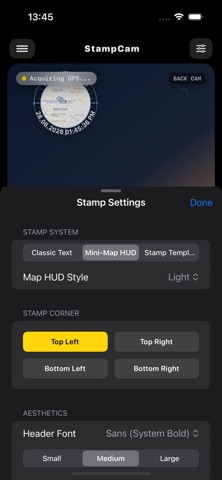
The app includes a real-time vector map engine that can display your current position as a Mini-Map overlay. You can choose between multiple map styles, including Sci-Fi, Navy, and Light. For users who prefer a simpler layout, a Classic text-based stamp is also available.
Stamp Camera supports both high-resolution photos and HD video recording, applying your selected stamp instantly to each capture.
Core Features
Real-Time GPS Tagging
- Connects to high-accuracy GPS
- Converts coordinates into readable addresses (City, Country, Street)
- Location modes: City + Country, City only, Detailed, or No Location
Mini-Map HUD
- Circular map overlay showing your live position and nearby streets
- Map styles: Sci-Fi, Navy, and Light
- Curved text layout for address and timestamp
Classic Stamp Customization
- Choose between Circle or Square stamp shapes
- Adjustable text color, frame color, and background color
- Font styles: Sans-Serif, Monospace
- Optional semi-transparent backgrounds or borders for readability
- Position options: top or bottom corners
Template System (8 Styles)
Each template supports:
- Custom text color
- Custom background color
- Adjustable opacity
Photo and Video Stamping
- Real-time watermarking for video
- Full-resolution stamping for photos and videos
- Live preview matches the final saved result
Camera Controls
- Smooth zoom with 0.5x, 1.0x, 2.0x, and 3.0x steps
- One-tap front and rear camera switching
- Clean dark-theme interface
How It Works
1. Open Stamp Camera and allow GPS and Camera permissions
2. Select Classic, Mini-Map, or a Template in the Stamp Customizer
3. Capture a photo or record a video
4. The stamped file is saved directly to your device gallery
Safety and technology
Found in the app by AppBrain- Price
- Free
- App size
- 6.11 MB
- Content rating
- Everyone
Technologies used by Stamp Camera Date and Location
Releases
Updates seen on the App Store- Version
- 2.5
- Launched
- July 2026
No changelog data
Alternatives
Similar apps and more from Yosef Jebara


Rankings
App Store top chartsApp Store Rankings for Stamp Camera Date and Location
About the app and developer
About Stamp Camera Date and Location
Stamp Camera Date and Location is a photo & video app developed by Yosef Jebara.
What is the rating of Stamp Camera Date and Location?
Stamp Camera Date and Location has no ratings yet.
Is Stamp Camera Date and Location free?
Stamp Camera Date and Location is free. The app size is 6.11 MB. The latest version available is 2.5. The last update was on July 9, 2026.
What are the requirements for Stamp Camera Date and Location?
The app has a content rating of Everyone. The app has been available on the App Store since July 2026.
Developer information for Yosef Jebara
Address: