

Stamp Maker & Signature Maker
Stamp Maker & Signature Maker is made and published by shahida parveen. AppBrain is an independent app data site and isn't affiliated with shahida parveen. The app name, icon, screenshots and description belong to shahida parveen and are shown as published on the App Store.
AppBrain's verdict
- Rating on App Store
- 5.00
- 19 ratings
- Last updated
- August 19, 2026
- Size
- 46.0 MB
It doesn't have enough ratings yet to judge what users think.
User feedback
Ratings and reviews on the App StoreComments on Stamp Maker & Signature Maker for iOS
We don't have enough comments to show example comments. Please check back later.
Store listing
By shahida parveen, from the App Store

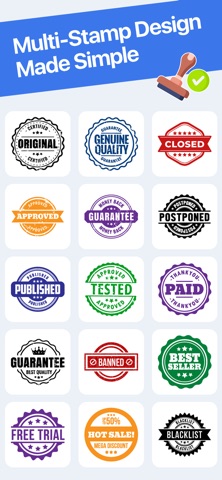


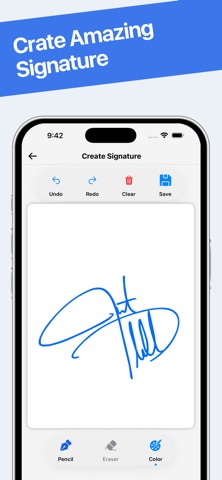
Description by shahida parveen Written by the developer, not by AppBrain. Click to read.
Stamp Maker & Signature Maker is an all-in-one professional utility designed for business owners, freelancers, and creative professionals. Whether you need to sign a legal contract, brand your photography with watermarks, or create a custom digital seal, our app provides a secure and seamless experience.
Key Features
Custom Stamp Designer: Create professional-grade digital stamps and seals. Choose from various shapes, colors, and border styles to match your brand identity.
Digital Signature Suite: Draw or scan your signature to sign PDFs, receipts, and documents on the go. Perfect for remote work and paperless workflows.
Advanced Watermarking: Protect your intellectual property. Easily add custom watermarks to photos and documents to prevent unauthorized use.
Template Library: Access a wide variety of pre-made stamp templates.
Offline Functionality: Work anytime, anywhere. No internet connection is required to create, edit, or save your documents.
Privacy You Can Trust
We believe your sensitive documents belong to you. All your creations and signed documents are saved locally on your device. We do not use cloud storage, ensuring your signatures and stamps never leave your phone without your permission.
Why Choose Us?
User-Friendly Interface: Clean, intuitive design requiring zero design experience.
High-Resolution Export: Save your work in crisp, high-quality formats.
Secure & Private: No registration or cloud uploads. Your data stays on your hardware.
Subscription Information
Upgrade to Stamp Maker Premium to unlock an ad-free experience, access all exclusive stamp templates, and export unlimited high-resolution signatures.
Subscription Options: Weekly, Monthly, or Yearly auto-renewable plans.
Payment: Payment will be charged to your Apple ID Account at confirmation of purchase.
Auto-Renewal: Subscriptions automatically renew unless auto-renew is turned off at least 24 hours before the end of the current period.
Renewal Fee: Account will be charged for renewal within 24 hours prior to the end of the current period at the cost of the selected plan.
Manage Subscriptions: You can manage and cancel your subscriptions by going to your App Store Account Settings after purchase.
Legal & Compliance
Privacy Policy & Terms of Use: https://sites.google.com/view/stam-maker/home
Apple Standard EULA: https://www.apple.com/legal/internet-services/itunes/dev/stdeula/
Safety and technology
Found in the app by AppBrain- Price
- Free
- App size
- 46.0 MB
- Content rating
- Everyone
Technologies used by Stamp Maker & Signature Maker
Releases
Updates seen on the App Store- Version
- 1.1
- Launched
- April 2026
No changelog data
Alternatives
Similar apps and more from shahida parveenAlternatives to Stamp Maker & Signature Maker


More from shahida parveen


Rankings
App Store top chartsApp Store Rankings for Stamp Maker & Signature Maker
About the app and developer
About Stamp Maker & Signature Maker
Stamp Maker & Signature Maker is a productivity app developed by shahida parveen.
User Ratings
Stamp Maker & Signature Maker is rated 5.00 out of 5 stars. The rating is based on 19 ratings.
App Information
Stamp Maker & Signature Maker is freely available from the App Store. The app size is 46.04 MB. The latest version available is 1.1. The last update was on August 19, 2026.
Technical Requirements
The app has a content rating of Everyone. The app has been available on the App Store since April 2026.
Developer information for shahida parveen
Address: