

StarDesk - Remote Desktop
StarDesk - Remote Desktop is made and published by GearUP Portal PTE. LTD. AppBrain is an independent app data site and isn't affiliated with GearUP Portal PTE. LTD. The app name, icon, screenshots and description belong to GearUP Portal PTE. LTD. and are shown as published on the App Store.
AppBrain's verdict
Loved by users- Rating on App Store
- 4.85
- 193 ratings
- Last updated
- October 8, 2026
- Size
- 62.4 MB
Users love it: 4.8 stars from 193 ratings.
User feedback
Ratings and reviews on the App StoreComments on StarDesk - Remote Desktop for iOS
We don't have enough comments to show example comments. Please check back later.
Store listing
By GearUP Portal PTE. LTD., from the App Store


Description by GearUP Portal PTE. LTD. Written by the developer, not by AppBrain. Click to read.
Control your PC or Mac remotely from iOS, Mac, Android, or Windows devices. Perfect for remote work, gaming, and technical support.
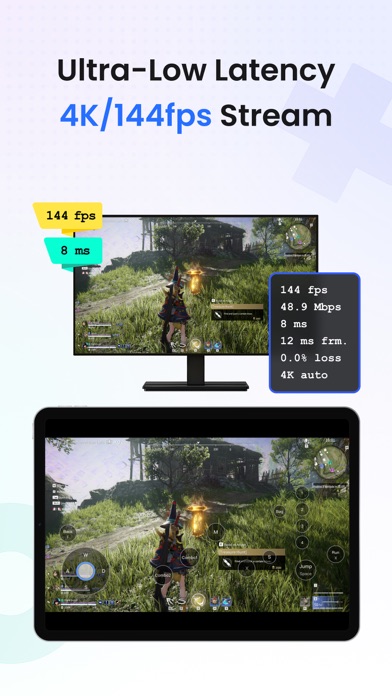
Enjoy ultra-low latency with high-speed direct connections for a smooth, local-like experience. Stream up to 4K at 144 FPS, with full support for mouse & keyboard, game controllers, and multi-touch gestures—ideal for gaming and productivity.
Key Features
- Remote Gaming: Play PC games on your mobile device in stunning 4K 144 FPS with minimal lag. Hundreds of customizable keyboard mappings and plug-and-play gamepad support.
- Remote Work: Wake your PC remotely, control multiple screens, transfer files without limits (any size or format), and work in true-color HDR/4:4:4 mode—perfect for design, CAD, Photoshop, Microsoft Office, WPS, and more.
- PC & Mac Host Support: Use your PC or Mac as a host machine—access and control your computer remotely from any device, anytime, anywhere.
- Seamless cross-platform access anytime, anywhere.
Why StarDesk Stands Out
- Millisecond-level responsiveness for fluid control
- Multi-screen management with quick switching
- Unlimited high-speed file transfers
- HDR and true-color support for precise visuals
- Full PC and Mac host support for remote access
About Accessibility Service Usage
To ensure smooth external keyboard operation (e.g., Bluetooth keyboards), this app uses Android's AccessibilityService API. It captures input events to prevent system interference and accurately transmit keystrokes to your remote PC.
We only collect temporary input data during active remote sessions—no storage or sharing of personal information. You can disable this feature anytime in system settings. For details, see our Privacy Policy.
We Value Your Privacy
All data transmission is encrypted end-to-end. Learn more at www.stardesk.net/license/privacy-policy.
Safety and technology
Found in the app by AppBrain- Price
- Free
- App size
- 62.4 MB
- Content rating
- Everyone
Technologies used by StarDesk - Remote Desktop
Releases
Updates seen on the App Store- Version
- 1.5.6
- Launched
- September 2025
No changelog data
Alternatives
Similar apps and more from GearUP Portal PTE. LTD.Alternatives to StarDesk - Remote Desktop







More from GearUP Portal PTE. LTD.


Also available on Google Play

Rankings
App Store top chartsApp Store Rankings for StarDesk - Remote Desktop
About the app and developer
About StarDesk - Remote Desktop
StarDesk - Remote Desktop is an utilities app developed by GearUP Portal PTE. LTD.
What is the rating of StarDesk - Remote Desktop?
StarDesk - Remote Desktop is rated 4.85 out of 5 stars, based on 190 ratings.
Is StarDesk - Remote Desktop free?
StarDesk - Remote Desktop is free. The app size is 62.42 MB. The latest version available is 1.5.6. The last update was on October 8, 2026.
What are the requirements for StarDesk - Remote Desktop?
The app has a content rating of Everyone. The app has been available on the App Store since September 2025.
Developer information for GearUP Portal PTE. LTD.
Address:
Frequently asked questions about StarDesk - Remote Desktop
Is StarDesk - Remote Desktop free?
Yes. StarDesk - Remote Desktop is free on the App Store.
Is StarDesk - Remote Desktop still available?
Yes. StarDesk - Remote Desktop is on the App Store, and the last update we saw was on October 8, 2026.
How large is StarDesk - Remote Desktop?
StarDesk - Remote Desktop is 62.42 MB.
Is StarDesk - Remote Desktop suitable for children?
App Store rates the content of StarDesk - Remote Desktop as suitable for everyone.
How do people rate StarDesk - Remote Desktop?
StarDesk - Remote Desktop scores 4.85 out of 5 stars, from 193 ratings on the App Store.
Who made StarDesk - Remote Desktop?
StarDesk - Remote Desktop was developed by GearUP Portal PTE. LTD. It is listed in the utilities category on the App Store.
What are the best alternatives to StarDesk - Remote Desktop?
People looking at StarDesk - Remote Desktop also look at these utilities apps: TuTuMirror, Digi-Past Kameiros, Concert Memories 2: Countdown, Vittoria Buzz, Luna AI: Girl Chat & Calls.