


AppBrain's verdict
- Rating on App Store
- 5.00
- 1 ratings
- Last updated
- November 10, 2026
- Size
- 2.81 MB
It doesn't have enough ratings yet to judge what users think.
User feedback
Ratings and reviews on the App StoreComments on Starlapse for iOS
We don't have enough comments to show example comments. Please check back later.
Store listing
By Rustam SALAVATOV, from the App StoreDescription by Rustam SALAVATOV Written by the developer, not by AppBrain. Click to read.
Starlapse locks the camera and keeps it locked. ISO, shutter, focus, white balance — set them once and they stay there for the whole session. No creeping exposure, no autofocus hunting in the dark and landing on nothing, no auto white balance turning the sky orange under a streetlight.
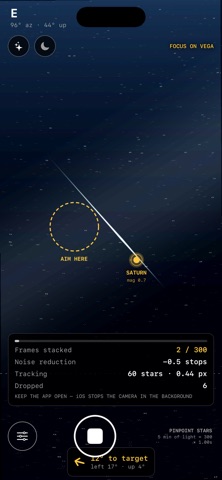
Then it does the thing the hardware cannot do alone. An iPhone sensor caps a single frame at about one second, so exposures longer than that are built by stacking hundreds of frames. That is not a workaround — it is better. Noise falls as the square root of the frame count, and the same night's light can be developed as pinpoint stars or as star trails afterwards, because nothing is thrown away.
WHAT IT DOES
• Manual camera that holds — ISO, frame exposure, focus, white balance, lens choice
• Autofocus on starlight — steps the lens and measures star size, the way observatories focus
• Self-timer, 3 or 10 seconds, so touching the phone does not shake the first frames
• Stacking from 10 seconds to a full hour of collected light
• Pinpoint stars — frames aligned on the stars themselves, so they stay points
• Star trails — the sky's rotation drawn as arcs, ground kept sharp
• Night time-lapse where every frame of the video is its own stack
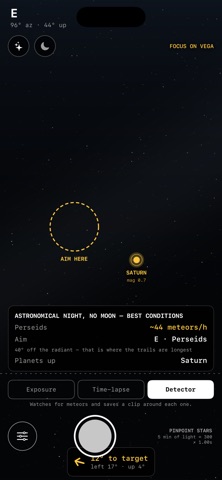
• Meteor detector — watches the sky and saves a short clip around anything that crosses it
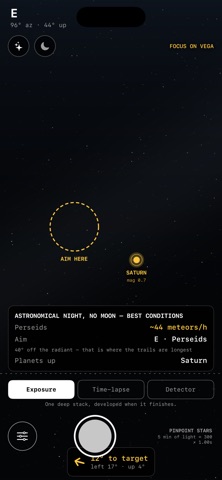
• Aiming overlay showing planets, bright stars and the Moon — tap any of them for its name, constellation and brightness
WHERE TO POINT
Most apps show you where a shower's radiant is. Starlapse tells you where to aim, which is not the same place: meteors streak away from the radiant, so the longest trails appear 40° off to the side. It works that out from your location and the time, keeps you clear of the Moon, and picks a height a tripod can actually hold.
FOCUS, WHICH IS THE HARD PART
Autofocus cannot see a night sky — there is no contrast to hunt on — and the infinity mark is not exactly infinity: it is a mechanical end stop, and the sharp point sits slightly inside it, at a place that differs between lenses and drifts as the phone cools. Starlapse steps the lens across its range, measures how large the stars come out at each position, and settles on the smallest. It takes about a minute.
DEVELOP AFTERWARDS
The stack is kept as accumulated light, not as a finished picture. When the exposure ends you can move the curve (stretch, black point, exposure, saturation) and it re-develops from the original data. Same latitude a RAW file gives you.
The curve is asinh, the one professional astronomical imaging uses. It lifts the faint Milky Way out of the noise while bright stars keep their cores and their colour instead of clipping to white discs.
HONEST LIMITS
• Aperture is fixed on iPhone. It is a property of the lens, not a setting. The app shows the f-number and what each lens gives up, and lets you choose — that is all any app can do here.
• A single frame is about one second. Everything longer is stacked, and the interface always shows the arithmetic: "10 min of light = 600 × 1.00s".
• Capture cannot run in the background. iOS stops the camera when an app leaves the screen. Starlapse keeps the screen on and dims it instead.
• You need a tripod. An hour of stacking on a handheld phone is an hour of nothing.
PRIVACY
No account. Location and motion are used on the device to work out where to aim. What leaves the phone: the optional purchase below, to Apple; a usage counter you can switch off; and, only if you say yes, sky readings and photos for a light-pollution dataset (location to ~10 km, deletable in Settings). Source: github.com/fortunto2/starlapse.
STARLAPSE PRO
Everything above is free and stays free. Pro is the sky's events, bought once: tonight's showers with their rates, the aim target 40° off the radiant and clear of the Moon, and peak nights. Comets, eclipses and dark frames join Pro at no further cost.
Safety and technology
Found in the app by AppBrain- Price
- Free
- App size
- 2.81 MB
- Content rating
- Everyone
Technologies used by Starlapse
Releases
Updates seen on the App Store- Version
- 1.2.1
- Launched
- August 2026
No changelog data
Alternatives
Similar apps and more from Rustam SALAVATOVAlternatives to Starlapse


More from Rustam SALAVATOV


Rankings
App Store top chartsApp Store Rankings for Starlapse
About the app and developer
About Starlapse
Starlapse is a photo & video app developed by Rustam SALAVATOV.
User Ratings
Starlapse is rated 5.00 out of 5 stars. The rating is based on one rating ratings.
App Information
Starlapse is freely available from the App Store. The app size is 2.81 MB. The latest version available is 1.2.1. The last update was on November 10, 2026.
Technical Requirements
The app has a content rating of Everyone. The app has been available on the App Store since August 2026.
Starlapse is made and published by Rustam SALAVATOV. AppBrain is an independent app data site and isn't affiliated with Rustam SALAVATOV. The app name, icon, screenshots and description belong to Rustam SALAVATOV and are shown as published on the App Store.
Developer information for Rustam SALAVATOV
Address: