
Starry waltz is made and published by Iulai Baichurin. AppBrain is an independent app data site and isn't affiliated with Iulai Baichurin. The app name, icon, screenshots and description belong to Iulai Baichurin and are shown as published on the App Store.
AppBrain's verdict
- Last updated
- February 13, 2024
Competitors
Similar apps and more from Iulai BaichurinMore from Iulai Baichurin







Releases
Updates seen on the App Store- Version
- 1.0
- Launched
- February 2024
No changelog data
User feedback
Ratings and reviews on the App StoreComments on Starry waltz for iOS
We don't have enough comments to show example comments. Please check back later.
Technology
Found in the app by AppBrain- Price
- Free
- App size
- 2.74 MB
- Content rating
- Everyone
Technologies used by Starry waltz
About the app and developer
About Starry waltz
Starry waltz was a games app developed by Iulai Baichurin. It was removed from the App Store Mar 8, 2026.
User Ratings
The app had no ratings.
App Information
Starry waltz was free. The app size was 2.74 MB. The last available version was 1.0. The last update was on February 13, 2024.
Technical Requirements
The app had a content rating of Everyone. The app had been available on the App Store since February 2024.
Developer information for Iulai Baichurin
Address:
Store listing
By Iulai Baichurin, from the App StoreSimilar apps




Description by Iulai Baichurin Written by the developer, not by AppBrain. Click to read.
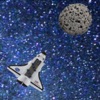
After starting the game, you will see a rotating spaceship in the center of the screen. After some time, asteroids will begin to appear.
To change the speed of the spaceship, briefly touch an empty area of the screen at those moments when the nose of the spaceship is pointed in the direction in which you want to accelerate it. The longer you touch the screen, the more momentum the spaceship will receive. Keep in mind that this momentum will be added vectorially to the existing momentum.
For each asteroid caught, one point is awarded. For each missed asteroid, one point is deducted. The total number of points is shown at the top center of the screen.
If the spaceship flies off the screen and you are unable to return it to the screen, press the left button to restart the game. If you don't do this, the game will restart automatically after the spaceship moves a long distance away.
Set the speed of rotation of the spacecraft that is convenient for you by successively pressing the second button from the left.
The right button pauses the game and opens a menu that allows you to turn sounds on or off and set the speed of asteroids. You can set the speed of the asteroids to zero if you want to practice controlling the spaceship.