AppBrain
AppBrain
  • Apps
  • Apps being viewed right now Trending apps today Most popular apps All-time most installed apps Top rated apps iPhone and iPad apps
  • Intelligence ▾
    Intelligence overview → Track any Android app or your whole market
    Track & analyze
    Keyword Tracker & OptimizerTrack & improve Play rankings App Performance ReportOne-off PDF for any app StatisticsFree Android & Play market stats
    Promote your app
    Featured Apps App Links
  • Intelligence
  • Pricing
  • Dashboard
  • Sign up
  • Log in
App Store Apps > Music > Staventabs Pro: Music Notation
App profile & analytics · Music · Data updated 2026-10-15
Staventabs Pro: Music Notation icon

Staventabs Pro: Music Notation

by Ivan Korovin · Free · Version 6.8
Availability On the App Store since May 2016 ↗
Rating on App Store
–
Rating
–
0 reviews
Best rank
–
not in the top lists
Last updated
October 8, 2026
6.8

Staventabs Pro: Music Notation is made and published by Ivan Korovin. AppBrain is an independent app data site and isn't affiliated with Ivan Korovin. The app name, icon, screenshots and description belong to Ivan Korovin and are shown as published on the App Store.

About Staventabs Pro: Music Notation

Staventabs Pro: Music Notation is a music app developed by Ivan Korovin.

User Ratings

The app has no ratings yet.

App Information

Staventabs Pro: Music Notation is freely available from the App Store. The app size is 81.56 MB. The latest version available is 6.8. The last update was on October 8, 2026.

Technical Requirements

The app has a content rating of Everyone. The app has been available on the App Store since May 2016.

Description by Ivan Korovin (from the App Store)
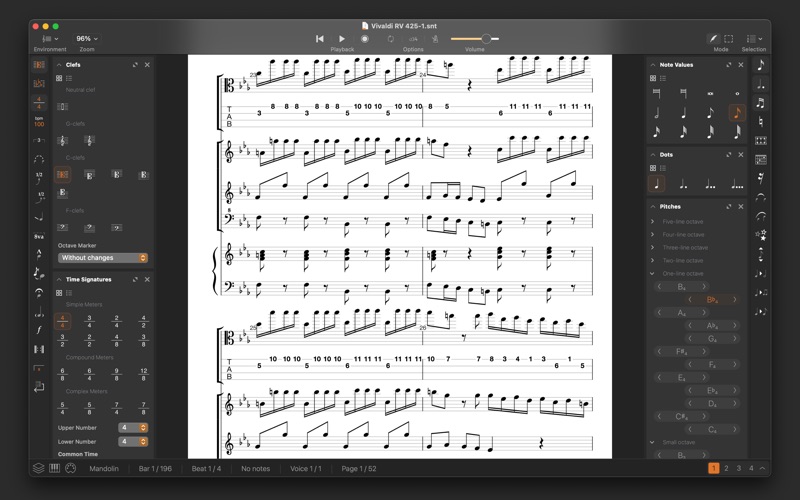
Staventabs Pro is a notation and tablature editor for your Mac. Simple interface, fast opening of files, smart and convenient tools let you feel the atmosphere of the majestic classical scores, dynamic rock ballads or good old jazz. Support of the main musical formats such as MIDI and MusicXML allows you to easily listen and practice your songs and compositions created earlier.

Begin creating music
• Start your new score from the scratch or with one of the two dozen templates
• Get inspired by famous composers in the Library
• Listen sounding and choose instruments for your parts from the list with more than 150 items (keyboards, guitars, strings, drums, percussions, etc.)
• Connect your MIDI devices to Staventabs Pro

Edit scores with Smart Contextual Musical Panels
• Enter notes with intuitive instrument-independent interface, Virtual Piano Keyboard or computer keyboard
• Explore and edit your score with sophisticated Piano Roll and Drums Editor
• Modify notes with dots, tuplets and ties
• Customize clefs, key signatures and time signatures for bars
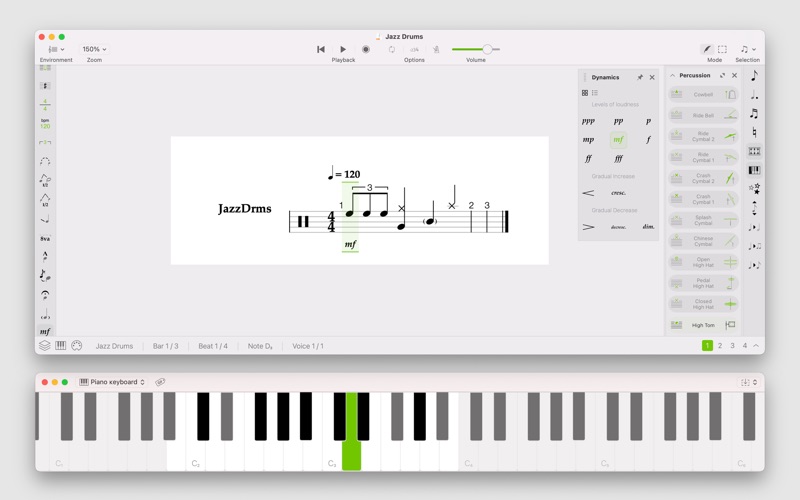
• Change dynamics
• Switch between enharmonic equivalents of the notes
• Use customizable voices
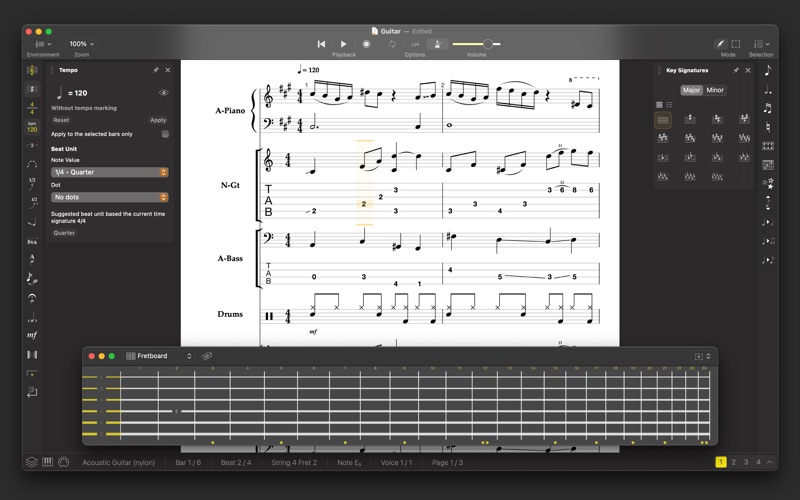
• Edit tabs with Virtual Fingerboard
• Setup tunings with the large value of presets
• Use Scientific or Helmholtz pitch notation when entering notes
• Edit tabs with keyboard
• Diminish, augment and subdivide note values
• Transpose pitches by semitones
• Make your music alive with lyrics
• Input notes by Staff Positions

Manage compositions
• Navigate around the score with Tracks board
• Set the visibility for instrument parts in the score
• Select and customize horizontal, vertical or page layout for your score
• Find out information about the selected elements in the Status Panel at the bottom
• Save changes to SNT file for free
• Edit title and information about creators

Practice your songs
• Play the whole composition or selected fragment
• Customize metronome clicking and countdown
• Loop the playback of the desired part
• Look at the keys on the virtual Piano keyboard

Improve compositions
• Detect non-playable objects with red highlighting
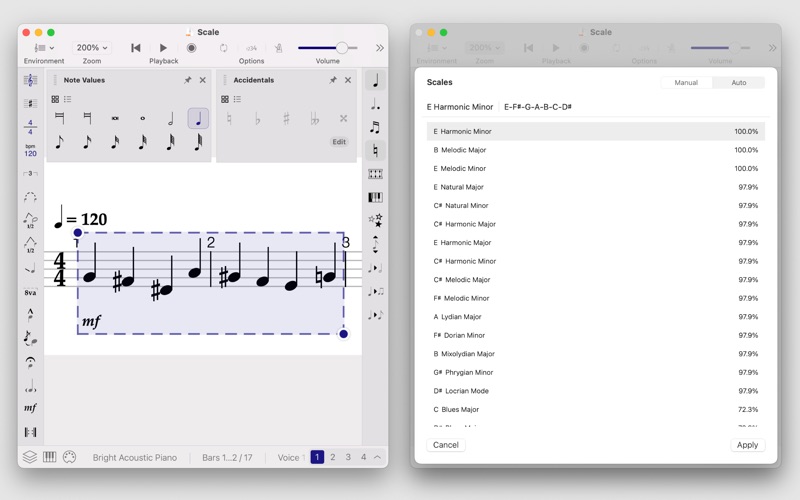
• Use the "Starred scales" AI to determine the chromatic scales most similar to the selected area
• Adjust the semitones of the selected area notes to the chromatic scale
• Customize the chromatic scale for adjustment

Work with different formats:
• snt - Staventabs project
• xml - MusicXML
• mxl - Compressed MusicXML
• midi - MIDI
• kar - Karaoke files
• gp, gpx, gp5 - Guitar Pro files

One-time in-app purchase called "Lifetime License" supports Family Sharing and removes all restrictions of the free mode.
Show more Show less

Screenshots

Staventabs Pro: Music Notation Screenshot 1 of 8
Staventabs Pro: Music Notation Screenshot 2 of 8
Staventabs Pro: Music Notation Screenshot 3 of 8
Staventabs Pro: Music Notation Screenshot 4 of 8
Staventabs Pro: Music Notation Screenshot 5 of 8
Staventabs Pro: Music Notation Screenshot 6 of 8
Staventabs Pro: Music Notation Screenshot 7 of 8
Staventabs Pro: Music Notation Screenshot 8 of 8
Screenshots by Ivan Korovin, from the the App Store listing
Official page on the App Store

More from Ivan Korovin

Staventabs: Compose & Notate icon Staventabs: Compose & Notate
Ivan Korovin
3.8
Free
70 ratings
Massage Maps • Reflexology icon Massage Maps • Reflexology
Ivan Korovin
3.5
Free
13 ratings
Chords by Staventabs icon Chords by Staventabs
Ivan Korovin
4.0
Free
4 ratings
Intervals by Staventabs icon Intervals by Staventabs
Ivan Korovin
0.0
Free
Massage Maps • Reflexology icon Massage Maps • Reflexology
Ivan Korovin
0.0
Free

Changelog of Staventabs Pro: Music Notation

No changelog data

Developer information for Ivan Korovin

Ivan Korovin

Address:

Share Staventabs Pro: Music Notation

Comments on Staventabs Pro: Music Notation for iOS

We don't have enough comments to show example comments. Please check back later.

App Store Rankings for Staventabs Pro: Music Notation

This app is not ranked

Technologies used by Staventabs Pro: Music Notation

Today's trending apps Price drops on Google Play Top new apps Apps other people are watching Popular Music Apps
More hot apps 🔥
Overview Reviews Rankings Technology
AppBrain Intelligence premium content

Subscribe now to get full and unlimited access to AppBrain Intelligence. You'll have access to:

  • App Intelligence dashboard (performance timeline, competitor comparison, country rankings, insight cards)
  • Detailed ranking data per app
  • Full timeline per developer
  • Device market shares data per country
  • Unlimited keyword tracking
1 Month

$75/mo
(billed every month)

SAVE 0%
Subscribe
3 Months

$65/mo
($195 billed every 3 months)

SAVE 13%
Subscribe
1 Year

$57.50/mo
($690 billed every year)

SAVE 23%
Subscribe
Each subscription will automatically renew 3 days before the expiration date for the same time period. Subscriptions can be cancelled at any time before the renewal.

AppBrain is an app data site, we track rankings, ratings, installs for all apps and games on Google Play and the App Store. AppBrain doesn't host app files or APKs, all install links go directly to the official store. All trademarks are owned by their respective owners. As an Amazon Associate AppBrain earns from qualifying purchases.

More apps

  • Top Android apps being viewed
  • Dream Tales for Android
  • View Pulsar Chess Engine
  • View Video to MP3 Converter

App statistics

  • Android statistics
  • Google Play Developer stats
  • Trending Android Apps
  • Trending iOS apps
  • Top popular Apps
  • Buy the best Android phone
  • Buy & sell app businesses

About AppBrain

  • Contact
  • Privacy
  • Documentation
  • DMCA takedowns
  • Articles
  • Blog
  • Android App Marketing: Learn how to better market your Android app
© 2010-2026 - AppBrain