AppBrain
AppBrain
  • Apps
  • Apps being viewed right now Trending apps today Most popular apps All-time most installed apps Top rated apps iPhone and iPad apps
  • Intelligence ▾
    Intelligence overview → Track any Android app or your whole market
    Track & analyze
    Keyword Tracker & OptimizerTrack & improve Play rankings App Performance ReportOne-off PDF for any app StatisticsFree Android & Play market stats
    Promote your app
    Featured Apps App Links
  • Intelligence
  • Pricing
  • Dashboard
  • Sign up
  • Log in
App Store Apps > Productivity > SteadyMemo: Calendar Notes
App profile & analytics · Productivity · Data updated 2026-10-07
SteadyMemo: Calendar Notes icon

SteadyMemo: Calendar Notes

by Yeongsang Kim · Free · Version 1.1.0
Availability On the App Store since September 2026 ↗
Rating on App Store
–
Rating
–
0 reviews
Best rank
–
not in the top lists
Last updated
September 14, 2026
1.1.0

SteadyMemo: Calendar Notes is made and published by Yeongsang Kim. AppBrain is an independent app data site and isn't affiliated with Yeongsang Kim. The app name, icon, screenshots and description belong to Yeongsang Kim and are shown as published on the App Store.

About SteadyMemo: Calendar Notes

SteadyMemo: Calendar Notes is a productivity app developed by Yeongsang Kim.

What is the rating of SteadyMemo: Calendar Notes?

SteadyMemo: Calendar Notes has no ratings yet.

Is SteadyMemo: Calendar Notes free?

SteadyMemo: Calendar Notes is free. The app size is 33.35 MB. The latest version available is 1.1.0. The last update was on September 14, 2026.

What are the requirements for SteadyMemo: Calendar Notes?

The app has a content rating of Everyone. The app has been available on the App Store since September 2026.

Description by Yeongsang Kim (from the App Store)
Organize plans, ideas, and everyday records by date.

SteadyMemo is an app for writing and organizing memos by date. Choose a day on the calendar, add a memo, and find it easily whenever you need it.

Pin important memos or use colors to tell them apart, and move finished records to the Archive. Set a reminder for a memo you need to remember, then return to it at the right time.

[What you can do with SteadyMemo]

- Keep memos by date and see each day's plans and records at a glance
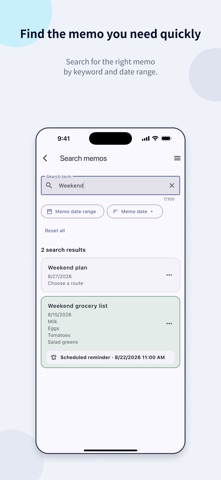
- Find the memo you want quickly using the calendar or search
- Pin important memos, organize them with colors, and archive finished records
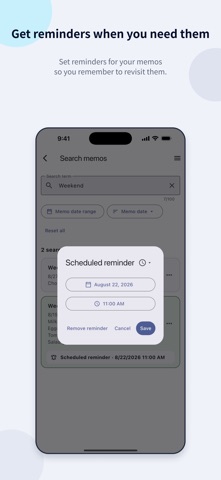
- Use scheduled reminders to revisit memos when they matter
- Start writing memos without creating an account

[Key features]

1. Calendar memos
- Create and edit memos by date from the monthly calendar
- See which dates have memos and how many are saved for each date

2. Search and organize
- Search titles and content
- Narrow results to a date range and sort by memo date or date added
- Pin memos, assign colors, and change their order within each date
- Move finished memos to the Archive and restore them when needed
- Restore deleted memos from Trash for 30 days or delete them permanently

3. Scheduled reminders
- Choose a date and time to set a reminder for a memo
- Set a reminder for each memo, with either one notification or up to 3 additional notifications at your chosen interval until confirmed
- Use reminders for schedules, appointments, and tasks you do not want to miss

4. Backup and restore
- With automatic backups enabled, all memos are backed up to iCloud Drive when you open the app, at most once a day
- Create a backup file manually whenever you need one
- Load a saved backup file to restore memos

5. App theme
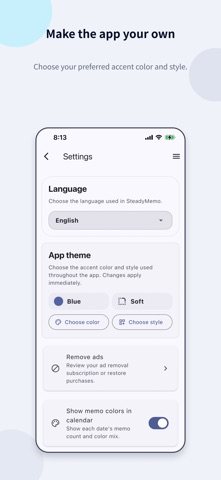
- Choose a theme color to suit your taste
- Choose from Default, Soft, and Flat styles

[Data and permissions]

Memo content is stored on your device. You can write, search, and organize memos without creating an account or connecting to the internet.

Automatic backups require iCloud Drive. Backup files are saved in the SteadyMemo/Backups folder in iCloud Drive. Saving a backup does not automatically restore memos in the app on another device.

You can restore memos by loading a backup file saved automatically or manually. The app does not add its own encryption to backup files, so keep them in a secure location that other people cannot access. Reminder settings are included, but only reminders scheduled for a future time are restored.

Scheduled reminders require notification permission on your iPhone.

Terms of Use (EULA): https://www.apple.com/legal/internet-services/itunes/dev/stdeula/

Privacy Policy: https://steadyseller.com/home/en/privacy-policy
Show more Show less

Screenshots

SteadyMemo: Calendar Notes Screenshot 1 of 7
SteadyMemo: Calendar Notes Screenshot 2 of 7
SteadyMemo: Calendar Notes Screenshot 3 of 7
SteadyMemo: Calendar Notes Screenshot 4 of 7
SteadyMemo: Calendar Notes Screenshot 5 of 7
SteadyMemo: Calendar Notes Screenshot 6 of 7
SteadyMemo: Calendar Notes Screenshot 7 of 7
Screenshots by Yeongsang Kim, from the the App Store listing
Official page on the App Store

Alternatives to SteadyMemo: Calendar Notes

ilo: All Your Work, One Place icon ilo: All Your Work, One Place
Sanglyn Lee
0.0
Free
Cuco Calendar & Tasks icon Cuco Calendar & Tasks
SERINUS TECNOLOGIA LTDA
0.0
Free
모멘톡 Momentalk icon 모멘톡 Momentalk
Hyeji Kim
0.0
Free
JH FamilySync icon JH FamilySync
Jermain Huber
0.0
Free
ScheduleMate icon ScheduleMate
Seongjae Yu
0.0
Free
Fluso icon Fluso
Vulpem
5.0
Free
2 ratings
DoTracker : To Do List Tracker icon DoTracker : To Do List Tracker
sekleung chang
0.0
$0.99
Calda - Journal Calendar icon Calda - Journal Calendar
SEUNGAH JO
0.0
Free

More from Yeongsang Kim

SteadyMap: All-in-One Map icon SteadyMap: All-in-One Map
Yeongsang Kim
0.0
Free
VTimer: Custom Interval Timer icon VTimer: Custom Interval Timer
Yeongsang Kim
0.0
Free

Changelog of SteadyMemo: Calendar Notes

No changelog data

Developer information for Yeongsang Kim

Yeongsang Kim

Address:

Share SteadyMemo: Calendar Notes

Comments on SteadyMemo: Calendar Notes for iOS

We don't have enough comments to show example comments. Please check back later.

App Store Rankings for SteadyMemo: Calendar Notes

This app is not ranked

Technologies used by SteadyMemo: Calendar Notes

Apps other people are watching Price drops on Google Play Today's trending apps Top new apps Popular Productivity Apps
ilo: All Your Work, One Place icon ilo: All Your Work, One Place
Cuco Calendar & Tasks icon Cuco Calendar & Tasks
모멘톡 Momentalk icon 모멘톡 Momentalk
JH FamilySync icon JH FamilySync
ScheduleMate icon ScheduleMate
Fluso icon Fluso
DoTracker : To Do List Tracker icon DoTracker : To Do List Tracker
Calda - Journal Calendar icon Calda - Journal Calendar
Overview Alternatives Reviews Rankings Technology
AppBrain Intelligence premium content

Subscribe now to get full and unlimited access to AppBrain Intelligence. You'll have access to:

  • App Intelligence dashboard (performance timeline, competitor comparison, country rankings, insight cards)
  • Detailed ranking data per app
  • Full timeline per developer
  • Device market shares data per country
  • Unlimited keyword tracking
1 Month

$75/mo
(billed every month)

SAVE 0%
Subscribe
3 Months

$65/mo
($195 billed every 3 months)

SAVE 13%
Subscribe
1 Year

$57.50/mo
($690 billed every year)

SAVE 23%
Subscribe
Each subscription will automatically renew 3 days before the expiration date for the same time period. Subscriptions can be cancelled at any time before the renewal.

AppBrain is an app data site, we track rankings, ratings, installs for all apps and games on Google Play and the App Store. AppBrain doesn't host app files or APKs, all install links go directly to the official store. All trademarks are owned by their respective owners.

More apps

  • Top Android apps being viewed
  • Hot Wheels Unlimited for Android
  • View First Tech Federal CU
  • View HeeSay: LGBTQ+ Community

App statistics

  • Android statistics
  • Google Play Developer stats
  • Trending Android Apps
  • Trending iOS apps
  • Top popular Apps
  • Buy the best Android phone
  • Buy & sell app businesses

About AppBrain

  • Contact
  • Privacy
  • Documentation
  • DMCA takedowns
  • Articles
  • Blog
  • Tips to improve your Android promotional campaign
© 2010-2026 - AppBrain