

Stemix: Vocal Remover
Stemix: Vocal Remover is made and published by Mateus Polonini Cardoso. AppBrain is an independent app data site and isn't affiliated with Mateus Polonini Cardoso. The app name, icon, screenshots and description belong to Mateus Polonini Cardoso and are shown as published on the App Store.
AppBrain's verdict
- Last updated
- October 20, 2026
- Size
- 292.5 MB
User feedback
Ratings and reviews on the App StoreComments on Stemix: Vocal Remover for iOS
We don't have enough comments to show example comments. Please check back later.
Store listing
By Mateus Polonini Cardoso, from the App Store




Description by Mateus Polonini Cardoso Written by the developer, not by AppBrain. Click to read.
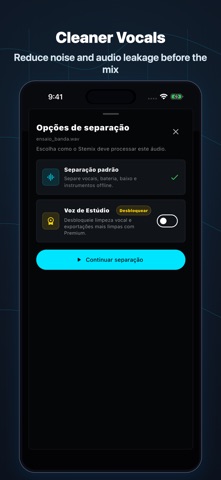
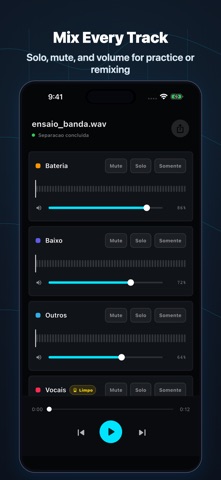
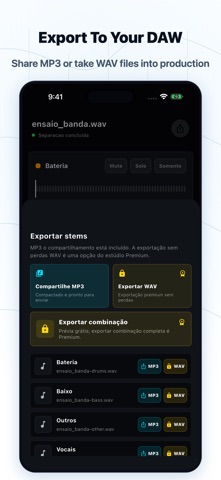
Import a track or capture an idea, run offline stem extraction, then review the separated parts in a simple mixer. Adjust levels, mute or solo stems, and export results for private practice, study, remix sketches, and production prep.
Key features:
- Offline stem separation workflow
- Import and recording entry points
- Mixer controls for separated stems
- Local processing and export preferences
- Private audio workflow without cloud upload requirements
Important: results depend on source audio quality, device performance, and the selected processing model. Respect copyright and use only audio you own, control, or have permission to process.
Terms of Use (EULA): https://www.apple.com/legal/internet-services/itunes/dev/stdeula/
Safety and technology
Found in the app by AppBrain- Price
- Free
- App size
- 292.5 MB
- Content rating
- Everyone
Technologies used by Stemix: Vocal Remover
Releases
Updates seen on the App Store- Version
- 1.0.8
- Launched
- July 2026
No changelog data
Alternatives
Similar apps and more from Mateus Polonini CardosoAlternatives to Stemix: Vocal Remover


More from Mateus Polonini Cardoso


Also available on Google Play

Rankings
App Store top chartsApp Store Rankings for Stemix: Vocal Remover
About the app and developer
About Stemix: Vocal Remover
Stemix: Vocal Remover is a music app developed by Mateus Polonini Cardoso.
User Ratings
The app has no ratings yet.
App Information
Stemix: Vocal Remover is freely available from the App Store. The app size is 292.50 MB. The latest version available is 1.0.8. The last update was on October 20, 2026.
Technical Requirements
The app has a content rating of Everyone. The app has been available on the App Store since July 2026.
Developer information for Mateus Polonini Cardoso
Address:
Frequently asked questions about Stemix: Vocal Remover
Is Stemix: Vocal Remover free?
Yes. Stemix: Vocal Remover is free on the App Store.
Is Stemix: Vocal Remover still available?
Yes. Stemix: Vocal Remover is on the App Store, and the last update we saw was on October 20, 2026.
How large is Stemix: Vocal Remover?
Stemix: Vocal Remover is 292.50 MB.
Is Stemix: Vocal Remover suitable for children?
App Store rates the content of Stemix: Vocal Remover as suitable for everyone.
Who made Stemix: Vocal Remover?
Stemix: Vocal Remover was developed by Mateus Polonini Cardoso. It is listed in the music category on the App Store.
What are the best alternatives to Stemix: Vocal Remover?
People looking at Stemix: Vocal Remover also look at these music apps: Stem Splitter - Vocal Remover, Vocal Remover · Isolate Vocals, Vocal Remover: AI Splitter, AI Vocal Remover-Stem Splitter, iSolo: Vocal & Music Remover.