AppBrain
AppBrain
  • Apps
  • Apps being viewed right now Trending apps today Most popular apps All-time most installed apps Top rated apps iPhone and iPad apps
  • Intelligence ▾
    Intelligence overview → Track any Android app or your whole market
    Track & analyze
    Keyword Tracker & OptimizerTrack & improve Play rankings App Performance ReportOne-off PDF for any app StatisticsFree Android & Play market stats
    Promote your app
    Featured Apps App Links
  • Intelligence
  • Pricing
  • Dashboard
  • Sign up
  • Log in
App Store Apps > Health & Fitness > Stepwell: Walking Step Counter
App profile & analytics · Health & Fitness · Data updated 2026-10-20
Stepwell: Walking Step Counter icon

Stepwell: Walking Step Counter

by Ngoc Mai Nguyen · Free · Version 1.0.3
Availability On the App Store since July 2026 ↗
Rating on App Store
–
Rating
–
0 reviews
Best rank
–
not in the top lists
Last updated
August 31, 2026
1.0.3

Stepwell: Walking Step Counter is made and published by Ngoc Mai Nguyen. AppBrain is an independent app data site and isn't affiliated with Ngoc Mai Nguyen. The app name, icon, screenshots and description belong to Ngoc Mai Nguyen and are shown as published on the App Store.

About Stepwell: Walking Step Counter

Stepwell: Walking Step Counter is a health & fitness app developed by Ngoc Mai Nguyen.

User Ratings

The app has no ratings yet.

App Information

Stepwell: Walking Step Counter is freely available from the App Store. The app size is 51.35 MB. The latest version available is 1.0.3. The last update was on August 31, 2026.

Technical Requirements

The app has a content rating of Everyone. The app has been available on the App Store since July 2026.

Description by Ngoc Mai Nguyen (from the App Store)
Stepwell is a step counter and pedometer for iPhone that turns everyday walking into a habit you can see. It reads your steps straight from Apple Health, then breaks the day into calories, distance, active minutes and a streak you will not want to break. There is no account and no sign-in — open the app and your walking is already counted.

STEP COUNTER AND PEDOMETER
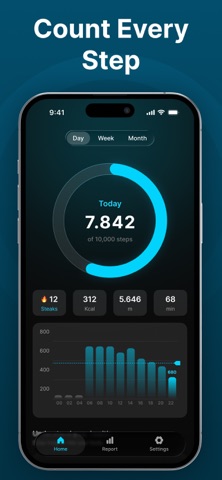
Your daily steps sit in the middle of the home screen as a progress ring that fills as you walk. Stepwell reads the step count Apple Health already records, so the pedometer keeps working whether the iPhone rides in a pocket or a bag, and steps your Apple Watch writes to Apple Health are counted too.

HOURLY, WEEKLY AND MONTHLY CHARTS
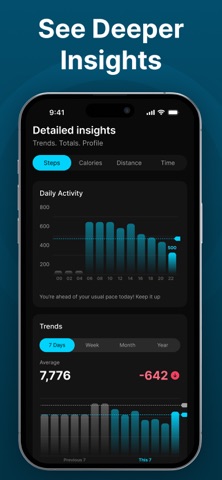
See which hours you actually move in with an hour-by-hour bar chart, compare the last seven days side by side, and open the month calendar to spot the weeks where walking slipped. The walking tracker history stays there to look back on.

STREAKS AND DAILY GOALS
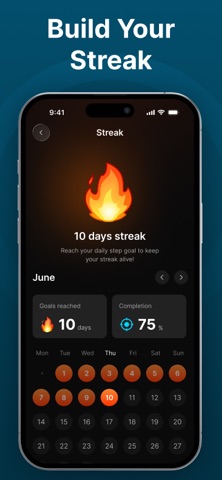
Set a daily step goal that fits your life, then keep the streak alive. Stepwell counts every consecutive day you reach the goal and shows the run on the home screen and in your report.

WALKING REPORT
The report screen collects your averages, your record day, your all-time totals and the trend across steps, calories, distance and walking time — the numbers a step tracker should give you without being asked.

CALORIE COUNTER AND DISTANCE
Every walk is turned into calories burned, distance covered and minutes on your feet, using the height and weight you enter, so the calorie counter reflects your body rather than an average one.

WEIGHT TRACKER
Log your weight, watch the chart move and scroll back through the full history. The weight tracker sits next to your walking data, so you can see what daily steps do to the line over weeks and months.

BMI CALCULATOR
Enter your height and weight and Stepwell returns your BMI and the range it falls in, for men and women. The BMI calculator is built in, so there is no second app to open.

HOME SCREEN WIDGET
Put your step count on the iPhone home screen. The widget shows today's steps and goal progress at a glance, so you can check the pedometer without opening the app.

PRIVACY
Stepwell has no account and asks for no sign-in. Your steps, weight and body measurements stay on your iPhone and in Apple Health, where you decide what is shared.

BATTERY FRIENDLY
Stepwell does not run GPS to count steps. It reads the motion data Apple Health already collects, so a walking tracker running all day costs almost nothing in battery.

APPLE HEALTH
Steps, weight and body measurements sync with Apple Health, so the step counter sits alongside the rest of your health and fitness apps instead of replacing them.

UNITS AND LANGUAGES
Switch between metric and imperial units, and use Stepwell in 10 languages including English, Spanish, Portuguese, French, Russian, Arabic, Hindi, Bengali, Chinese and Vietnamese.

WHAT STEPWELL INCLUDES
- Step counter with a daily goal ring and live progress
- Pedometer readings from Apple Health, with no GPS drain
- Walking tracker with hourly, weekly and monthly charts
- Calorie counter, distance and active minutes for every day
- Streaks that count each day you reach your step goal
- Weight tracker with full history, plus a BMI calculator
- Home screen widget showing today's steps and goal

IMPORTANT NOTE
Step, calorie and distance figures are estimates produced by the motion sensors in your iPhone and the data stored in Apple Health. Accuracy depends on where you carry the phone and how you walk, so treat the numbers as a guide rather than a measurement. Stepwell needs permission to read steps from Apple Health: if the count stays at zero, open Settings, then Health, then Data Access & Devices, and allow Stepwell to read Steps. Stepwell is not a medical device. It does not diagnose, treat or prevent any condition. Speak to a doctor before changing your activity level or your weight.
Show more Show less

Screenshots

Stepwell: Walking Step Counter Screenshot 1 of 6
Stepwell: Walking Step Counter Screenshot 2 of 6
Stepwell: Walking Step Counter Screenshot 3 of 6
Stepwell: Walking Step Counter Screenshot 4 of 6
Stepwell: Walking Step Counter Screenshot 5 of 6
Stepwell: Walking Step Counter Screenshot 6 of 6
Screenshots by Ngoc Mai Nguyen, from the the App Store listing
Official page on the App Store

Alternatives to Stepwell: Walking Step Counter

Step Counter - Daily Pedometer icon Step Counter - Daily Pedometer
Thao Dang
4.4
Free
105 ratings
Step Diary: Daily Pedometer icon Step Diary: Daily Pedometer
Quynh Trang Pham Doan
0.0
Free
Walk Log – Pedometer Counter icon Walk Log – Pedometer Counter
Cuong Kieu Van
4.3
Free
146 ratings
MoveClover: Step, Move & Gain icon MoveClover: Step, Move & Gain
Sylvaria Corporation
4.5
Free
421 ratings
TrailPay:Health & Wealth icon TrailPay:Health & Wealth
Quantivox Technology Limited
4.4
Free
1.3K ratings
PaceGains: Walk & Gain More icon PaceGains: Walk & Gain More
MindsEye Mobile Limited
4.3
Free
378 ratings
StepVital: Pedometer & Running icon StepVital: Pedometer & Running
Yiyi Network
4.0
Free
169 ratings
CoinWalk - Walk & Earn icon CoinWalk - Walk & Earn
Shanghai Bitui Technology Co., Ltd.
4.7
Free
290 ratings

More from Ngoc Mai Nguyen

AI Fusion: Merge Character icon AI Fusion: Merge Character
Ngoc Mai Nguyen
2.0
Free
3 ratings
Food Tracker - Calorie Scanner icon Food Tracker - Calorie Scanner
Ngoc Mai Nguyen
0.0
Free
Video Player - All Formats icon Video Player - All Formats
Ngoc Mai Nguyen
0.0
Free

Changelog of Stepwell: Walking Step Counter

No changelog data

Developer information for Ngoc Mai Nguyen

Ngoc Mai Nguyen

Address:

Share Stepwell: Walking Step Counter

Comments on Stepwell: Walking Step Counter for iOS

We don't have enough comments to show example comments. Please check back later.

App Store Rankings for Stepwell: Walking Step Counter

This app is not ranked

Technologies used by Stepwell: Walking Step Counter

Frequently asked questions about Stepwell: Walking Step Counter

Is Stepwell: Walking Step Counter free?

Yes. Stepwell: Walking Step Counter is free on the App Store.

Is Stepwell: Walking Step Counter still available?

Yes. Stepwell: Walking Step Counter is on the App Store, and the last update we saw was on August 31, 2026.

How large is Stepwell: Walking Step Counter?

Stepwell: Walking Step Counter is 51.35 MB.

Is Stepwell: Walking Step Counter suitable for children?

App Store rates the content of Stepwell: Walking Step Counter as suitable for everyone.

Who made Stepwell: Walking Step Counter?

Stepwell: Walking Step Counter was developed by Ngoc Mai Nguyen. It is listed in the health & fitness category on the App Store.

What are the best alternatives to Stepwell: Walking Step Counter?

People looking at Stepwell: Walking Step Counter also look at these health & fitness apps: Step Counter - Daily Pedometer, Step Diary: Daily Pedometer, Walk Log – Pedometer Counter, MoveClover: Step, Move & Gain, TrailPay:Health & Wealth.

Popular Health & Fitness Apps Apps other people are watching Top new apps Today's trending apps Price drops on Google Play
Step Counter - Daily Pedometer icon Step Counter - Daily Pedometer
Step Diary: Daily Pedometer icon Step Diary: Daily Pedometer
Walk Log – Pedometer Counter icon Walk Log – Pedometer Counter
MoveClover: Step, Move & Gain icon MoveClover: Step, Move & Gain
TrailPay:Health & Wealth icon TrailPay:Health & Wealth
PaceGains: Walk & Gain More icon PaceGains: Walk & Gain More
StepVital: Pedometer & Running icon StepVital: Pedometer & Running
CoinWalk - Walk & Earn icon CoinWalk - Walk & Earn
Overview Alternatives Reviews Rankings Technology
AppBrain Intelligence premium content

Subscribe now to get full and unlimited access to AppBrain Intelligence. You'll have access to:

  • App Intelligence dashboard (performance timeline, competitor comparison, country rankings, insight cards)
  • Detailed ranking data per app
  • Full timeline per developer
  • Device market shares data per country
  • Unlimited keyword tracking
1 Month

$75/mo
(billed every month)

SAVE 0%
Subscribe
3 Months

$65/mo
($195 billed every 3 months)

SAVE 13%
Subscribe
1 Year

$57.50/mo
($690 billed every year)

SAVE 23%
Subscribe
Each subscription will automatically renew 3 days before the expiration date for the same time period. Subscriptions can be cancelled at any time before the renewal.

AppBrain is an app data site, we track rankings, ratings, installs for all apps and games on Google Play and the App Store. AppBrain doesn't host app files or APKs, all install links go directly to the official store. All trademarks are owned by their respective owners. As an Amazon Associate AppBrain earns from qualifying purchases.

More apps

  • Top Android apps being viewed
  • Lowins - Live Video Chat Android App
  • Boundrees for Kids
  • Samriddh Gram Android App

App statistics

  • Android statistics
  • Google Play Developer stats
  • Trending Android Apps
  • Trending iOS apps
  • Top popular Apps
  • Buy the best Android phone
  • Buy & sell app businesses

About AppBrain

  • Contact
  • Privacy
  • Documentation
  • DMCA takedowns
  • Blog
  • How to improve the earnings of your ad units
© 2010-2026 - AppBrain