

StereoCheckRM
StereoCheckRM is made and published by Mevis Informática Médica Ltda. AppBrain is an independent app data site and isn't affiliated with Mevis Informática Médica Ltda. The app name, icon, screenshots and description belong to Mevis Informática Médica Ltda. and are shown as published on the App Store.
AppBrain's verdict
- Last updated
- December 15, 2025
Rankings
App Store top chartsApp Store Rankings for StereoCheckRM
Competitors
Similar apps and more from Mevis Informática Médica Ltda.More from Mevis Informática Médica Ltda.

Releases
Updates seen on the App Store- Version
- 1.4
- Launched
- December 2014
No changelog data
User feedback
Ratings and reviews on the App StoreComments on StereoCheckRM for iOS
We don't have enough comments to show example comments. Please check back later.
Technology
Found in the app by AppBrain- Price
- $9.99
- App size
- 2.64 MB
- Content rating
- Medium
Technologies used by StereoCheckRM
About the app and developer
About StereoCheckRM
StereoCheckRM is a medical app developed by Mevis Informática Médica Ltda.
User Ratings
The app has no ratings yet.
App Information
StereoCheckRM costs $9.99. The app size is 2.64 MB. The latest version available is 1.4. The last update was on December 15, 2025.
Technical Requirements
The app has a content rating of Medium Maturity. The app has been available on the App Store since December 2014.
Developer information for Mevis Informática Médica Ltda.
Mevis Informática Médica Ltda.
Address:
Frequently asked questions about StereoCheckRM
Is StereoCheckRM free?
No. StereoCheckRM costs $9.99 on the App Store.
Is StereoCheckRM still available?
Yes. StereoCheckRM is on the App Store, and the last update we saw was on December 15, 2025.
How large is StereoCheckRM?
StereoCheckRM is 2.64 MB.
Is StereoCheckRM suitable for children?
App Store gives StereoCheckRM a medium maturity rating, so it is not meant for young children.
Who made StereoCheckRM?
StereoCheckRM was developed by Mevis Informática Médica Ltda. It is listed in the medical category on the App Store.
Store listing
By Mevis Informática Médica Ltda., from the App Store

Description by Mevis Informática Médica Ltda. Written by the developer, not by AppBrain. Click to read.
StereoCheckRM is also a valuable educational tool for beginners in the field of stereotaxy.
Two methods are available:
- Using two CT or MR images corresponding to the target point, which will be reached by the probe, and the trepanation point where the probe will enter the skull.
- Using one CT or MR image corresponding to the target point, and entering the value of SW and HW angles directly.
The user can get the images taking a photo of the stereo-CT or stereo-MR or entering the image into the camera roll using any available way.
Considering that most modern CT equipments are able to export a JPEG version of each slide, a simple way to get the desired images into the user device is to send that JPEG images attached to an email.
StereoCheckRM work with axial (transverse) slices only, there is no support for coronal or sagittal views.
StereoCheckRM main axis are: latero-lateral (X), dorso-ventral (Y) and caudal-rostral (Z).
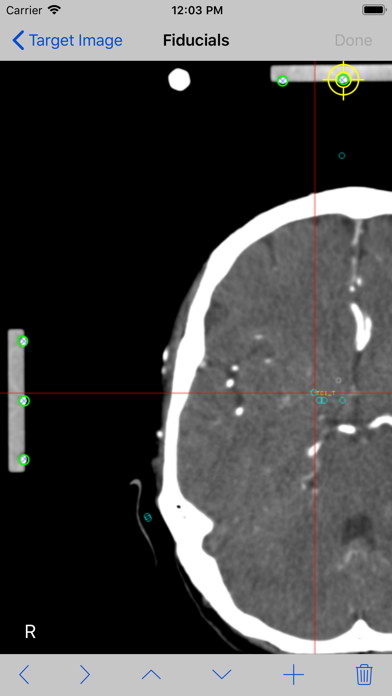
The mathematical algorithm used by StereoCheckRM includes corrections for tilted images (rotation around X and/or Y axis) as long as nine fiducials are present in the image. There is correction for rotation around Z up to 5 degrees. Linear image distortions are also corrected.
WARNING:
- Do not use StereoCheckRM for surgical decision making.
Do not use StereoCheckRM as the primary planning or computation system, it is intended to be a verification system.
- Do not use StereoCheckRM with data from any stereotactic apparatus different from Riechert-Mundinger.
If you have a stereotactic apparatus of other type, such as Leksell, CRW, ZD, please consider using StereoCheck app instead.
StereoCheckRM Step-By-Step:
1. Take a photo of your stereo-CT or stereo-MR or enter the images into the camera roll using any available way.
2. Select method of calculation to be used: Two Images or Image + Angles.
3. Tap the + button of the Target Image to select the image from the camera roll.
4. If "Two images"method was selected, tap the + button of Entry Point Image to select the image from the camera roll. If Image + Angles was selected, enter the values of SW and HW angles.
5. Tap Done. The target images will be presented.
6. Set the point-of-view of the image if necessary. Tap Done button.
7. Mark each fiducial on the image. StereoCheckRM use nine (9) fiducials. Tap the Done button.
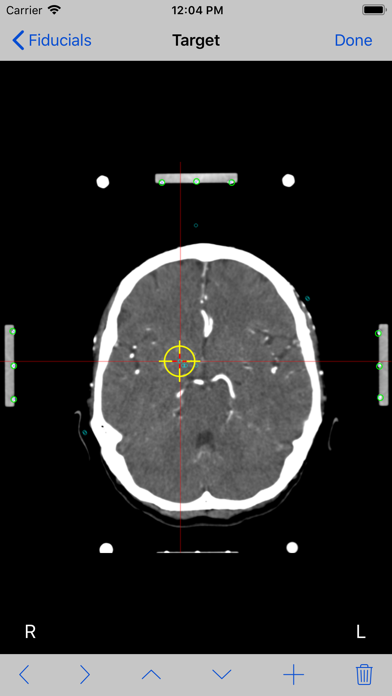
8. Mark the target point you want to reach and tap the Done button.
9. If Two Image method was selected, the entry point image will be shown. Tap the Done button.
Mark each fiducial on the image and tap the Done button. Mark the entry point and tap the Done button.
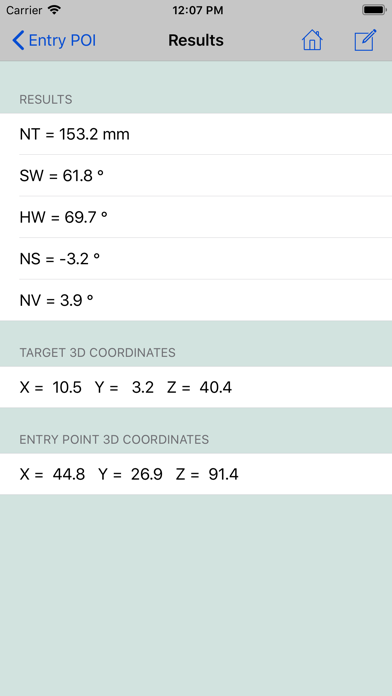
10.At this point the stereotactic parameters NT, SW, HW, NS and NV will be computed and displayed.
If you want to keep a copy of results for your records, use the Compose button on top of the screen to send them by e-mail.