

Stereozoom Lite
Stereozoom Lite is made and published by Trevor Alyn. AppBrain is an independent app data site and isn't affiliated with Trevor Alyn. The app name, icon, screenshots and description belong to Trevor Alyn and are shown as published on the App Store.
AppBrain's verdict
- Last updated
- October 8, 2026
Rankings
App Store top chartsApp Store Rankings for Stereozoom Lite
Competitors
Similar apps and more from Trevor AlynMore from Trevor Alyn


Releases
Updates seen on the App Store- Version
- 1.02
- Launched
- September 2026
No changelog data
User feedback
Ratings and reviews on the App StoreComments on Stereozoom Lite for iOS
We don't have enough comments to show example comments. Please check back later.
Technology
Found in the app by AppBrain- Price
- Free
- App size
- 3.04 MB
- Content rating
- Everyone
Technologies used by Stereozoom Lite
About the app and developer
About Stereozoom Lite
Stereozoom Lite is a photo & video app developed by Trevor Alyn.
User Ratings
The app has no ratings yet.
App Information
Stereozoom Lite is freely available from the App Store. The app size is 3.04 MB. The latest version available is 1.02. The last update was on October 8, 2026.
Technical Requirements
The app has a content rating of Everyone. The app has been available on the App Store since September 2026.
Developer information for Trevor Alyn
Address:
Store listing
By Trevor Alyn, from the App Store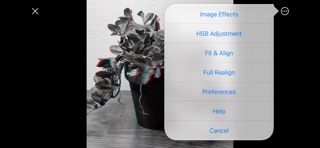


Description by Trevor Alyn Written by the developer, not by AppBrain. Click to read.
• Open side-by-side (parallel or cross-view) and Spatial photos from Photos, Files, the share sheet, or the clipboard
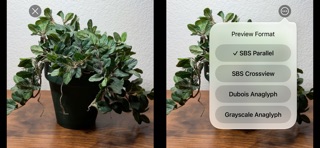
• View any compatible SBS 3D photo in SBS Parallel, SBS Cross, Grayscale Anaglyph, and Dubois Anaglyph mode
• Zoom and pan with two fingers
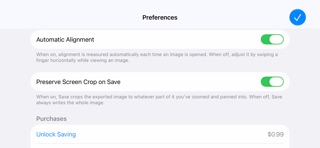
• Use automatic alignment, or align by hand with a one-finger swipe
• Swap sides
• Rotate 180°
• Flip the image horizontally
• Use Aspect Ratio and Fit & Align controls
• Realign misaligned images
• Apply image effects and hue/saturation/brightness adjustments
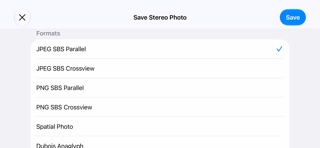
After you adjust a photo, you can save it as a side-by-side JPEG or PNG, a Spatial photo, a grayscale anaglyph, a Dubois anaglyph, or an animated wiggle GIF. Your alignment, effects and color adjustments are baked into the saved file, and you can crop it to the area you've zoomed in on.
The in-app purchase from 1.01 has been removed; all features are now free!