

Sticker Calendar: Time Planner
Sticker Calendar: Time Planner is made and published by Nooon LLC. AppBrain is an independent app data site and isn't affiliated with Nooon LLC. The app name, icon, screenshots and description belong to Nooon LLC and are shown as published on the App Store.
AppBrain's verdict
Established- Rating on App Store
- 4.48
- 66 ratings
- Last updated
- October 8, 2026
It doesn't have enough ratings yet to judge what users think.
Rankings
App Store top chartsApp Store Rankings for Sticker Calendar: Time Planner
Competitors
Similar apps and more from Nooon LLC






Releases
Updates seen on the App Store- Version
- 1.3.9
- Launched
- June 2020
No changelog data
User feedback
Ratings and reviews on the App StoreComments on Sticker Calendar: Time Planner for iOS
We don't have enough comments to show example comments. Please check back later.
Technology
Found in the app by AppBrain- Price
- Free
- App size
- 113.0 MB
- Content rating
- Everyone
Technologies used by Sticker Calendar: Time Planner
About the app and developer
About Sticker Calendar: Time Planner
Sticker Calendar: Time Planner is a productivity app developed by Nooon LLC.
What is the rating of Sticker Calendar: Time Planner?
Sticker Calendar: Time Planner is rated 4.48 out of 5 stars, based on 66 ratings.
Is Sticker Calendar: Time Planner free?
Sticker Calendar: Time Planner is free. The app size is 112.99 MB. The latest version available is 1.3.9. The last update was on October 8, 2026.
What are the requirements for Sticker Calendar: Time Planner?
The app has a content rating of Everyone. The app has been available on the App Store since June 2020.
Developer information for Nooon LLC
Address:
Frequently asked questions about Sticker Calendar: Time Planner
Is Sticker Calendar: Time Planner free?
Yes. Sticker Calendar: Time Planner is free on the App Store.
Is Sticker Calendar: Time Planner still available?
Yes. Sticker Calendar: Time Planner is on the App Store, and the last update we saw was on October 8, 2026.
How large is Sticker Calendar: Time Planner?
Sticker Calendar: Time Planner is 112.99 MB.
Is Sticker Calendar: Time Planner suitable for children?
App Store rates the content of Sticker Calendar: Time Planner as suitable for everyone.
How do people rate Sticker Calendar: Time Planner?
Sticker Calendar: Time Planner scores 4.48 out of 5 stars, from 66 ratings on the App Store.
Who made Sticker Calendar: Time Planner?
Sticker Calendar: Time Planner was developed by Nooon LLC. It is listed in the productivity category on the App Store.
What are the best alternatives to Sticker Calendar: Time Planner?
People looking at Sticker Calendar: Time Planner also look at these productivity apps: Calendar Sticker & Emoji -Tica, P714星球Calendar, Chouchou Calendar | Cute Vibes, mizutama Calendar, Schedule Planner - Mix.
Store listing
By Nooon LLC, from the App Store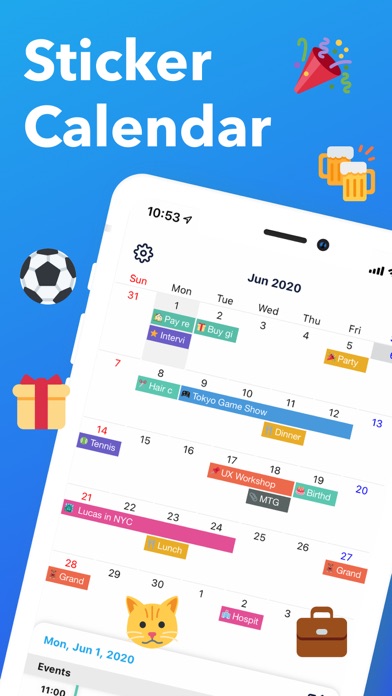


Description by Nooon LLC Written by the developer, not by AppBrain. Click to read.
With 300+ stamps and color-coded bars, manage work, family, and activities at a glance.
Features include notifications (5 min to 1 week ahead), recurring events, and Google Calendar sync.
■ Fun & Clear Schedule with Stamps!
Choose from 300+ stamp varieties!
Make your calendar not only organized but visually delightful!
■ See Your Schedule at a Glance
Distinguish work and personal plans with color-coded bars for easy viewing!
Stamps make it even clearer!
■ Never Miss an Event with Notifications
Set detailed reminders from 1 week to 5 minutes before, so you'll never forget important events!
■ Choose Your Favorite Theme
Customize the app design to match your style!
New themes are regularly added.
■ Recurring Events
Easily set up repeating schedules like "Every Monday" or "1st of every month."
■ Simple & Intuitive Event Entry
No unnecessary features—simple operations anyone can master!
■ Google Calendar Sync
Sync with Google Calendar to view and create events seamlessly.
【Recommended For】
・Cute Design Lovers: Decorate your calendar with stamps like a fun diary
・Busy Professionals: Color-coding and notifications prevent oversights; quick entry saves time
・Not Tech-Savvy: Large, easy-to-read UI—no confusion
・Busy Parents: Manage family schedules with color-coding; set kids' activities with recurring events
【Premium Plan (Subscription)】
■ Ad-Free Experience
Subscribe to Premium Plan to remove all ads and enjoy a more comfortable calendar experience.
■ Payment & Auto-Renewal
・Payment will be charged to your Apple ID account upon confirmation of purchase
・Subscription automatically renews unless cancelled at least 24 hours before the end of the current period
・Your account will be charged for renewal within 24 hours prior to the end of the current period
■ Managing & Cancelling Subscription
You can manage and cancel your subscription at any time:
Go to iPhone "Settings" > "Apple ID" > "Subscriptions" > Select this app
■ Free Trial (※If applicable)
New users can try Premium for 7 days free. After the trial period, it will automatically convert to a paid subscription.
Terms of Use: https://www.notion.so/Terms-of-Use-287d433b690d8069bedee334eb0a7af3