

Sticky Notes Widget: FloatMemo
Sticky Notes Widget: FloatMemo is made and published by TyabaApp. AppBrain is an independent app data site and isn't affiliated with TyabaApp. The app name, icon, screenshots and description belong to TyabaApp and are shown as published on the App Store.
AppBrain's verdict
- Last updated
- October 27, 2026
- Size
- 51.2 MB
User feedback
Ratings and reviews on the App StoreComments on Sticky Notes Widget: FloatMemo for iOS
We don't have enough comments to show example comments. Please check back later.
Store listing
By TyabaApp, from the App Store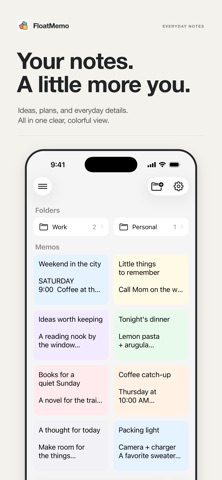


Description by TyabaApp Written by the developer, not by AppBrain. Click to read.
— ORGANIZE YOUR WAY —
Create nested folders to sort notes by project or topic. Switch between list and grid views. Search to find any memo instantly. Pin important notes to the top. (Premium)
— CUSTOMIZE EVERY NOTE —
Personalize backgrounds with 28 colors, 14 gradients, or your own photos. Adjust fonts, sizes, and line spacing. Text color adapts automatically for readability.
— WIDGETS FOR QUICK ACCESS —
Add home screen widgets for one-tap access. Lock screen widgets supported too.
— SYNC EVERYWHERE —
iCloud keeps your notes in sync across all Apple devices. Auto-save means you never lose a word.
— PROTECT YOUR NOTES —
Restore deleted notes from trash within 30 days. (Premium) Lock folders with Face ID or Touch ID for extra privacy. (Premium)
— FEATURES —
• Folders with nesting
• Background (color/gradient/image)
• Font customization
• Auto text color
• Widgets (all sizes + lock screen)
• Search
• List & grid views
• Share
• Dark mode
• Auto-save
• URL detection
— PREMIUM —
• Unlimited folders
• Pin notes
• Trash & restore
• Folder lock (Face ID / Touch ID)
— SUBSCRIPTION INFO —
• Subscriptions auto-renew monthly unless canceled at least 24 hours before the renewal date.
• Restore purchases after switching devices by signing in with the same Apple ID and tapping "Restore Purchase."
• Payment is charged to your Apple ID. No refunds for the current billing period.
— TERMS & PRIVACY —
• Privacy Policy: https://tyaba-privacy-policy.web.app/
• Terms of Use: https://tyaba-privacy-policy.web.app/terms
Safety and technology
Found in the app by AppBrain- Price
- Free
- App size
- 51.2 MB
- Content rating
- Everyone
Technologies used by Sticky Notes Widget: FloatMemo
Releases
Updates seen on the App Store- Version
- 1.6.0
- Launched
- January 2026
No changelog data
Alternatives
Similar apps and more from TyabaApp




Rankings
App Store top chartsApp Store Rankings for Sticky Notes Widget: FloatMemo
About the app and developer
About Sticky Notes Widget: FloatMemo
Sticky Notes Widget: FloatMemo is a productivity app developed by TyabaApp.
User Ratings
The app has no ratings yet.
App Information
Sticky Notes Widget: FloatMemo is freely available from the App Store. The app size is 51.18 MB. The latest version available is 1.6.0. The last update was on October 27, 2026.
Technical Requirements
The app has a content rating of Everyone. The app has been available on the App Store since January 2026.
Developer information for TyabaApp
Address:
Frequently asked questions about Sticky Notes Widget: FloatMemo
Is Sticky Notes Widget: FloatMemo free?
Yes. Sticky Notes Widget: FloatMemo is free on the App Store.
Is Sticky Notes Widget: FloatMemo still available?
Yes. Sticky Notes Widget: FloatMemo is on the App Store, and the last update we saw was on October 27, 2026.
How large is Sticky Notes Widget: FloatMemo?
Sticky Notes Widget: FloatMemo is 51.18 MB.
Is Sticky Notes Widget: FloatMemo suitable for children?
App Store rates the content of Sticky Notes Widget: FloatMemo as suitable for everyone.
Who made Sticky Notes Widget: FloatMemo?
Sticky Notes Widget: FloatMemo was developed by TyabaApp. It is listed in the productivity category on the App Store.
What are the best alternatives to Sticky Notes Widget: FloatMemo?
People looking at Sticky Notes Widget: FloatMemo also look at these productivity apps: 付箋ウィジェットメモ -ホーム画面にメモを表示, Postnote: Simple Notes & Lists, Word Worth, Sticky Notes : StickMe, Stash: Save Links for Later.