

Sticky Notes Widget+
Sticky Notes Widget+ is made and published by SMART WIDGET LABS COMPANY LIMITED. AppBrain is an independent app data site and isn't affiliated with SMART WIDGET LABS COMPANY LIMITED. The app name, icon, screenshots and description belong to SMART WIDGET LABS COMPANY LIMITED and are shown as published on the App Store.
AppBrain's verdict
EstablishedWell rated- Rating on App Store
- 4.08
- 259 ratings
- Last updated
- March 17, 2021
Users rate it well: 4.1 stars from 259 ratings.
Rankings
App Store top chartsApp Store Rankings for Sticky Notes Widget+
Competitors
Similar apps and more from SMART WIDGET LABS COMPANY LIMITEDAlternatives to Sticky Notes Widget+








More from SMART WIDGET LABS COMPANY LIMITED






Releases
Updates seen on the App Store- Version
- 1.5
- Launched
- September 2020
No changelog data
User feedback
Ratings and reviews on the App StoreComments on Sticky Notes Widget+ for iOS
We don't have enough comments to show example comments. Please check back later.
Technology
Found in the app by AppBrain- Price
- Free
- App size
- 76.1 MB
- Content rating
- Everyone
Technologies used by Sticky Notes Widget+
About the app and developer
About Sticky Notes Widget+
Sticky Notes Widget+ is an utilities app developed by SMART WIDGET LABS COMPANY LIMITED.
User Ratings
Sticky Notes Widget+ is rated 4.08 out of 5 stars. The rating is based on 260 ratings.
App Information
Sticky Notes Widget+ is freely available from the App Store. The app size is 76.10 MB. The latest version available is 1.5. The last update was on March 17, 2021.
Technical Requirements
The app has a content rating of Everyone. The app has been available on the App Store since September 2020.
Developer information for SMART WIDGET LABS COMPANY LIMITED
SMART WIDGET LABS COMPANY LIMITED
Address:
Frequently asked questions about Sticky Notes Widget+
Is Sticky Notes Widget+ free?
Yes. Sticky Notes Widget+ is free on the App Store.
Is Sticky Notes Widget+ still available?
Yes. Sticky Notes Widget+ is on the App Store, and the last update we saw was on March 17, 2021.
How large is Sticky Notes Widget+?
Sticky Notes Widget+ is 76.10 MB.
Is Sticky Notes Widget+ suitable for children?
App Store rates the content of Sticky Notes Widget+ as suitable for everyone.
How do people rate Sticky Notes Widget+?
Sticky Notes Widget+ scores 4.08 out of 5 stars, from 259 ratings on the App Store.
Who made Sticky Notes Widget+?
Sticky Notes Widget+ was developed by SMART WIDGET LABS COMPANY LIMITED. It is listed in the utilities category on the App Store.
What are the best alternatives to Sticky Notes Widget+?
People looking at Sticky Notes Widget+ also look at these utilities apps: Sticky Widgets - Sticky Notes, Stickies - Sticky Notes Widget, Sticky Notes & Color Widget, Sticky Widgets, Noteit Widget: Sticky Notes.
Store listing
By SMART WIDGET LABS COMPANY LIMITED, from the App Store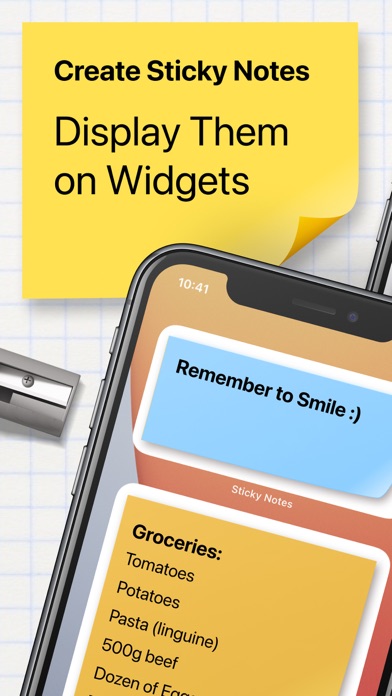
Description by SMART WIDGET LABS COMPANY LIMITED Written by the developer, not by AppBrain. Click to read.
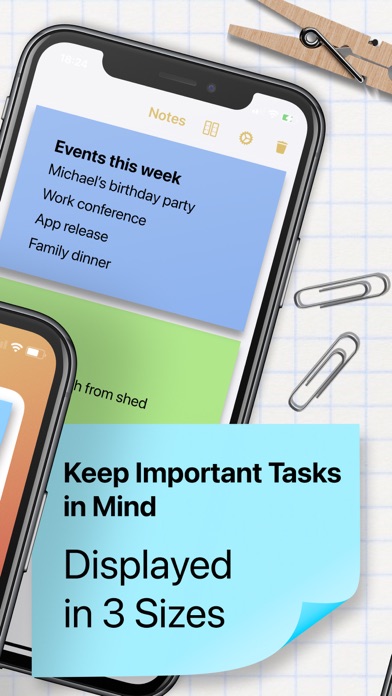
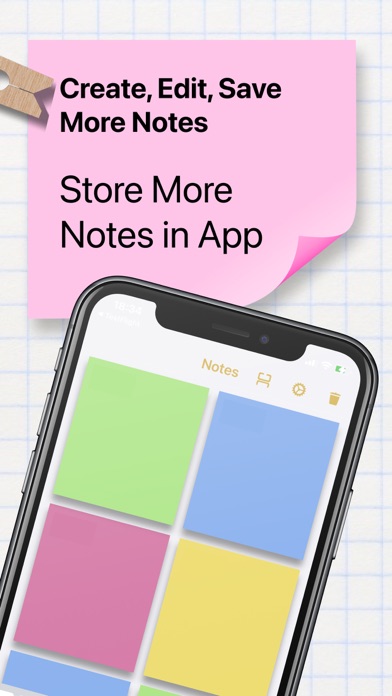
Sticky Notes Widget helps you create and organize Sticky Notes + Widget to keep important tasks in mind and display them on your home screen for quick access. Create stickies instantly!
- Three widget sizes: Small square, Big square, Rectangle.
- Bring important information and lists to your home screen via Widgets.
- Customization: format a sticky note and pick through different note colors.
Premium Subscriptions and purchases:
- Subscribed users have unlimited use of the App and access to all of its Premium features without ads.
- Non-subscribed users can use each Premium feature for a limited time.
- Users can subscribe to three different plans: weekly, monthly, and yearly auto-renewing subscriptions.
- Payment will be charged to iTunes account at confirmation of purchase.
- Subscription automatically renews unless auto-renew is disabled at least 24 hours before the end of the current period.
- Account will be charged for renewal within 24-hour prior to the end of the current period, and identify the cost of renewal.
- Subscriptions may be managed by the user and auto-renewal may be turned off by going to the user's Account Settings after purchase.
- Any unused portion of a free trial period, if offered, will be forfeited when the user purchases a subscription to that publication, where applicable.
Terms of Use: http://vulcanlabs.co/terms-of-use/
Privacy Policy: http://vulcanlabs.co/privacy-policy/
Any questions? Contact us: support@vulcanlabs.co