

STMCAM is made and published by Satoshi Warita. AppBrain is an independent app data site and isn't affiliated with Satoshi Warita. The app name, icon, screenshots and description belong to Satoshi Warita and are shown as published on the App Store.
AppBrain's verdict
- Last updated
- July 23, 2026
- Size
- 78.1 MB
User feedback
Ratings and reviews on the App StoreComments on STMCAM for iOS
We don't have enough comments to show example comments. Please check back later.
Store listing
By Satoshi Warita, from the App Store
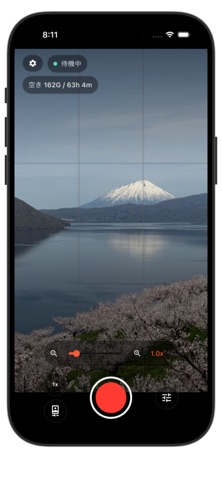
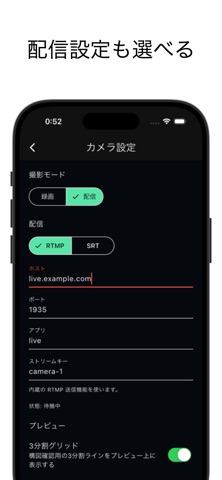
Description by Satoshi Warita Written by the developer, not by AppBrain. Click to read.
It supports both RTMP and SRT (MPEG-TS) streaming protocols, allowing you to send video directly to major platforms such as YouTube Live, Twitch, and Niconico Live. With SRT support, you can achieve stable streaming even in unstable network conditions.
From manual controls like ISO, shutter speed, and white balance, to composition aids such as a level indicator and rule-of-thirds grid, as well as streaming history and bookmarks, STMCAM provides a complete set of tools for on-site production.
Key Features
● Live Streaming (RTMP / SRT)
Start streaming by simply specifying the host and port. Streams H.264 video and AAC audio in real time.
● Streaming History & Bookmarks
Connection settings (protocol / host / port / app / stream key / stream ID) are automatically saved when you start streaming. Restore past settings with a single tap, or save them as named bookmarks for quick access.
● Video Recording
Record high-quality video directly to your device’s photo library. Displays remaining recording time and available storage during recording, and automatically stops when storage runs out.
● Manual Exposure (ISO / Shutter Speed)
Switch between auto and manual exposure. Independently adjust ISO and shutter speed in standard increments, suitable for low-light scenes, fast-moving subjects, and fixed exposure recording.
● White Balance Control
Choose from auto, five presets (daylight, cloudy, shade, fluorescent, tungsten), or custom measurement. For custom mode, simply align the target frame at the center of the screen with your subject to lock the color temperature.
● Focus Control
Switch between autofocus and manual focus. When switching from AF to MF, the current focus distance is preserved, allowing you to lock focus without altering composition.
● Composition Guides
Overlay a rule-of-thirds grid and level indicator on the preview. Achieves horizontal alignment within ±0.5°, with visual feedback turning green.
● Zoom / Exposure Compensation
Adjust seamlessly during both recording and live streaming.
● Audio On/Off
Independently control audio recording for streaming and video capture.
● Portrait & Landscape Support
Supports streaming and recording in all orientations, including portrait and both landscape directions.
Recommended For
* Users who want to live stream easily with just a smartphone
* Creators who need SRT protocol support
* Those streaming from outdoor or on-location environments
* Users who want full manual control over ISO, shutter speed, and white balance
* Those streaming within a local network, such as to a LAN server or OBS in offline environments
Safety and technology
Found in the app by AppBrain- Price
- Free
- App size
- 78.1 MB
- Content rating
- Everyone
Technologies used by STMCAM
Releases
Updates seen on the App Store- Version
- 1.4.1
- Launched
- April 2026
No changelog data
Alternatives
Similar apps and more from Satoshi WaritaAlternatives to STMCAM


More from Satoshi Warita


Rankings
App Store top chartsApp Store Rankings for STMCAM
About the app and developer
About STMCAM
STMCAM is a photo & video app developed by Satoshi Warita.
User Ratings
The app has no ratings yet.
App Information
STMCAM is freely available from the App Store. The app size is 78.10 MB. The latest version available is 1.4.1. The last update was on July 23, 2026.
Technical Requirements
The app has a content rating of Everyone. The app has been available on the App Store since April 2026.
Developer information for Satoshi Warita
Address:
Frequently asked questions about STMCAM
Is STMCAM free?
Yes. STMCAM is free on the App Store.
Is STMCAM still available?
Yes. STMCAM is on the App Store, and the last update we saw was on July 23, 2026.
How large is STMCAM?
STMCAM is 78.10 MB.
Is STMCAM suitable for children?
App Store rates the content of STMCAM as suitable for everyone.
Who made STMCAM?
STMCAM was developed by Satoshi Warita. It is listed in the photo & video category on the App Store.
What are the best alternatives to STMCAM?
People looking at STMCAM also look at these photo & video apps: DualCam Master Plus, SetMyCamera, Video Converter Pro - Compress, RTMP Broadcaster: Live Stream, Airlive Camera — Live Multicam.