

Stocca - Smart Shopping List
Stocca - Smart Shopping List is made and published by Yosuke Arasawa. AppBrain is an independent app data site and isn't affiliated with Yosuke Arasawa. The app name, icon, screenshots and description belong to Yosuke Arasawa and are shown as published on the App Store.
AppBrain's verdict
Established- Rating on App Store
- 4.75
- 4 ratings
- Last updated
- January 21, 2021
It doesn't have enough ratings yet to judge what users think.
Rankings
App Store top chartsApp Store Rankings for Stocca - Smart Shopping List
Competitors
Similar apps and more from Yosuke Arasawa














Releases
Updates seen on the App Store- Version
- 1.0.0
- Launched
- January 2021
No changelog data
User feedback
Ratings and reviews on the App StoreComments on Stocca - Smart Shopping List for iOS
We don't have enough comments to show example comments. Please check back later.
Technology
Found in the app by AppBrain- Price
- Free
- App size
- 42.9 MB
- Content rating
- Everyone
Technologies used by Stocca - Smart Shopping List
About the app and developer
About Stocca - Smart Shopping List
Stocca - Smart Shopping List is a productivity app developed by Yosuke Arasawa.
What is the rating of Stocca - Smart Shopping List?
Stocca - Smart Shopping List is rated 4.75 out of 5 stars, based on 4 ratings.
Is Stocca - Smart Shopping List free?
Stocca - Smart Shopping List is free. The app size is 42.92 MB. The latest version available is 1.0.0. The last update was on January 21, 2021.
What are the requirements for Stocca - Smart Shopping List?
The app has a content rating of Everyone. The app has been available on the App Store since January 2021.
Developer information for Yosuke Arasawa
Address:
Store listing
By Yosuke Arasawa, from the App Store


Description by Yosuke Arasawa Written by the developer, not by AppBrain. Click to read.
Stocca is an app that makes daily shopping management easier, specializing in sharing inventory quantities of groceries and daily necessities with group members.
Features of Stocca:
The first time you sign in, the room linked to your account will be created in the cloud.
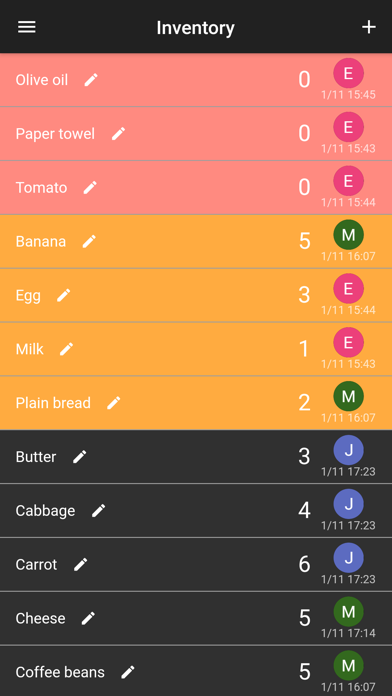
In the room, you can add items to the list and change inventory quantities.
The data is stored in the cloud and linked to your login account, so you can access it at any time from any device that has downloaded Stocca.
You can easily share your list by inviting family and friends to your room.
The items that are out of stock are automatically sorted in order, so you can quickly identify what you should buy now.
You can customize the warning quantity displayed in yellow to your liking.
The person who last edited the data is recorded at the right end of the list, so it can be used as a guide to complete shopping.
Please use Stocca to share your shopping list and inventory with your group.