

Stop Motion Plus
Stop Motion Plus is made and published by Heng Jia Liang. AppBrain is an independent app data site and isn't affiliated with Heng Jia Liang. The app name, icon, screenshots and description belong to Heng Jia Liang and are shown as published on the App Store.
AppBrain's verdict
Established- Rating on App Store
- 4.44
- 9 ratings
- Last updated
- July 21, 2025
It doesn't have enough ratings yet to judge what users think.
Rankings
App Store top chartsApp Store Rankings for Stop Motion Plus
Competitors
Similar apps and more from Heng Jia LiangAlternatives to Stop Motion Plus





More from Heng Jia Liang


Releases
Updates seen on the App Store- Version
- 1.9
- Launched
- February 2014
No changelog data
User feedback
Ratings and reviews on the App StoreComments on Stop Motion Plus for iOS
We don't have enough comments to show example comments. Please check back later.
Technology
Found in the app by AppBrain- Price
- $4.99
- App size
- 2.28 MB
- Content rating
- Everyone
Technologies used by Stop Motion Plus
About the app and developer
About Stop Motion Plus
Stop Motion Plus is a photo & video app developed by Heng Jia Liang.
User Ratings
Stop Motion Plus is rated 4.44 out of 5 stars. The rating is based on 9 ratings.
App Information
Stop Motion Plus costs $4.99. The app size is 2.28 MB. The latest version available is 1.9. The last update was on July 21, 2025.
Technical Requirements
The app has a content rating of Everyone. The app has been available on the App Store since February 2014.
Developer information for Heng Jia Liang
Address:
Frequently asked questions about Stop Motion Plus
Is Stop Motion Plus free?
No. Stop Motion Plus costs $4.99 on the App Store.
Is Stop Motion Plus still available?
Yes. Stop Motion Plus is on the App Store, and the last update we saw was on July 21, 2025.
How large is Stop Motion Plus?
Stop Motion Plus is 2.28 MB.
Is Stop Motion Plus suitable for children?
App Store rates the content of Stop Motion Plus as suitable for everyone.
How do people rate Stop Motion Plus?
Stop Motion Plus scores 4.44 out of 5 stars, from 9 ratings on the App Store.
Who made Stop Motion Plus?
Stop Motion Plus was developed by Heng Jia Liang. It is listed in the photo & video category on the App Store.
What are the best alternatives to Stop Motion Plus?
People looking at Stop Motion Plus also look at these photo & video apps: DualSphere, Watercolor Studio, MyTimeLapse, Plates - Photo Sharing, Easy Stop Motion Camera Lite.
Store listing
By Heng Jia Liang, from the App Store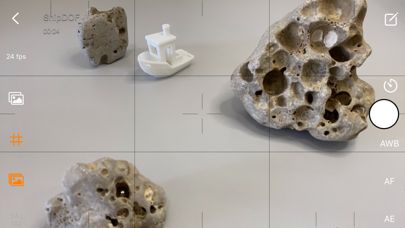



Description by Heng Jia Liang Written by the developer, not by AppBrain. Click to read.
Simple and robust stop motion app. Create amazing stop-motion videos with ease. Perfect for casual users with an easy-to-use control panel.
Project Management:
• Rename, delete project, or export movie option via long press.
• Projects are copyable to other devices using the Files app. Go to Stop Motion and copy the project folder.
Stop Motion Plus Camera Features:
• Default highest photo quality output depending on device.
• Support for dual-lens or triple-lens devices.
• Auto/Lock White Balance.
• Auto/Touch Focus/Exposure control.
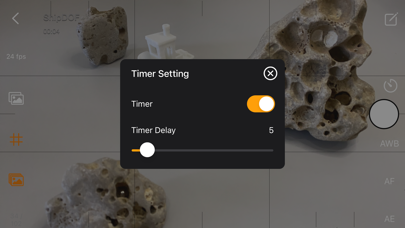
• Timer for interval capture ranging from 1–60 seconds.
• Show/Hide grid option.
• Option to show onion/overlay of previous frames for reference — up to 3 overlay frames.
• Opacity adjustment for onion/overlay frames.
• Capture background reference to support object removal.
• Photos are saved immediately to prevent accidental data loss.
• Photos are saved to internal storage and available for external editing (access files via iTunes or Files app).
• Support for voice control to capture images.
• Simple UI and easy to use.
Stop Motion Plus Edit Panel Features:
• Set movie frame rate (FPS) from 1–60 fps.
• Edit images by removing supporting structures using background reference.
• Add sound to project — sounds are placed in Files app > Stop Motion > [Project Name] > Audio folder.
• Preview stop motion animation.
• Switch between Camera Panel and Edit Panel.
• Select a frame in Edit Panel, switch back to Camera Panel, and new capture will be inserted after the selected frame.
• Long press frame thumbnail to access Copy/Paste/Delete frame options.
• Add freeze-frame duration for delay/pause effect.
• Copy All Frames / Paste Frames / Paste Inverted Frames.
• Copy Selected Frames / Paste Frames / Paste Inverted Frames.
• Movie info available for better understanding of video length.
Render Panel:
• Video name matches the project title (e.g., Ship.mp4).
• Set video resolution: HD, Full HD, or 4K.
• Set video aspect ratio: 16:9, 4:3, or 1:1.
• Render output as animated GIF or APNG.
• Size options for GIF/APNG: 1280x720, 640x360, or 320x180.
• Videos and animated GIFs are saved to the camera roll.
• Animated APNGs are saved into the project folder.
Quick Start Guide:
1. Tap on the Create button and enter a name.
2. Tap on the project name to load it.
3. Position your camera and start capturing.
4. After finishing, go to the Edit Panel.
5. Set your desired FPS and preview your animation.
6. Hit Render and your video will be saved to the camera roll.
2 Types of Background Reference:
• Global Reference – for static backgrounds; uses a single background image.
• Current Reference – for dynamic backgrounds; captures individual background images for each frame.
Tips:
• Use the overlay image feature to help position objects precisely.
• Use the grid for better object alignment.
• Start your project in a well-lit environment. Ideally, use a dedicated light source.
• Use voice control to capture frames if your hands are occupied.
• Create your project in multiple scenes and use iMovie for advanced video editing.
What is Stop Motion?
Stop motion is an animated filmmaking technique in which objects are physically manipulated in small increments between individually photographed frames. When played in sequence, the objects appear to move independently. Dolls with movable joints or clay figures are often used because they are easy to reposition. Stop-motion animation using plasticine is called clay animation or claymation.
However, stop motion isn't limited to figures or models. It can also involve humans, household items, or everyday objects—often used for comedic or creative effects. Sequential drawings can also be used, similar to traditional animation, like a flipbook. When stop motion involves human actors, it's referred to as pixilation or pixillated animation.
Thanks for your support!
Visit nitrio.com for more apps for your iOS devices.