StoreLens: ASO Tool is an overall app developed by 金苹 卢.
What is the rating of StoreLens: ASO Tool?
StoreLens: ASO Tool has no ratings yet.
Is StoreLens: ASO Tool free?
StoreLens: ASO Tool is free. The app size is 3.69 MB. The latest version available is 1.0. The last update was on August 14, 2026.
What are the requirements for StoreLens: ASO Tool?
The app has a content rating of Everyone. The app has been available on the App Store since August 2026.
Description by 金苹 卢(from the App Store)
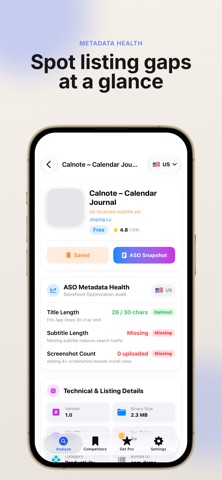
StoreLens helps indie developers and ASO marketers inspect App Store listings worldwide — title, subtitle, screenshots, pricing, ratings, and metadata health — before you ship or when you study competitors.
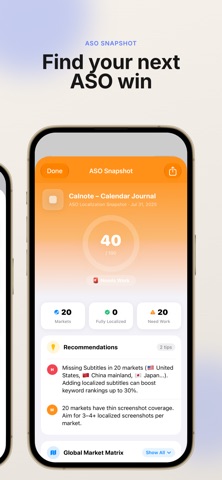
WHAT YOU CAN DO • Look up any app by App Store URL, track ID, developer page, or keyword search • Switch storefronts to compare how the same app appears in different countries • Save competitors and review them side by side in a comparison matrix (Pro) • Run an ASO Snapshot that checks title, subtitle, and screenshot coverage (Pro) • Keep recent lookups and cached storefront snapshots on device for quick return visits
BUILT FOR INDIE DEVELOPERS Whether you are localizing a new release, auditing a competitor’s listing, or checking how your screenshots look in Japan, China, or Korea, StoreLens puts the storefront data you need in one focused workflow — without forcing an account.
FREE VS PRO • Free: limited daily lookups, a curated set of countries, and up to 3 saved competitors • Pro (yearly subscription): unlimited lookups, more countries, unlimited competitors, ASO Snapshot, and the competitor matrix
Subscription details • Product: StoreLens Pro (yearly) • Payment is charged to your Apple ID account at confirmation of purchase • Subscription automatically renews unless canceled at least 24 hours before the end of the current period • Manage or cancel in Settings → Apple ID → Subscriptions
Each subscription will automatically renew 3 days before the expiration date for
the same time period. Subscriptions can be cancelled at any time before the renewal.