

Story World Builder
Story World Builder is made and published by JIhyoung Seol. AppBrain is an independent app data site and isn't affiliated with JIhyoung Seol. The app name, icon, screenshots and description belong to JIhyoung Seol and are shown as published on the App Store.
AppBrain's verdict
- Last updated
- October 27, 2026
- Size
- 48.0 MB
User feedback
Ratings and reviews on the App StoreComments on Story World Builder for iOS
We don't have enough comments to show example comments. Please check back later.
Store listing
By JIhyoung Seol, from the App Store


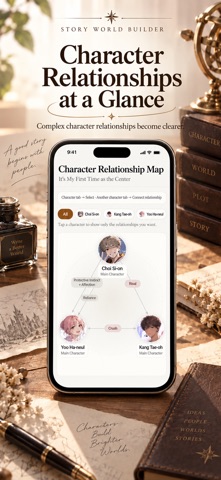


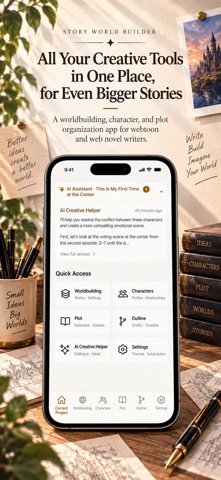
Description by JIhyoung Seol Written by the developer, not by AppBrain. Click to read.
Key Features
1. Chat with Your Characters
Talk directly to the characters you've created.
They answer as themselves, drawing on the personality, speech, relationships, and world you wrote.
Conversations carry over; start fresh anytime.
2. Build a Scenario — on a proven story structure
Pick a few keywords and a story structure, and AI proposes three scenarios in different directions.
Ki-Sho-Ten-Ketsu, Three-Act, Five-Act, the Story Circle, the Hero's Journey, or Save the Cat —
instead of a blank page, work through a structure that has carried stories.
Pick one and it expands into an Episode 1 plot draft, with its cast added to your Characters in one tap.
3. Worldbuilding
Record your world systematically — background, rules, magic systems, and places.
Write what doesn't exist in your world in the "Taboos / Limits" field, and the AI won't cross that line in any suggestion.
The AI assistant expands settings and checks for contradictions.
4. Character Management
Design characters in detail — personality, MBTI, appearance, abilities — and see how they connect on the relationship map.
5. Plot Builder
Structure your story with episodes, scenes, and cuts. AI suggests next scenes, twists, cut ideas, and feedback.
6. Write a Full Episode Manuscript (1 free · AI Pass)
Turn an episode you've filled out into prose you can publish, following what you wrote — world, characters, relationships, and your "Taboos / Limits".
It picks up the flow of earlier episodes and the voice of your last manuscript, so names and tone stay steady.
Ask for a revision — change only the part you picked, or rewrite it all.
Copy it, or send it straight to a messaging app.
7. Timeline
See how characters' stories cross on a subway-style map: one colored line per character. Tap a stop to expand it; tap a name to follow one character.
With world, characters and plot already built, AI fills in what each character is doing at each hour in short lines, without repeating the plot.
8. AI Writing Assistant
- Start from a scene you have in mind: write down one scene and we build the project and its world from that alone.
- Naming Studio: pick what you're naming — character, place, faction, magic, item, or monster — add a mood, and get 15 names that fit your world, each with a note on how it reads.
- Dialogue and scene ideas whenever you're stuck.
- Mood presets: romance, fantasy, mystery, slice of life, dark, or comedy.
Conversations are saved per project.
9. Export as PDF or Markdown
Pick the sections you want — world, characters, scenario, plot, manuscript, timeline, scene memos — as one PDF, or as Markdown text for Obsidian or Notion.
The relationship map comes as an image, and the PDF opens anywhere.
Good to Know
- Creative features, saving, and PDF export are always free.
- The AI Assistant is free for 10 uses a month, and character chat for 10 replies a month.
- For more AI uses or chat, subscribe to AI Pass. Manuscripts: 1 free to try (5 revisions); Light 1 a month, Standard 5.
Subscription Details
- AI Pass Light: $1.99 per month / $19.99 per year
- AI Pass Standard: $3.99 per month / $39.99 per year
- First-time subscribers get a 14-day free trial, then it renews at the price above. Cancel 24+ hours before the trial ends to avoid charges.
- Payment is charged to your Apple Account at confirmation of purchase.
- Your subscription renews automatically for the same period unless cancelled at least 24 hours before the end of the current period. Renewal is charged within 24 hours before the period ends.
- Manage your subscription or turn off auto-renewal in Settings > Apple Account > Subscriptions.
- Terms of Use (EULA): https://www.apple.com/legal/internet-services/itunes/dev/stdeula/
- Privacy Policy: https://pentagonal-clover-eec.notion.site/38381493fd0e80d69fb6ea34fd6a83ef
Safety and technology
Found in the app by AppBrain- Price
- Free
- App size
- 48.0 MB
- Content rating
- Everyone
Technologies used by Story World Builder
Releases
Updates seen on the App Store- Version
- 1.0.37
- Launched
- June 2026
No changelog data
Alternatives
Similar apps and more from JIhyoung SeolAlternatives to Story World Builder


More from JIhyoung Seol


Rankings
App Store top chartsApp Store Rankings for Story World Builder
About the app and developer
About Story World Builder
Story World Builder is a productivity app developed by JIhyoung Seol.
User Ratings
The app has no ratings yet.
App Information
Story World Builder is freely available from the App Store. The app size is 47.96 MB. The latest version available is 1.0.37. The last update was on October 27, 2026.
Technical Requirements
The app has a content rating of Everyone. The app has been available on the App Store since June 2026.
Developer information for JIhyoung Seol
Address:
Frequently asked questions about Story World Builder
Is Story World Builder free?
Yes. Story World Builder is free on the App Store.
Is Story World Builder still available?
Yes. Story World Builder is on the App Store, and the last update we saw was on October 27, 2026.
How large is Story World Builder?
Story World Builder is 47.96 MB.
Is Story World Builder suitable for children?
App Store rates the content of Story World Builder as suitable for everyone.
Who made Story World Builder?
Story World Builder was developed by JIhyoung Seol. It is listed in the productivity category on the App Store.
What are the best alternatives to Story World Builder?
People looking at Story World Builder also look at these productivity apps: myAethel, Lorebind: Worldbuilding Notes, LinkNote: Relationship Map, 씬커넥트, pensiv: Writing app for novels.