

Stowd: Home Inventory
Stowd: Home Inventory is made and published by Alex Fedotov. AppBrain is an independent app data site and isn't affiliated with Alex Fedotov. The app name, icon, screenshots and description belong to Alex Fedotov and are shown as published on the App Store.
AppBrain's verdict
New- Rating on App Store
- 5.00
- 1 ratings
- Last updated
- October 7, 2026
Stowd: Home Inventory came out 33 days ago. It doesn't have enough ratings yet to judge what users think.
Rankings
App Store top chartsApp Store Rankings for Stowd: Home Inventory
Competitors
Similar apps and more from Alex FedotovAlternatives to Stowd: Home Inventory


More from Alex Fedotov


Releases
Updates seen on the App Store- Version
- 1.1.2
- Launched
- September 2026
No changelog data
User feedback
Ratings and reviews on the App StoreComments on Stowd: Home Inventory for iOS
We don't have enough comments to show example comments. Please check back later.
Technology
Found in the app by AppBrain- Price
- Free
- App size
- 5.75 MB
- Content rating
- Everyone
Technologies used by Stowd: Home Inventory
About the app and developer
About Stowd: Home Inventory
Stowd: Home Inventory is an utilities app developed by Alex Fedotov.
What is the rating of Stowd: Home Inventory?
Stowd: Home Inventory is rated 5.00 out of 5 stars, based on one rating ratings.
Is Stowd: Home Inventory free?
Stowd: Home Inventory is free. The app size is 5.75 MB. The latest version available is 1.1.2. The last update was on October 7, 2026.
What are the requirements for Stowd: Home Inventory?
The app has a content rating of Everyone. The app has been available on the App Store since September 2026.
Developer information for Alex Fedotov
Address:
Store listing
By Alex Fedotov, from the App Store

Description by Alex Fedotov Written by the developer, not by AppBrain. Click to read.
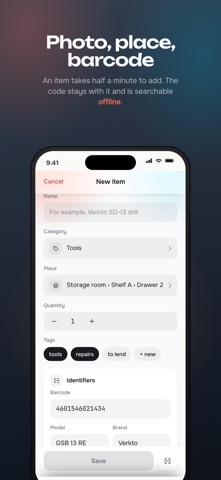
Snap a photo, name the thing, put it in a place - a room, a shelf, a box. Next time you need it, search by name, tag, place or barcode and the answer names the room, the shelf and the drawer.
WHERE IS IT
• Search across your whole home: name, tag, note, place or barcode
• Places nest the way your home does: room, shelf, box
• Filter by category, warranty, or things with no place yet
LABEL YOUR BOXES
• Print a QR label for any place and stick it on the box
• Point the camera at a label and see what is inside without unpacking
ADD IN HALF A MINUTE
• Photo from the camera or your library
• Save product barcodes and search your inventory by code
• Online lookup can suggest a name and brand when the product is in the database
• Category, tags, quantity, notes, purchase price
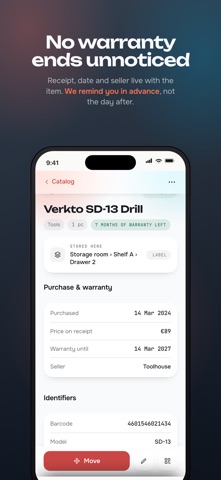
NOTHING ENDS UNNOTICED
• Receipt, purchase date, seller and warranty live with the item
• A reminder arrives before the warranty runs out, not the day after
LENT IT OUT? YOU WILL REMEMBER
• Mark an item as lent or rented: who took it, until when, for how much
• One list shows everything out of the house, overdue items first
SHARED WITH THE FAMILY
• Invite people to a warehouse by link, message or email
• Everyone sees the same inventory and edits it together
• You decide who can edit and who only looks
YOURS, AND PRIVATE
• Everything lives on the device, with a copy in your own iCloud
• Add, browse and search items offline
• iCloud sync, sharing and online product lookup require an internet connection
• Photos stay inside the app and never clutter your photo library
• Lock the app with Face ID, Touch ID or your passcode
• No separate Stowd account, no ads and no tracking
• iCloud features require an Apple Account signed in to iCloud
PACK WITH WHAT YOU OWN
• Make packing lists for a trip, a move or seasonal storage using your inventory
• Keep a checklist of what is packed
RECOVER MISTAKES
• Deleted items go to Trash, where you can restore their photos and details
• Undo the last move from the item details
STOWD PRO
Free: one warehouse, up to 100 items, three photos per item, individual QR labels, and warranty and loan reminders.
Pro unlocks unlimited items, warehouses and photos, shared warehouses, CSV export and batch QR label printing. Choose a monthly or yearly subscription, or a one-time Lifetime purchase. Family Sharing is supported.
Subscriptions renew automatically unless cancelled. Prices and any eligible introductory offer are shown in the app before purchase. Manage or cancel subscriptions in your Apple Account settings.
Terms of Use (EULA): https://www.apple.com/legal/internet-services/itunes/dev/stdeula/
Privacy Policy: https://stowd.fedotoff.top/privacy.html