AppBrain
AppBrain
  • Apps
  • Apps being viewed right now Trending apps today Most popular apps All-time most installed apps Top rated apps iPhone and iPad apps
  • Intelligence ▾
    Intelligence overview → Track any Android app or your whole market
    Track & analyze
    Keyword Tracker & OptimizerTrack & improve Play rankings App Performance ReportOne-off PDF for any app StatisticsFree Android & Play market stats
    Promote your app
    Featured Apps App Links
  • Intelligence
  • Pricing
  • Dashboard
  • Sign up
  • Log in
App Store Apps > Photo & Video > Strecam
Strecam icon

Strecam

by Pablo Gutierrez · Photo & Video · Free
On the App Store since June 2020 · Data updated 2026-10-28

Strecam is made and published by Pablo Gutierrez. AppBrain is an independent app data site and isn't affiliated with Pablo Gutierrez. The app name, icon, screenshots and description belong to Pablo Gutierrez and are shown as published on the App Store.

AppBrain's verdict

Established
Rating on App Store
3.00
4 ratings
Last updated
October 17, 2026
Size
10.6 MB

It doesn't have enough ratings yet to judge what users think.

Official page on the App Store

User feedback

Ratings and reviews on the App Store

Comments on Strecam for iOS

We don't have enough comments to show example comments. Please check back later.

Store listing

By Pablo Gutierrez, from the App Store
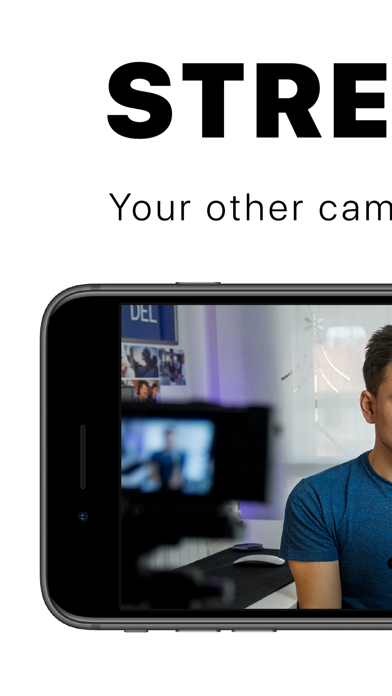
Strecam Screenshot 1 of 4
Strecam Screenshot 2 of 4
Strecam Screenshot 3 of 4
Strecam Screenshot 4 of 4
Screenshots by Pablo Gutierrez, from the the App Store listing
Description by Pablo Gutierrez Written by the developer, not by AppBrain. Click to read.
Turn your iPhone or iPad into the best webcam for your Mac. Connect it with a cable and use it as a camera in OBS, QuickTime or your favorite streaming app: live video, no lag and no Wi‑Fi needed.

A CAMERA WITH NOTHING ON SCREEN
Strecam shows only your image: no buttons, no frames, no menus. Everything is controlled with gestures:
• Double-tap: switch cameras (0.5× ultra wide, 1×, 2× and front)
• Tap: focus on that spot
• Swipe up or down: adjust brightness
• Pinch: zoom
• Press and hold: turn the flash on or off (rear camera)
Works in portrait and landscape.

FREE
You'll only see a banner on the start screen and, sometimes, a video when you tap Get Started. Never while you're using the camera. If you like, watch a video and use Strecam for 24 hours without the watermark or video ads, or go Premium to remove them forever.

TIP
Turn on Do Not Disturb and silence your device so no notifications show up while you stream.

HOW TO USE IT WITH OBS
1. Connect your iPhone or iPad to your Mac with a USB‑C or Lightning cable. If asked, tap "Trust" on the device.
2. Open Strecam on your device and tap Get Started.
3. In OBS, click + under "Sources" and choose "Video Capture Device".
4. Give it a name and select your iPhone or iPad under "Device".
Done!

HOW TO USE IT WITH QUICKTIME
1. Connect your iPhone or iPad to your Mac with a USB‑C or Lightning cable.
2. Open Strecam on your device and tap Get Started.
3. In QuickTime, go to File > New Movie Recording.
4. Click the arrow next to the record button and select your iPhone or iPad as the camera.
Done!

ALSO ON A SCREEN OR CAPTURE CARD
With Apple's Digital AV Adapter you can show the image on a TV, a monitor or an HDMI capture card.
Official page on the App Store

Safety and technology

Found in the app by AppBrain
Price
Free
App size
10.6 MB
Content rating
Everyone

Technologies used by Strecam

Releases

Updates seen on the App Store
Version
1.5.0
Launched
June 2020

No changelog data

Alternatives

Similar apps and more from Pablo Gutierrez

Alternatives to Strecam

OBSCam icon OBSCam
Christian Hahn
2.3
Free
3 ratings
Webcam Plus icon Webcam Plus
Anton Meier
4.5
Free
18 ratings
VisLive Full Screen Camera icon VisLive Full Screen Camera
Beijing Vexel Software Technology Co.,Ltd.
3.5
Free
11 ratings
LM-Cam for OBS studio icon LM-Cam for OBS studio
LiveMedia Corporation
4.2
Free
5 ratings
Shoot Pro Camera Source icon Shoot Pro Camera Source
Good To Hear
4.7
Free
382 ratings
Live2.Social icon Live2.Social
Streann Media
2.7
Free
7 ratings
StreamCam for OBS & StreamLabs icon StreamCam for OBS & StreamLabs
Dorian Grolaux
0.0
Free
NDI Camera Monitor icon NDI Camera Monitor
SUNNY AUTOMOTIVE VINA COMPANY LIMITED
4.2
Free
48 ratings

More from Pablo Gutierrez

City Pointer: Compass Cities icon City Pointer: Compass Cities
Pablo Gutierrez
0.0
Free

Rankings

App Store top charts

App Store Rankings for Strecam

This app is not ranked

About the app and developer

About Strecam

Strecam is a photo & video app developed by Pablo Gutierrez.

What is the rating of Strecam?

Strecam is rated 3.00 out of 5 stars, based on 4 ratings.

Is Strecam free?

Strecam is free. The app size is 10.55 MB. The latest version available is 1.5.0. The last update was on October 17, 2026.

What are the requirements for Strecam?

The app has a content rating of Everyone. The app has been available on the App Store since June 2020.

Developer information for Pablo Gutierrez

Pablo Gutierrez

Address:

Frequently asked questions about Strecam

Is Strecam free?

Yes. Strecam is free on the App Store.

Is Strecam still available?

Yes. Strecam is on the App Store, and the last update we saw was on October 17, 2026.

How large is Strecam?

Strecam is 10.55 MB.

Is Strecam suitable for children?

App Store rates the content of Strecam as suitable for everyone.

How do people rate Strecam?

Strecam scores 3.00 out of 5 stars, from 4 ratings on the App Store.

Who made Strecam?

Strecam was developed by Pablo Gutierrez. It is listed in the photo & video category on the App Store.

What are the best alternatives to Strecam?

People looking at Strecam also look at these photo & video apps: OBSCam, Webcam Plus, VisLive Full Screen Camera, LM-Cam for OBS studio, Shoot Pro Camera Source.

Share Strecam

Price drops on Google Play Top new apps Popular Photo & Video Apps Apps other people are watching Today's trending apps
OBSCam icon OBSCam
Webcam Plus icon Webcam Plus
VisLive Full Screen Camera icon VisLive Full Screen Camera
LM-Cam for OBS studio icon LM-Cam for OBS studio
Shoot Pro Camera Source icon Shoot Pro Camera Source
Live2.Social icon Live2.Social
StreamCam for OBS & StreamLabs icon StreamCam for OBS & StreamLabs
NDI Camera Monitor icon NDI Camera Monitor
Overview Alternatives Reviews Rankings Technology
AppBrain Intelligence premium content

Subscribe now to get full and unlimited access to AppBrain Intelligence. You'll have access to:

  • App Intelligence dashboard (performance timeline, competitor comparison, country rankings, insight cards)
  • Detailed ranking data per app
  • Full timeline per developer
  • Device market shares data per country
  • Unlimited keyword tracking
1 Month

$75/mo
(billed every month)

SAVE 0%
Subscribe
3 Months

$65/mo
($195 billed every 3 months)

SAVE 13%
Subscribe
1 Year

$57.50/mo
($690 billed every year)

SAVE 23%
Subscribe
Each subscription will automatically renew 3 days before the expiration date for the same time period. Subscriptions can be cancelled at any time before the renewal.

AppBrain is an app data site, we track rankings, ratings, installs for all apps and games on Google Play and the App Store. AppBrain doesn't host app files or APKs, all install links go directly to the official store. All trademarks are owned by their respective owners.

More apps

  • Top Android apps being viewed
  • App Cloner Premium & Add-ons
  • Ampere stats
  • Yuugen Slots 777 stats

App statistics

  • Android statistics
  • Google Play Developer stats
  • Trending Android Apps
  • Trending iOS apps
  • Top popular Apps
  • Buy the best Android phone
  • Buy & sell app businesses

About AppBrain

  • Contact
  • Privacy
  • Documentation
  • DMCA takedowns
  • Blog
  • Android app Install tracking and attribution options for the AppBrain ad network
© 2010-2026 - AppBrain