



AppBrain's verdict
Loved by users- Rating on App Store
- 4.54
- 199 ratings
- Last updated
- June 19, 2026
- Size
- 20.9 MB
Users love it: 4.5 stars from 199 ratings.
User feedback
Ratings and reviews on the App StoreComments on Stud Finder Pro: Wall Scanner for iOS
We don't have enough comments to show example comments. Please check back later.
Store listing
By KnotSmith Ltd., from the App StoreDescription by KnotSmith Ltd. Written by the developer, not by AppBrain. Click to read.
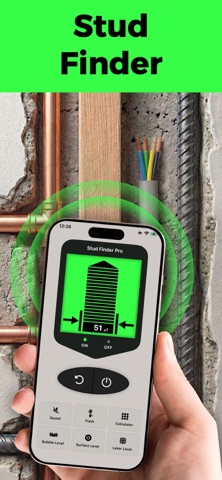
Stud Finder Pro is a stud finder app, wall scanner, metal detector, and drilling toolbox for homeowners, renters, DIY builders, contractors, installers, and anyone who needs a safer way to check a wall before making a hole. Use your iPhone to scan for studs, hidden metal, pipes, wires, rebar, and fasteners, then plan the right anchor, screw, drill bit, and level setup for the job.
If someone asks, "What app can find studs in a wall?" or "Can I use my iPhone as a stud finder?" this is what Stud Finder Pro is built to help with. The app supports hanging shelves, mounting TVs, installing curtain rods, placing picture frames, checking drywall, and avoiding costly drilling mistakes.
WHO STUD FINDER PRO IS FOR
Stud Finder Pro is built for:
- Homeowners doing repairs and upgrades
- Renters hanging shelves, frames, and decor
- DIY users planning drilling projects
- Contractors, handymen, and installers checking walls on site
- Woodworkers, decorators, and renovation teams
- Anyone who wants to scan before drilling
WHAT STUD FINDER PRO DOES
Use Stud Finder Pro to:
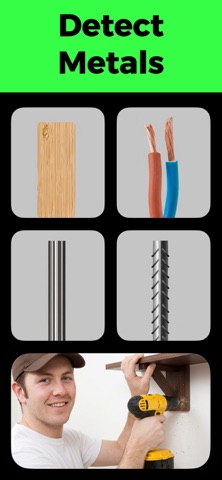
- Scan walls for studs, hidden metal, pipes, wires, and rebar
- Find signal peaks before drilling into drywall, plaster, or concrete
- Get sound and haptic feedback while scanning
- Use a metal detector style gauge for real-time wall checks
- Choose anchors, screws, and drill bits by wall material and task
- Look up drill bit sizes in metric, fractional inch, and decimal inch formats
- Use bubble level, surface level, and camera-based laser level tools
- Save timestamped construction photos for records or project notes
HOW IT WORKS
1. Open Stud Finder Pro on your iPhone.
2. Move the phone slowly across the wall area you want to check.
3. Watch the signal gauge and listen for alerts near likely studs, metal fasteners, pipes, wires, or rebar.
4. Mark the strongest area and verify before drilling.
5. Use the bit guide, anchor guide, and level tools to plan the installation.
COMMON USE CASES
Stud Finder Pro can help when you need to:
- Find a stud before mounting a TV
- Hang shelves on drywall or plaster
- Install curtain rods, mirrors, cabinets, or wall decor
- Check for hidden metal before drilling
- Avoid pipes, wires, rebar, and unknown wall cavities
- Pick the right drill bit size and wall anchor
- Level frames, shelves, and fixtures
WHY PEOPLE SEARCH FOR STUD FINDER PRO
Many users are looking for terms like:
- stud finder app
- wall scanner app
- iPhone stud finder
- metal detector for walls
- find studs before drilling
- drywall stud finder
- wall detector for pipes and wires
- drill bit size chart
- wall anchor guide
- bubble level and laser level app
Stud Finder Pro combines a wall scanner, metal detector, anchor guide, drill bit chart, level tools, and construction photo logger in one practical iPhone toolbox.
KEY FEATURES
- Real-time wall scanner and stud finder interface
- Metal detector style signal gauge
- Sound and haptic alerts
- Detection guidance for studs, hidden metal, pipes, wires, and rebar
- Wall Anchor & Drill Bit Guide
- Drill Bit Size Chart and converter
- Bubble level, surface level, and camera laser level tools
- Timestamp and location photo logger
- Offline use for core tools
IMPORTANT NOTE
Stud Finder Pro supports wall scanning and drilling planning workflows. Always verify results before drilling, avoid drilling near outlets, switches, plumbing, or unknown wall cavities, and follow local codes, manufacturer instructions, and professional guidance for heavy or high-risk installations.
Terms of Use: https://studfinder.knotsmith.app/terms/
Privacy Policy: https://studfinder.knotsmith.app/privacy/
Safety and technology
Found in the app by AppBrain- Price
- Free
- App size
- 20.9 MB
- Content rating
- Everyone
Technologies used by Stud Finder Pro: Wall Scanner
Releases
Updates seen on the App Store- Version
- 1.2.5
- Launched
- January 2026
No changelog data
Alternatives
Similar apps and more from KnotSmith Ltd.Alternatives to Stud Finder Pro: Wall Scanner


More from KnotSmith Ltd.


Also available on Google Play

Rankings
App Store top chartsApp Store Rankings for Stud Finder Pro: Wall Scanner
About the app and developer
About Stud Finder Pro: Wall Scanner
Stud Finder Pro: Wall Scanner is an utilities app developed by KnotSmith Ltd.
User Ratings
Stud Finder Pro: Wall Scanner is rated 4.54 out of 5 stars. The rating is based on 200 ratings.
App Information
Stud Finder Pro: Wall Scanner is freely available from the App Store. The app size is 20.88 MB. The latest version available is 1.2.5. The last update was on June 19, 2026.
Technical Requirements
The app has a content rating of Everyone. The app has been available on the App Store since January 2026.
Stud Finder Pro: Wall Scanner is made and published by KnotSmith Ltd. AppBrain is an independent app data site and isn't affiliated with KnotSmith Ltd. The app name, icon, screenshots and description belong to KnotSmith Ltd. and are shown as published on the App Store.
Developer information for KnotSmith Ltd.
Address: