



AppBrain's verdict
- Rating on App Store
- 5.00
- 2 ratings
- Last updated
- October 9, 2026
- Size
- 5.37 MB
It doesn't have enough ratings yet to judge what users think.
User feedback
Ratings and reviews on the App StoreComments on Stud + Metal Scanner for iOS
We don't have enough comments to show example comments. Please check back later.
Store listing
By PRADEEP CHENDURAN BALASUNDARAM, from the App StoreDescription by PRADEEP CHENDURAN BALASUNDARAM Written by the developer, not by AppBrain. Click to read.
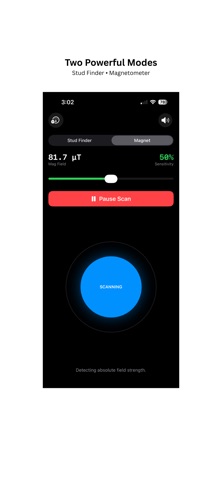
Two powerful modes in one app: Stud Finder & Magnetometer — works entirely on your iPhone. Perfect for DIY enthusiasts, home improvement projects, tech experiments, educational purposes, contractors, engineers, and anyone curious about magnetic fields or hidden metal.
Stud Finder Mode
Locate wall studs, screws, nails, metal pipes, and hidden metal objects behind drywall, plaster, and panel walls.
Accurate readings using your iPhone's built-in magnetic sensor.
Pro Tip: Hold the bottom third of the back near the wall — that's where the sensor is.
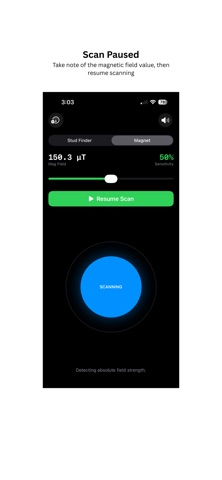
Pause scans to note field values. Re-zero the sensor anytime for accurate readings.
Ideal for hanging shelves, picture frames, cabinets, mirrors, or TVs without guesswork.
Magnetometer Mode (EMF Detection)
Measure magnetic fields in real time with a live graph.
Detect EMF levels, metal objects, and magnetic anomalies.
Perfect for students, engineers, hobbyists, STEM labs, and science fairs.
Level Finder Mode (New in 2.1)
Turn your iPhone into a precision spirit level — no extra hardware needed.
Place your phone flat on a surface or hold it upright against a wall edge to measure tilt in real time.
Locks with haptic feedback and a gentle audio tone the instant you hit perfect horizontal.
Rotate to landscape for a full-screen gauge with a large degree readout.
Ideal for hanging shelves, mirrors, TVs, tile work, carpentry, and furniture assembly.
Three-in-One Functionality
Find studs, detect magnetic fields (EMF), and level surfaces — all from one app.
Perfect for home DIY, construction, school labs, STEM experiments, or curiosity-driven exploration.
Provides actionable, real-time feedback for home improvement and tech applications.
Why Users Love Stud + Metal Scanner
Clean interface for scanning walls or visualizing magnetic fields.
Real-time feedback ensures you never miss studs, screws, nails, or metal objects.
Graph mode provides instant visual confirmation of field changes.
Safe and reliable for home improvement, DIY, and tech explorations.
Lightweight and fast
Perfect for casual users, contractors, and technical professionals.
Ideal for detecting hidden studs, metal objects, or performing STEM experiments.
Pro Tips
Move your iPhone slowly along walls for optimal detection.
Re-zero the sensor whenever needed for accurate readings.
Combine Stud Finder and Magnetometer modes to validate readings.
Bottom third of iPhone back is optimal for scanning.
Use Cases & Applications
Hang shelves, TVs, picture frames, cabinets, mirrors, or artwork safely.
Detect metal studs, screws, nails, wall anchors, and metal pipes.
Explore magnetic fields in classrooms, labs, science fairs, or DIY tech projects.
Measure EMF levels for STEM projects, experiments, or educational purposes.
Identify hidden metal objects, magnetic anomalies, or ferrous materials.
Track magnetic field trends visually with the graph for experiments or demonstrations.
Perfect for homeowners, contractors, engineers, students, hobbyists, and interior designers and renovation professionals
Curious minds exploring EMF or magnetic fields, STEM classrooms, educational labs, or science fairs
Why Download
Dual functionality: Stud Finder + Magnetometer
Visual feedback: Graph shows field changes in real time
Reliable: Perfect for home, school, or lab use
Sensor guidance: Bottom third of iPhone back is optimal for scanning
Versatile: DIY projects, home improvement, STEM experiments, and tech enthusiasts
Download Stud + Metal Scanner now to make your next project easier, safer, and more accurate. Detect studs, screws, nails, metal objects, or explore magnetic fields (EMF) - all from your iPhone!
Start scanning today and experience the most versatile Stud Finder & Magnetometer utility app on the App Store!
Safety and technology
Found in the app by AppBrain- Price
- Free
- App size
- 5.37 MB
- Content rating
- Everyone
Technologies used by Stud + Metal Scanner
Releases
Updates seen on the App Store- Version
- 2.1
- Launched
- January 2026
No changelog data
Alternatives
Similar apps and more from PRADEEP CHENDURAN BALASUNDARAMMore from PRADEEP CHENDURAN BALASUNDARAM


Rankings
App Store top chartsApp Store Rankings for Stud + Metal Scanner
About the app and developer
About Stud + Metal Scanner
Stud + Metal Scanner is an utilities app developed by PRADEEP CHENDURAN BALASUNDARAM.
User Ratings
Stud + Metal Scanner is rated 5.00 out of 5 stars. The rating is based on 2 ratings.
App Information
Stud + Metal Scanner is freely available from the App Store. The app size is 5.37 MB. The latest version available is 2.1. The last update was on October 9, 2026.
Technical Requirements
The app has a content rating of Everyone. The app has been available on the App Store since January 2026.
Stud + Metal Scanner is made and published by PRADEEP CHENDURAN BALASUNDARAM. AppBrain is an independent app data site and isn't affiliated with PRADEEP CHENDURAN BALASUNDARAM. The app name, icon, screenshots and description belong to PRADEEP CHENDURAN BALASUNDARAM and are shown as published on the App Store.
Developer information for PRADEEP CHENDURAN BALASUNDARAM
PRADEEP CHENDURAN BALASUNDARAM
Address: