

StudioTimer - Time Billing Pro
StudioTimer - Time Billing Pro is made and published by 聪 毕. AppBrain is an independent app data site and isn't affiliated with 聪 毕. The app name, icon, screenshots and description belong to 聪 毕 and are shown as published on the App Store.
AppBrain's verdict
- Last updated
- June 25, 2026
Rankings
App Store top chartsApp Store Rankings for StudioTimer - Time Billing Pro
Releases
Updates seen on the App Store- Version
- 4.0
- Launched
- January 2026
No changelog data
User feedback
Ratings and reviews on the App StoreComments on StudioTimer - Time Billing Pro for iOS
We don't have enough comments to show example comments. Please check back later.
Technology
Found in the app by AppBrain- Price
- Free
- App size
- 3.66 MB
- Content rating
- Everyone
Technologies used by StudioTimer - Time Billing Pro
About the app and developer
About StudioTimer - Time Billing Pro
StudioTimer - Time Billing Pro is an utilities app developed by 聪 毕.
What is the rating of StudioTimer - Time Billing Pro?
StudioTimer - Time Billing Pro has no ratings yet.
Is StudioTimer - Time Billing Pro free?
StudioTimer - Time Billing Pro is free. The app size is 3.66 MB. The latest version available is 4.0. The last update was on June 25, 2026.
What are the requirements for StudioTimer - Time Billing Pro?
The app has a content rating of Everyone. The app has been available on the App Store since January 2026.
Developer information for 聪 毕
Address:
Store listing
By 聪 毕, from the App Store



Description by 聪 毕 Written by the developer, not by AppBrain. Click to read.
SESSION TIMING
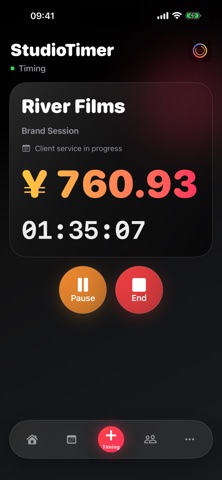
Enter the client, project, and service type, then start the clock. Pause, resume, and finish with clear controls. On iPhone, Live Activities can keep the active timer visible at a glance.
BOOKING AND SCHEDULE
Create and edit appointments with start and end times, client details, project type, and notes. Today's schedule stays visible on the dashboard.
CLIENTS AND PREPAID BALANCES
Keep contact details, VIP status, default discounts, and notes together. Track top-ups, deductions, refunds, and adjustments, with a clear transaction history for each client.
CHECKOUT, RECEIPTS, AND EXPORTS
Calculate base fees from session duration and your default rates. Add extra charges, discounts, or prepaid balance deductions. Generate shareable PDF or image receipts and export order or client transaction data.
ANALYTICS
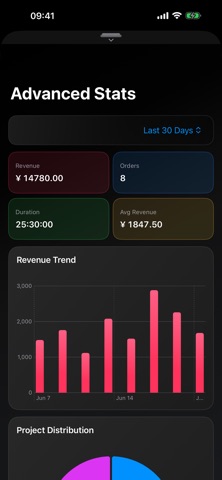
Review revenue, service time, trends, and project distribution. Filter records by date range to understand how the studio is performing.
ICLOUD SYNC
Use iCloud to keep appointments, clients, orders, and settings in sync across supported Apple devices, with a continuous workflow across iPhone, iPad, and Mac.
Basic session timing is available for free. Scheduling, receipts, exports, advanced analytics, branding, and advanced history tools require StudioTimer Pro. Feature availability and sync depend on device, system version, and iCloud status.
Terms of Use (EULA): https://www.apple.com/legal/internet-services/itunes/dev/stdeula/