

StudyDay - Pomodoro Timer
StudyDay - Pomodoro Timer is made and published by Jinyoung Lee. AppBrain is an independent app data site and isn't affiliated with Jinyoung Lee. The app name, icon, screenshots and description belong to Jinyoung Lee and are shown as published on the App Store.
AppBrain's verdict
- Last updated
- October 13, 2026
Rankings
App Store top chartsApp Store Rankings for StudyDay - Pomodoro Timer
Competitors
Similar apps and more from Jinyoung LeeAlternatives to StudyDay - Pomodoro Timer


Also available on Google Play

Releases
Updates seen on the App Store- Version
- 1.3.1
- Launched
- July 2026
No changelog data
User feedback
Ratings and reviews on the App StoreComments on StudyDay - Pomodoro Timer for iOS
We don't have enough comments to show example comments. Please check back later.
Technology
Found in the app by AppBrain- Price
- Free
- App size
- 5.64 MB
- Content rating
- Everyone
Technologies used by StudyDay - Pomodoro Timer
About the app and developer
About StudyDay - Pomodoro Timer
StudyDay - Pomodoro Timer is an education app developed by Jinyoung Lee.
User Ratings
The app has no ratings yet.
App Information
StudyDay - Pomodoro Timer is freely available from the App Store. The app size is 5.64 MB. The latest version available is 1.3.1. The last update was on October 13, 2026.
Technical Requirements
The app has a content rating of Everyone. The app has been available on the App Store since July 2026.
Developer information for Jinyoung Lee
Address:
Store listing
By Jinyoung Lee, from the App Store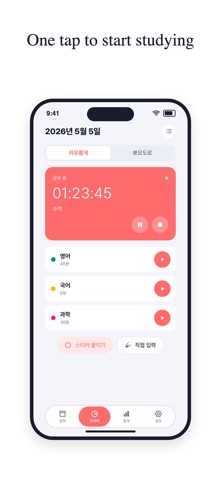


Description by Jinyoung Lee Written by the developer, not by AppBrain. Click to read.
StudyDay: Study Timer & Log is a simple, beautiful study tracker built for students and exam takers. Tap to start a stopwatch for any subject, stop when you're done, and your time is saved automatically. No setup, no complexity.
KEY FEATURES
• Subject Timer — One tap starts a stopwatch for any subject. Switch subjects anytime; the previous one stops automatically.
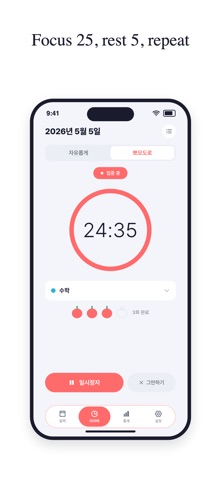
• Pomodoro Timer — Focus and rest in turns (25 and 5 minutes by default, adjustable in Settings). You get a notification when each round ends, and tomatoes show how many rounds you finished today.
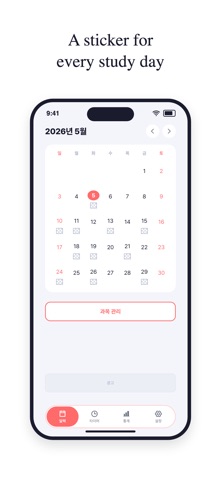
• Monthly Calendar — See which days you studied at a glance. Tap any day to jump straight to the timer.
• Study Stickers — After each session, pick a sticker that matches your mood. Your calendar fills up with small victories.
• Detailed Statistics — View your study time by day, week, or month. A bar chart shows your weekly rhythm; a donut chart breaks down time by subject.
• Manual Entry — Forgot to start the timer? Enter time directly for any subject and date. Fix or delete any record from the study log.
• Subject Management — Add as many subjects as you need, each with its own color, so your data is always organized.
• Dark Mode — Follows your phone's setting automatically. Easy on the eyes for late-night study.
• Color Themes — Coral is always on. Pastel Blue, Green and Purple can each be unlocked for 7 days by watching a short ad.
DESIGNED FOR SIMPLICITY
No account required. No internet connection needed. All your data stays on your device — private, always.
Whether you're preparing for an exam, tracking daily study habits, or just curious how much time you spend on each subject, StudyDay gives you the clarity you need.
StudyDay is supported by ads: a banner on the Calendar and Stats screens, and an optional video ad only when you choose to unlock a color theme.
Privacy Policy: https://www.junu.co.kr/terms/studytime/privacy/