

StudyTok AI: Note,Feynman,Memo
StudyTok AI: Note,Feynman,Memo is made and published by Dat Nguyen Thanh. AppBrain is an independent app data site and isn't affiliated with Dat Nguyen Thanh. The app name, icon, screenshots and description belong to Dat Nguyen Thanh and are shown as published on the App Store.
AppBrain's verdict
- Rating on App Store
- 3.50
- 14 ratings
- Last updated
- September 17, 2026
It doesn't have enough ratings yet to judge what users think.
Rankings
App Store top chartsApp Store Rankings for StudyTok AI: Note,Feynman,Memo
Competitors
Similar apps and more from Dat Nguyen ThanhAlternatives to StudyTok AI: Note,Feynman,Memo


More from Dat Nguyen Thanh


Also available on Google Play

Releases
Updates seen on the App Store- Version
- 1.3.8
- Launched
- June 2025
No changelog data
User feedback
Ratings and reviews on the App StoreComments on StudyTok AI: Note,Feynman,Memo for iOS
We don't have enough comments to show example comments. Please check back later.
Technology
Found in the app by AppBrain- Price
- Free
- App size
- 44.2 MB
- Content rating
- Everyone
Technologies used by StudyTok AI: Note,Feynman,Memo
About the app and developer
About StudyTok AI: Note,Feynman,Memo
StudyTok AI: Note,Feynman,Memo is an education app developed by Dat Nguyen Thanh.
User Ratings
StudyTok AI: Note,Feynman,Memo is rated 3.50 out of 5 stars. The rating is based on 14 ratings.
App Information
StudyTok AI: Note,Feynman,Memo is freely available from the App Store. The app size is 44.18 MB. The latest version available is 1.3.8. The last update was on September 17, 2026.
Technical Requirements
The app has a content rating of Everyone. The app has been available on the App Store since June 2025.
Developer information for Dat Nguyen Thanh
Address:
Frequently asked questions about StudyTok AI: Note,Feynman,Memo
Is StudyTok AI: Note,Feynman,Memo free?
Yes. StudyTok AI: Note,Feynman,Memo is free on the App Store.
Is StudyTok AI: Note,Feynman,Memo still available?
Yes. StudyTok AI: Note,Feynman,Memo is on the App Store, and the last update we saw was on September 17, 2026.
How large is StudyTok AI: Note,Feynman,Memo?
StudyTok AI: Note,Feynman,Memo is 44.18 MB.
Is StudyTok AI: Note,Feynman,Memo suitable for children?
App Store rates the content of StudyTok AI: Note,Feynman,Memo as suitable for everyone.
How do people rate StudyTok AI: Note,Feynman,Memo?
StudyTok AI: Note,Feynman,Memo scores 3.50 out of 5 stars, from 14 ratings on the App Store.
Who made StudyTok AI: Note,Feynman,Memo?
StudyTok AI: Note,Feynman,Memo was developed by Dat Nguyen Thanh. It is listed in the education category on the App Store.
What are the best alternatives to StudyTok AI: Note,Feynman,Memo?
People looking at StudyTok AI: Note,Feynman,Memo also look at these education apps: Blurt: Blurting Study Method, Bananote - AI Note Taker, Studytok: AI Study & Quizzes, Studley: AI Study Tutor, Feynman AI: Note,Mindmap,Memo.
Store listing
By Dat Nguyen Thanh, from the App Store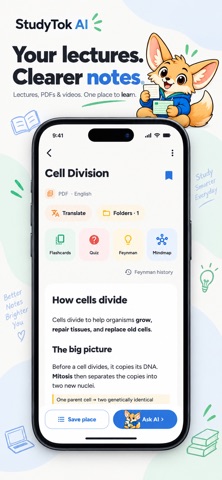


Description by Dat Nguyen Thanh Written by the developer, not by AppBrain. Click to read.
StudyTok AI turns recordings, documents, videos and ideas into organized notes, then helps you study them with flashcards, quizzes, mind maps and AI feedback. From capturing a lecture to preparing for an exam, keep your materials and study tools together around each note.
CREATE NOTES FROM YOUR STUDY MATERIALS
Bring the content you already learn from:
• Record a lecture directly in the app
• Import audio and voice recordings
• Upload images of your learning materials
• Paste text
• Import PDF documents and PowerPoint presentations (PPTX)
• Add a YouTube video
• Enter a topic you want to explore
Let AI organize the key ideas into structured notes you can read, revisit and build on.
PRACTICE WHAT YOU LEARN
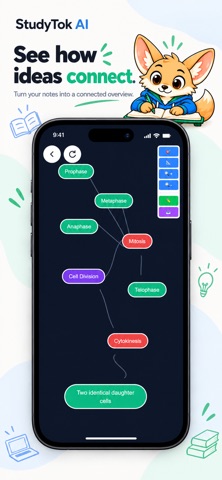
Turn a note into flashcards for active recall or a quiz to test your understanding. Use mind maps to see how concepts fit together. Move between your notes and study tools without losing the context.
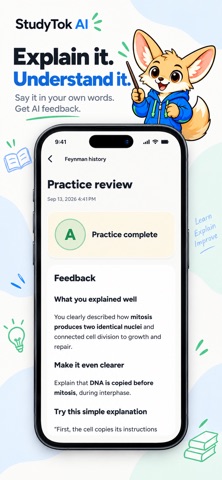
EXPLAIN IT IN YOUR OWN WORDS
Go beyond rereading with the Feynman Technique. Record your explanation of a topic, listen back before sending, and get AI feedback on what you explained well and what needs more work.
ASK QUESTIONS ABOUT YOUR NOTES
Get help with a confusing passage, ask for a simpler explanation or explore an idea in more detail. AI chat uses your note as context so the conversation stays connected to your material.
KEEP THE IMPORTANT PARTS CLOSE
Organize notes into folders and find them with search. In Saved, bookmark notes and keep individual flashcards or quiz questions for later, grouped by their source note.
Access your account's notes on the app and web. Saved bookmarks and copied study items stay on the device where you save them.
LEARN IN YOUR PREFERRED LANGUAGE
Choose the language for new notes or use automatic detection. Translate a note into another supported language to revisit the topic in the language that works for you.
MAKE ROOM FOR FOCUSED STUDY
Use the built-in Pomodoro timer to alternate focused sessions with breaks, whether you are reading notes, reviewing cards or practicing an explanation.
START WITH 3 FREE NOTES
Your first 3 note creations are free. Premium lets you create more notes and use premium features, including note translation and Feynman voice practice. Your existing notes remain accessible after your free creations are used.
Build a study routine around your own materials with StudyTok AI.
SUBSCRIPTION INFORMATION
Premium is available through auto-renewing subscriptions. Available plans, prices and any eligible introductory offers are shown before purchase.
Payment is charged to your Apple Account at confirmation of purchase. Subscriptions renew automatically unless canceled at least 24 hours before the current period ends. Your account is charged for renewal within 24 hours before the period ends. Manage or cancel your subscription in your App Store account settings.
Privacy Policy: https://studytokai.com/privacy
Terms of Use: https://studytokai.com/terms
Apple Standard EULA: https://www.apple.com/legal/internet-services/itunes/dev/stdeula/